Tasks
Tasks define goals for players, commonly used for quests, missions, daily challenges, and achievements. Each task has an icon, description, reward, and a specific goal type that determines how progress is tracked.
Base Task
The parent component is Base Task. It doesn't have any goals on its own, so its child templates should be used to define specific goal types.
| Parameter | Type | Description |
|---|---|---|
| Icon | Image | Displayed in UI |
| Description | Localized String | Goal description shown to the player |
| Reward | List\<ItemWithAmount> | Items added to Inventory when the task is claimed |

You can create your own task types by inheriting a new template from Base Task and adding custom parameters for your game-specific goal logic.
Built-in Task Types
LiveOps package has 3 built-in child templates for common task patterns.
Task Item
Track item interactions: collect, spend, or own a specific amount of a given Item.
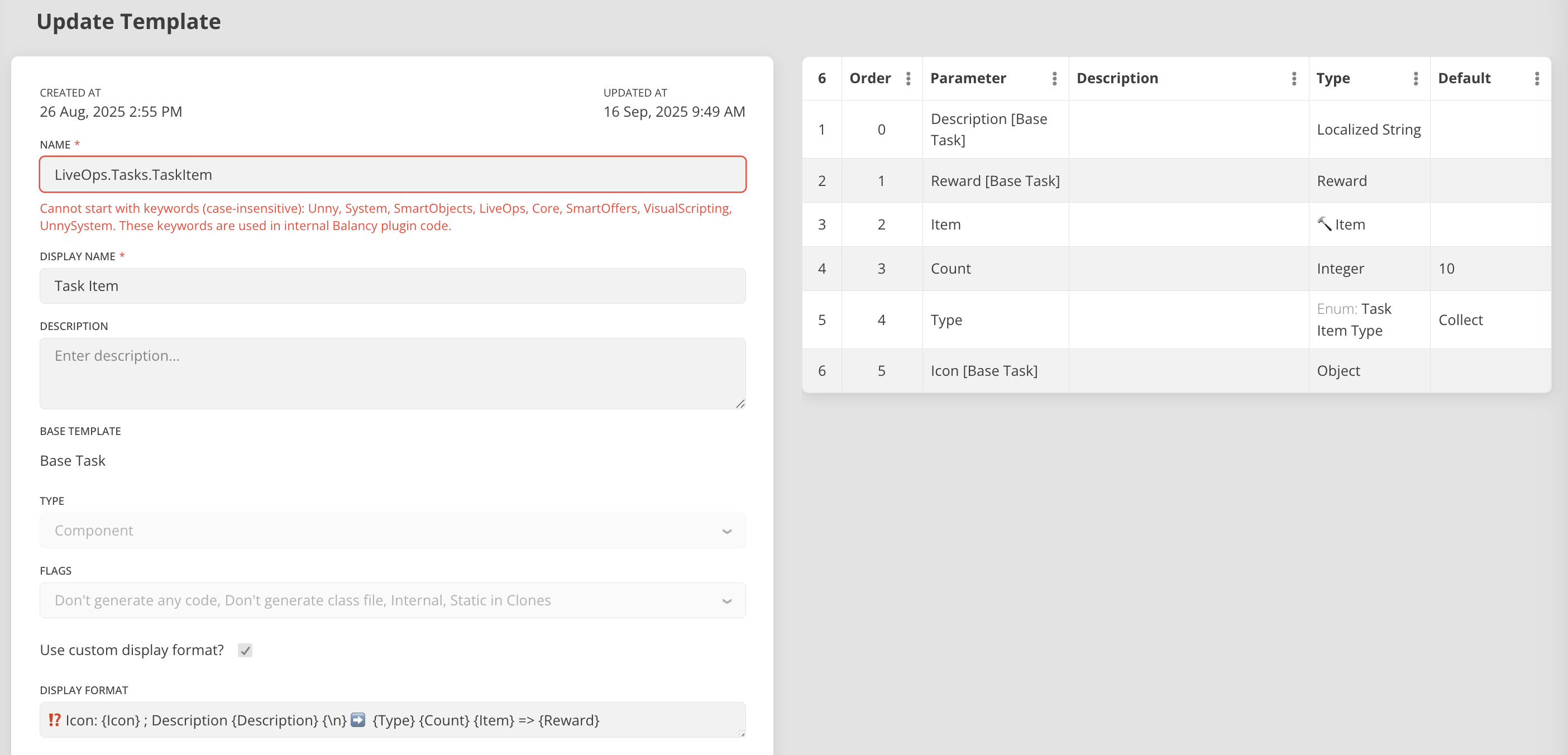
| Parameter | Type | Description |
|---|---|---|
| Target Item | Item | Which item to track |
| Required Amount | int | Amount needed to complete |
| Type | enum | Collect, Spend, or Own |
Type Behaviors:
| Type | Tracks | Description |
|---|---|---|
| Collect | Items gained | Progress increases when items are added to Inventory. Spending doesn't affect progress. |
| Spend | Items spent | Progress increases when items are removed from Inventory. Gaining doesn't affect progress. |
| Own | Current inventory count | Progress equals current Inventory count. Can decrease if items are spent. |
Own Type Can Revert
With the Own type, task completion is not permanent. If a player's inventory count drops below the required amount (e.g., by spending items), the task reverts from Completed back to InProgress.
Task Complete Levels
Complete a specified number of levels. Progress is tracked automatically via the Level user property from the System Profile.

| Parameter | Type | Description |
|---|---|---|
| Levels To Complete | int | Number of levels to finish |
Task Complete Levels Streak
Complete a specified number of levels in a row without losing.
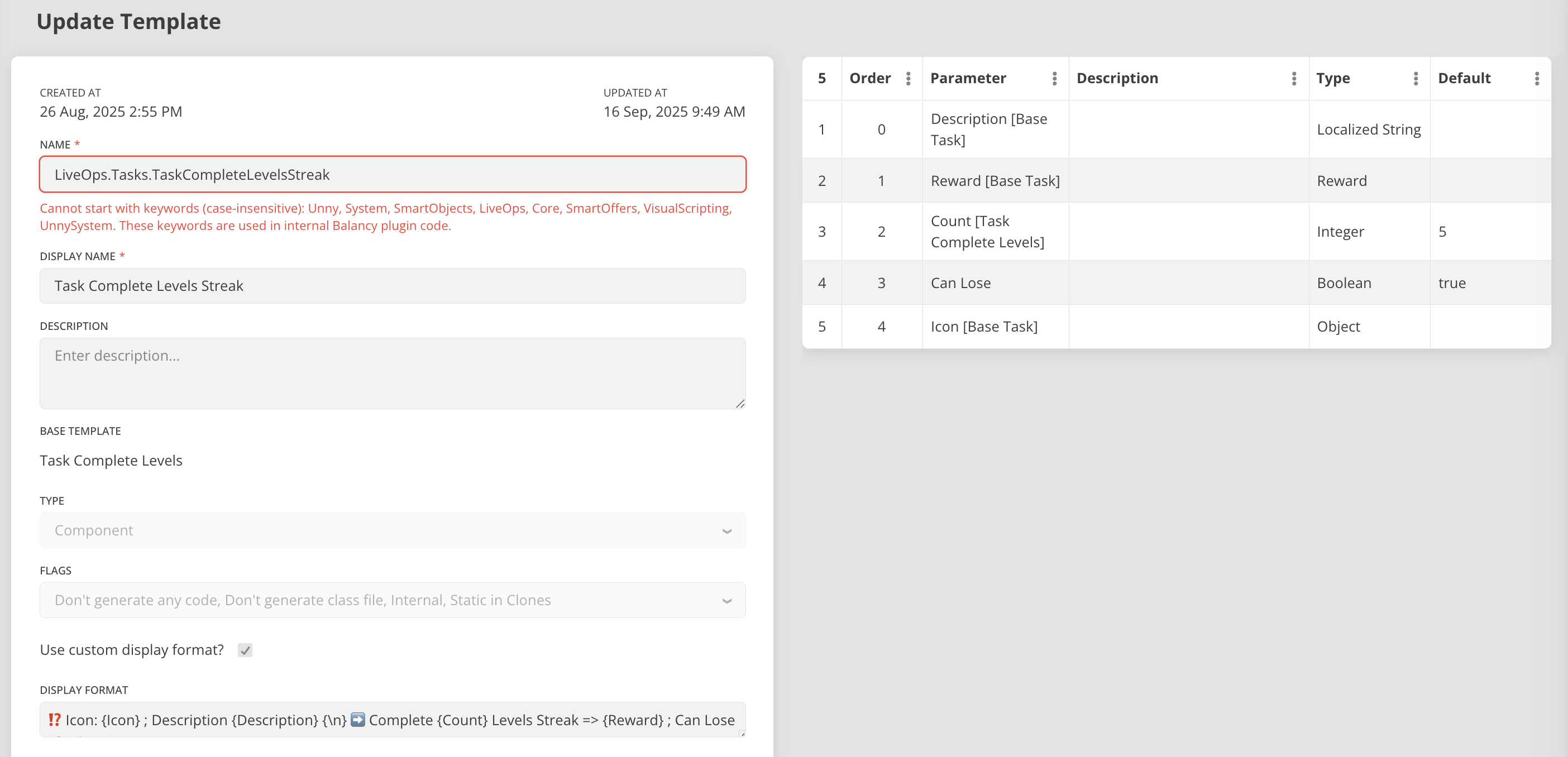
| Parameter | Type | Description |
|---|---|---|
| Streak Length | int | Consecutive wins needed |
| Can Lose | boolean | Determines what happens when the player loses a level |
Can Lose Behavior:
| Can Lose | On Level Failure |
|---|---|
| true | Task fails completely (Status = Failed). Must be restored via API to retry. |
| false | Streak resets to 0, but task remains active. Player can keep trying. |
Task Lifecycle
Every task goes through a lifecycle of states:
Inactive --> Activated --> InProgress --> Completed --> Claimed
                              |
                           Failed (streak tasks with CanLose=true only)
                              |
                           Restored --> InProgress
TaskStatus values:
| Value | Status | Description |
|---|---|---|
| 0 | None | Not active |
| 1 | InProgress | Active, player working toward goal |
| 2 | Completed | Goal reached, reward available to claim |
| 3 | Claimed | Reward collected |
| 4 | Failed | Failed (streak tasks with CanLose=true) |
Using Tasks with Game Events
Tasks are typically activated through Game Events. A Game Event can have a Visual Script attachment that activates tasks when the event triggers.
Typical flow:
- Create task documents in the CMS (using Base Task child templates)
- Create a Visual Script that activates the tasks
- Create a Game Event with conditions (e.g., Level >= 5, specific day of week)
- Assign the script as the event's attachment
- Deploy
When the event's conditions are met, the script runs and the tasks become active for the player.
Integration
Accessing Task Data
Task data is stored on the System Profile in the TasksInfo container.
var tasksInfo = Balancy.Profiles.System.TasksInfo;

// Find a specific task by its UnnyId
var taskInfo = tasksInfo.FindTaskInfoByTaskUnnyId("task-unny-id");
if (taskInfo != null)
{
    Debug.Log($"Status: {taskInfo.Status}, Progress: {taskInfo.Progress}");
}

// Get all tasks for a specific Game Event
var eventTasks = tasksInfo.GetTasksForEvent(myGameEvent);
foreach (var task in eventTasks)
{
    Debug.Log($"Task: {task.Task?.Description}, Status: {task.Status}");
}
const tasksInfo = Balancy.Profiles.system.tasksInfo;

// Find a specific task by its UnnyId
const taskInfo = tasksInfo.findTaskInfoByTaskUnnyId("task-unny-id");
if (taskInfo) {
    console.log(`Status: ${taskInfo.status}, Progress: ${taskInfo.progress}`);
}

// Get all tasks for a specific Game Event by UnnyId
const eventTasks = tasksInfo.getTasksForEventById("event-unny-id");
TaskInfo fields:
| Field | Type | Description |
|---|---|---|
task |
BaseTask |
The task template this instance is based on |
taskUnnyId |
string |
UnnyId of the BaseTask model |
parent |
GameEvent |
The GameEvent this task belongs to (if any) |
parentUnnyId |
string |
UnnyId of the parent GameEvent |
progress |
int |
Current progress value |
status |
TaskStatus |
Current status |
startTime |
int |
Timestamp when task was activated |
completeTime |
int |
Timestamp when task was completed |
TasksInfo helper methods:
| Method | Description |
|---|---|
FindTaskInfo(task) |
Find by task reference |
FindTaskInfoByTaskUnnyId(unnyId) |
Find by the BaseTask model's UnnyId |
GetTasksForEvent(gameEvent) |
Get all tasks for a specific GameEvent |
GetTasksForEvent(gameEventUnnyId) |
Get all tasks for a GameEvent by its UnnyId |
Task API Methods
The SDK provides four methods to manage tasks programmatically.
ActivateTask
Activates a task, optionally associating it with a GameEvent.
var baseTask = Balancy.CMS.GetModelByUnnyId<BaseTask>("task-unny-id");
Balancy.API.Tasks.ActivateTask(baseTask, myGameEvent);  // gameEvent is optional
// Via WASM
core.balancyTasks_ActivateTask(taskPointer, gameEventPointer);
DeactivateTask
Deactivates a currently active task.
Balancy.API.Tasks.DeactivateTask(baseTask);
core.balancyTasks_DeactivateTask(taskPointer);
ClaimReward
Claims the reward for a completed task. Returns true if successful. The reward items are automatically added to the player's Inventory.
bool success = Balancy.API.Tasks.ClaimReward(baseTask);
if (success)
{
    Debug.Log("Reward claimed!");
}
const success: boolean = core.balancyTasks_ClaimReward(taskPointer);
RestoreFailedTask
Restores a task with Failed status back to active state. This is used for streak tasks that have CanLose = true - after the player fails, you can offer them a chance to retry.
Balancy.API.Tasks.RestoreFailedTask(baseTask);
core.balancyTasks_RestoreFailedTask(taskPointer);
Complete Example
var tasksInfo = Balancy.Profiles.System.TasksInfo;
var eventTasks = tasksInfo.GetTasksForEvent(myGameEvent);

foreach (var taskInfo in eventTasks)
{
    switch (taskInfo.Status)
    {
        case TaskStatus.InProgress:
            // Show progress UI
            UpdateProgressBar(taskInfo.Task, taskInfo.Progress);
            break;

        case TaskStatus.Completed:
            // Reward ready to claim
            bool claimed = Balancy.API.Tasks.ClaimReward(taskInfo.Task);
            if (claimed)
                ShowRewardAnimation(taskInfo.Task.Reward);
            break;

        case TaskStatus.Failed:
            // Offer to restore (for streak tasks)
            ShowRestoreDialog(taskInfo.Task);
            break;
    }
}
const tasksInfo = Balancy.Profiles.system.tasksInfo;
const eventTasks = tasksInfo.getTasksForEventById("event-unny-id");

for (let i = 0; i < eventTasks.length; i++) {
    const taskInfo = eventTasks[i];
    console.log(`Task: ${taskInfo.taskUnnyId}`);
    console.log(`  Status: ${taskInfo.status}`);
    console.log(`  Progress: ${taskInfo.progress}`);
}
UI Builder (WebView) API
If you are displaying tasks inside UI Builder views, use the JavaScript bridge API instead of the SDK methods above. The bridge provides the same functionality through a different interface optimized for WebView context.
See the full API reference at Balancy JavaScript API - Tasks & Events.
// Get all tasks
const tasks = await balancy.getTasks();

// Activate tasks
await balancy.activateTasks(['quest-1', 'quest-2']);

// Deactivate tasks
await balancy.deactivateTasks(['quest-1', 'quest-2']);

// Claim reward
const success = await balancy.claimTaskReward('daily-quest-1');

// Restore a failed task
const failedTask = tasks.find(t => t.status === balancy.TaskStatus.Failed);
if (failedTask) {
    await balancy.restoreFailedTask(failedTask);
}
Examples
Tasks are used for setting up events in Starter Kit package - Car Race and Tower Climb.
Car Race:

Tower Climb:
