Release Notes
October 16, 2026 [New SDK 1.9.8]
New Features
- Added a Cancel button for Download Data in the Unity Editor, with safe cleanup before asset importing resumes.
Improvements
- Download Data now shows View counts, asset counts and progress percentages, making long downloads easier to follow.
Fixes
- Fixed Unity Editor downloads stalling until the window regained focus or after entering and leaving Play Mode.
- Fixed Unity asset import errors caused by importing View files while they were still being extracted.
- Fixed results from an earlier View extraction affecting a new SDK session after stopping and restarting.
October 12, 2026 [New SDK 1.9.7]
Improvements
- Improved the consistency of A/B test group assignment across platforms while preserving players' existing groups.
- Android Views opened from local content now wait for readiness before appearing, and the display callback runs when the View is revealed.
Fixes
- Fixed Android Views failing to initialize their scripts, while keeping older custom messaging and owner data working.
- Fixed eligible A/B tests not starting after a temporary group-assignment failure, and fixed manual starts reporting success when no group could be assigned.
- Fixed Android View readiness being processed for the wrong offer or event when the game opens another View from a display callback.
- Fixed hidden Android Views waiting until the timeout when required scripts fail to load.
- Fixed View callbacks firing after SDK shutdown or affecting a replacement View. Cleanup also closes unfinished Android Views even if a game callback throws an exception.
October 6, 2026
Asset Store and packages
- New: a
Templatesbutton onGroup OffersandGame Storeopens the matchingAsset Storetemplates. - New: the
New Packageform lists "Documents needing a template", each with "Remove from package". - These are selected documents whose actual template isn't in the package, or is local to this project while the document comes through a dependency.
- Removals apply on save.
- Fixed: package documents are checked against their actual template.
- Fixed: the package selector no longer offers enums from packages that are already installed.
- New: a package install that fails on an unresolvable template parameter now says which template, parameter and reference failed.
- New: a script records the localization strings it names, so a package carries them.
- Those strings are now locked to Reuse in asset authoring, and saving enforces it.
Files and Views tables
- Changed: moving files or views to another group:
- edits the group in place;
- works for rows without an id;
- runs in batches of 5 with localized messages;
- lists failures one per line.
- Fixed: the
Viewlabel in theGroup Offerwindow matches theStore Itemslabel.
UI Builder
- New: remembers the device picked for each view.
- Fixed: the canvas opens on the right device.
- Fixed: landscape device mockups are aligned.
- Faster: the device menu's selected item no longer rebuilds on every render.
AI assistant
- New: the panel refuses AI tool calls aimed at a different game or branch than the open one. Calls without a target still run, so today's hosted MCP keeps working.
- Fixed: an AI save that rebuilds a view keeps placed prefabs' root scripts, and view validation warns when one is missing.
User profiles
- Fixed: editing any user profile now bumps its version, so clients load the edit. Before, only the main profile was bumped.
October 3, 2026 [New SDK 1.9.6]
Breaking Changes
- Reset Script starts a fresh run — In 1.9.5 and earlier it restarted flows while keeping Script variables, Calls Counter counts, and Limit's used state; in 1.9.6 a manual Reset Script restores variable defaults, clears those node states and previous run values, then replays the original launch input.
On Pre Resetcan read the old values before they are cleared; save anything that must survive in the player profile.Reset Flowand resets caused by a Script version change still preserve Script variables. See Reset Script. - Nested Scripts have a safety limit — A chain of
Run Scriptcalls stops after 16 nested levels to prevent accidental recursion from exhausting the stack.
Improvements
- Prefab preloading now follows dependency chains of any length and stops at cycles, so deeply nested Views can load without the former five-pass cutoff.
- Closing a View sends its pending click analytics before the close event in both classic and persistent modes.
Fixes
- Fixed UI Builder images shrinking or losing their intended tiling and sizing in Views; images now keep the styles saved in the builder.
- Fixed root scripts on prefabs placed inside other prefabs through element parameters, so their components are available when the prefab is instantiated.
- Fixed Game Event Views assigned by an override failing to open when the event had no default View.
- Fixed Asset overrides with an empty default missing their object type, and fixed composite overrides restoring an empty default when removed.
- Fixed a failed or previously cached broken prefab from preventing an unrelated View or prefab from loading; missing dependencies retain the previous best-effort behavior.
- Fixed a misleading analytics warning when closing a View, while keeping genuine request failures visible.
- Fixed SDK log messages occasionally going missing during heavy logging.
- Fixed Views remaining open or using stale context after an offer or offer group deactivates, and restricted WebView messages to the View's own iframe.
- Fixed browser SDK stop or reinitialization freezing when a download was in progress, and fixed stop and network callback hangs during concurrent shutdown.
- Fixed repeated zipped downloads retaining their extracted data in Unity memory.
- Fixed crashes when a saved list contains values of the wrong type, when an A/B test variant is missing, and when callbacks arrive while profile or Script objects are being replaced.
September 25, 2026 [Web]
View Health (new, Views page)
- New: the Health Check button on the Views page scans every UI Builder view and groups what it finds by check. It runs the UI Builder's 22 checks directly on each view's saved data, without opening the editor for each view.
- New: Fix repairs the chosen views in one batch and rebuilds their packages.
- Nothing is pre-selected; the All and Persistent Mode Ready presets select in one click.
- Fix asks before it writes, runs once per click, shows progress per view, names what it left out, and says when to deploy.
- New: a dry-run mode (toggle on the dev tools page) records every write instead of sending it.
viewHealthDryRun()in the browser console downloads the capture as a JSON file. - What Fix repairs is what the editor would repair when you open and save a view:
- ids and guids duplicated across views, except values other views refer to;
- broken references;
- localized text values and links;
- the editor's default rules and
@font-facerules a view lacks.
Migrations it doesn't apply (aspect ratio, missing images, missing scripts) are named in the report, so they can be done by hand. - Bad connections: Fix pauses while offline and resumes, slows down on a slow link, and never writes an older version back. It also holds up if you leave the page, close the tab or press Cancel.
Visual scripting
- New: script health check (Michael).
- When a script opens, it says what's wrong before changing anything, and repairs what it safely can.
- A project-wide check runs from the Health Check button on the scripts page.
- Fixed: the check no longer traps scripts it can't repair, and its dialogs open through the shared modal system.
UI Builder
- Fixed: a failed view-data write stops the save instead of rebuilding the package anyway.
- Fixed: expanding transform shorthands keeps the order of the transforms.
- Fixed: the save confirmation names what is broken, and a server rejection keeps its message.
- Fixed: a failed animation upload after saving says so, instead of "Save Failed".
- Fixed: the no-token save toast names keys that exist.
- Fixed: the save dialog and AI saves report manifest references to objects that can't be found.
- New: the Upload Scene/Prefab button has a tooltip.
AI assistant
- New: renaming a script through the assistant renames the class itself, not just its display name.
- It rewrites the class declaration and every reference to it in all scripts (calls,
getComponent,extends,instanceof), plus whole-word mentions in strings and comments. - Properties, object keys, parameters and imports are left alone.
- New: after a class rename, the assistant warns that copies of the scripts kept outside the CMS must be renamed to match, and that AI metadata isn't updated.
- Fixed: views saved by the assistant list the prefabs their scripts reference, even when those prefabs aren't loaded, and their metadata includes prefab guids.
- Fixed: the view tools:
- say when a package wasn't built;
- stop waiting for a stuck package build;
- tell the AI which editor rules they dropped;
- keep the editor's own rules out of the AI's round trip.
September 24, 2026 [Web]
UI Builder
- New: opens a view in the mode you used last, Design or Code.
- Fixed: prefab roots that set their own width are no longer stretched on wide screens.
- Fixed: custom CSS on a prefab’s child elements, such as a gradient background, now shows in the canvas and is kept on save.
- Fixed: views that size text with container units (cqh, cqmin) no longer show invisible text in the canvas on Chrome.
- Fixed: opening a view built from many prefabs no longer raises false “Bad Link Scripts” or “Bad Links Detected” warnings.
- Fixed: the properties panel no longer cuts off the controls at the end of a row.
AI assistant
- New: view-preview workflow.
- New: the assistant reads and writes element styles inline. Properties the Styles panel understands stay editable there; the rest are kept as custom CSS. Hover, active, focus, before and after states are edited on the element itself, and class rules that match no element get a warning.
- Fixed: views saved by the assistant now list everything they load: prefabs referenced from scripts, Lottie files and file parameters. Missing entries broke views that are preloaded or opened offline.
- Fixed: editing a script through the assistant refreshes its field summaries, as saving in the code editor does.
LiveOps and tables
- New: a Date Range whose “repeat every” equals the event’s duration now shows a warning.
- Fixed: applying an A/B test’s best variant now converts every one of its conditions.
- Fixed: floating editable cells now grow with their content.
September 23, 2026 [New SDK 1.9.5]
Tasks
- Added Task Condition: select a Balancy Condition; the SDK completes the task when it becomes true.
- Added Task Field Number: select a numeric profile field, comparison, and target; the SDK observes the field and completes the task when the comparison matches.
NumericProgresspreserves fractional values for display. - Added Task Custom for game-defined goals. CMS templates can extend it with game-specific parameters; Unity and TypeScript wrappers receive
OnStart/OnStoplifecycle hooks and can set/add progress, complete, or fail a task. A positive Count completes automatically when reached. Run IDs prevent stale callbacks from changing a later activation. See Tasks: setup, extension, and SDK examples.
Game Events / Manual Remove
- Added
Callbacks.OnEventRemoved(Unity),Callbacks.onEventRemoved(TypeScript), andNotificationType.OnEventRemoved(113) for Views. Remove event icons on Removed, identified by instance ID. Deactivated still means the event finished and is not repeated when a Finished instance is removed. Lifecycle and migration. - With Manual Remove, a naturally Finished event remains in the list for final View actions until
StopEventManually/stopEventManuallyremoves it. A normal event emits Deactivated then Removed at completion; a manually removed Finished event emits only Removed. - Fixed instance-specific custom event data cleanup on removal, including events already Finished, and prevented repeated finish notifications during offline reconciliation.
Upgrade the native/WASM core and Unity or TypeScript wrapper together to use the new task types and removal callback.
September 21, 2026 [New SDK 1.9.1]
Compared with SDK 1.8.11, this release removes long main-thread stalls from SDK startup, makes packaged and downloaded content updates safer across Unity platforms, adds reusable persistent Views, and introduces explicit View instance context and independent timers.
Breaking Changes
- Explicit View context now requires
instanceId.getTasks,activateTasks,deactivateTasks,getBattlePassConfig,getBattlePassProgress,claimBattlePassReward,stopEventManually,getCustomEventInfo,setCustomEventInfo,buyOffer,buyGroupOfferandcanBuyGroupOfferuse the runtime instance ID in their context argument. Passing a configurationunnyId/unnyIdGameEvent, an empty value ornullis no longer supported. Event operations require an event instance; offer operations require the corresponding offer/group instance. - Timer integration has changed. Replace the global
balancy.getTimeLeft()workflow withconst timer = await balancy.createTimer(info.instanceId), then readtimer.getTimeLeft()locally. Useawait timer.refresh()when the deadline may have changed.nullmeans no deadline and0means expired; unknown instances reject. Update the native SDK and bridge together.
Temporary compatibility: old calls that omit their context argument still work through the View owner, and the old global timer remains in the runtime for existing scripts. Migrate to explicit instance context and instance timers. Other IDs (task IDs, reward line IDs and custom-document IDs) are unchanged. See View instance context for complete signatures.
Migration examples
Receive eventInfo, offerInfo or groupInfo in the component's init(info) method.
// Before: implicit owner / configuration context
await balancy.buyOffer();
await balancy.buyGroupOffer(index);
await balancy.getTasks(eventInfo.unnyIdGameEvent);
const seconds = balancy.getTimeLeft();

// Now: explicit runtime instance context
await balancy.buyOffer(offerInfo.instanceId);
await balancy.buyGroupOffer(groupInfo.instanceId, index);
await balancy.getTasks(eventInfo.instanceId);
const timer = await balancy.createTimer(eventInfo.instanceId);
const secondsLeft = timer.getTimeLeft();
| Operation | New call / documentation |
|---|---|
| Offer purchase | buyOffer(instanceId) |
| Group purchase | buyGroupOffer(instanceId, index) |
| Tasks | getTasks(instanceId), activateTasks(taskIds, instanceId), deactivateTasks(taskIds, instanceId) |
| Battle Pass | getBattlePassConfig(instanceId), getBattlePassProgress(instanceId), claimBattlePassReward(lineId, index, instanceId) |
| Custom info | getCustomEventInfo(instanceId), setCustomEventInfo(data, instanceId) |
| Event control | stopEventManually(cooldown, instanceId) |
| Timer | createTimer(instanceId) |
Temporary purchase compatibility: buyOffer(), buyGroupOffer(index) and the old object-parameter forms still work. The no-context forms use the View owner. New scripts should use the signatures above; no extra purchase object is required. Configuration IDs are not accepted as explicit instance IDs. The current API reference describes only the new integration.
New Features
- Independent View Timers —
await balancy.createTimer(instanceId)supports events, offers, and offer groups without a global owner or explicit type. Read remaining time locally withtimer.getTimeLeft()and refresh explicitly withawait timer.refresh(). Requires the updated native SDK and bridge. - Explicit Persistent View Preparation — Unity projects can call
Balancy.RenderViewsManager.PrepareWebView(...)to prewarm and reuse a persistent WebView. Persistent mode remains opt-in; projects that do not call this method continue to open Views on demand.
Improvements
- Non-blocking Startup and Cloud Sync — Network completion, archive extraction, and optional asset preloads no longer perform long batches of work on the Unity thread after the local data callback. Optional images and other background assets continue downloading without delaying the cloud
OnDataUpdatedcallback;OnBackgroundPreloadCompletedreports when that work finishes. - Faster Packaged Resources on Mobile — Android now reads packaged files synchronously and lazily through
AAssetManager, while iOS reads the app-bundle snapshot directly and exposes local resources toWKWebViewthrough a private URL scheme. Neither platform copies the complete StreamingAssets snapshot into persistent storage during startup. - Versioned Combined View Scripts — When a deploy contains a combined script bundle, the SDK downloads and reuses that single versioned file instead of fetching every View script separately. Legacy per-script projects remain supported. Unity passes the script file to the WebView instead of copying a multi-megabyte source string through managed/native boundaries.
- Faster Browser Startup — WebGL and TypeScript index cached files but hydrate only data required by synchronous core reads. Large images, audio, fonts, and archives stay in browser storage until requested. Authentication and other extensionless SDK state are still restored synchronously.
- Safer Content Updates — The SDK now activates exactly the content versions requested by the server. Downloads are staged and published only after the complete required snapshot succeeds, so interrupted updates keep the previous committed configuration instead of exposing a partial mixture of old and new files.
- Reliable Shared View Preloading — Concurrent Views share downloads and extraction without reporting success before all dependencies are ready. Cyclic prefab graphs no longer hang or produce false success, failed dependencies can be retried, and catalog replacement cannot lose waiting callbacks or publish stale bytes.
- Stronger Persistent View Lifecycle — Unchanged script versions reuse the prepared shell. A changed script snapshot refreshes it safely after the current View closes. View-owned components, prefabs, requests, subscriptions, and temporary resources are released on close, including instances moved outside their original parent.
- Bounded Resource Preparation — View images, fonts, and prefab resources are prepared concurrently in bounded batches. Image replacement and late async completions now respect the active View lifetime and cannot recreate disposed UI.
- Consistent Local Resource URLs — Packaged and downloaded HTML, images, fonts, and other local resources resolve correctly in classic and persistent Views on Android, iOS, macOS, and WebGL, including paths containing spaces or encoded characters.
- Smoother Demo UI Loading — Unity example sections create interactive entries immediately and fill their icons asynchronously. A slow or failed image no longer delays buttons, timers, ordering, or the rest of the section.
- Improved Unity Integration Tools — The example Cheat Panel can list all catalog items, display their current totals, and add or remove inventory through the public Inventory API. Opt-in WebView performance logging now reports correlated preparation, opening, disposal, batching, and lifecycle counters without logging resource payloads.
- Smoother Unity View Presentation — Unity WebViews now wait 30 ms before becoming visible and fade in over 80 ms by default. This reduces visible layout or state changes during View initialization. Projects can override both values after SDK initialization with
Balancy.RenderViewsManager.SetViewDelays(showDelay, fadeDuration).
Platform Packaging
- The Unity iOS native core now ships as
BalancyCore.xcframeworkwith anarm64device slice and anarm64 + x86_64Simulator slice. Build pipelines that previously copiedPlugins/iOS/libBalancyCore.amust preserve the complete XCFramework directory.
September 15, 2026 [Web]
Improvements
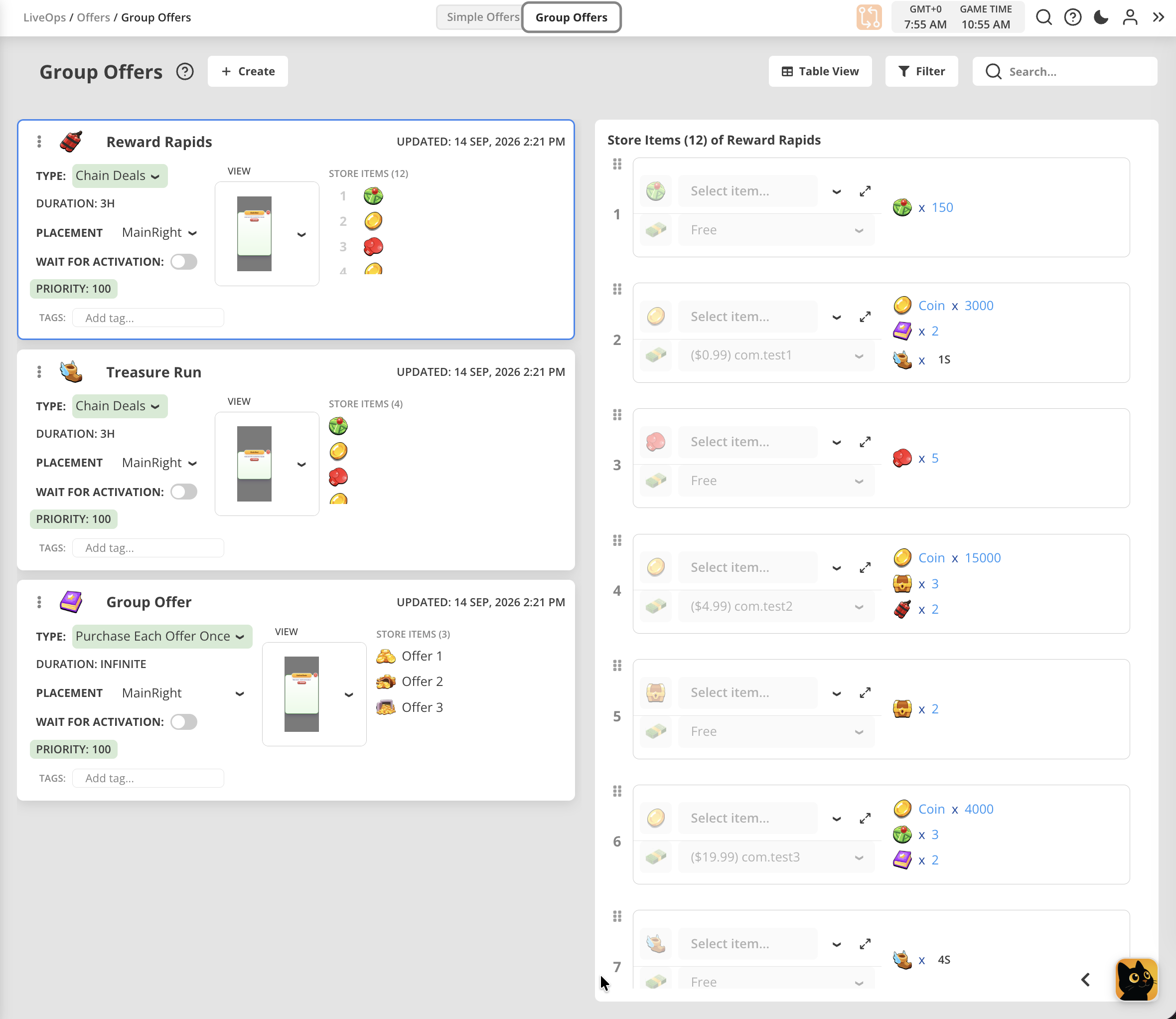
- Group Offers page reworked to display offers' content in the separate panel to provide better tools for managing long lists of StoreItems. Supports adding, deleting, inserting, and drag-n-drop for moving items.
September 9, 2026 [New SDK 1.8.11]
This update improves LiveOps continuity after content changes and brings more reliable Lottie animation loading to Android.
Improvements
- Cleaner Event Script Lifecycle — When restoring a player session after branch or content changes, the SDK now performs exit cleanup for scripts whose owning events have been removed, without restarting their main flow. Scripts belonging to existing events are preserved.
- Android Lottie Support — Lottie JSON animations bundled in StreamingAssets are now preloaded alongside other text resources, making them available to in-game views without an additional download.
September 4, 2026 [New SDK 1.8.10]
This update strengthens everyday reliability across LiveOps, purchases, and player sessions, and adds richer data access for custom in-game views.
New Features
- Inventory Data for Custom Views — Views can retrieve inventory slots, item quantities, and optional item details together, making inventory screens easier to build.
- Richer Shop Data — Views can retrieve the active shop directly, including slot availability, cooldowns, and purchase limits for more responsive storefronts.
Improvements
- LiveOps Continuity — Improved recovery of event scripts and linked offers when a player profile is reloaded or synchronized with the cloud.
- Battle Pass Continuity — Active Battle Passes are reconciled with their events during profile initialization, preserving existing progress when the same pass is already active.
- More Reliable Purchases — Purchase completion handles provider exceptions and incomplete responses more gracefully, with additional protection against duplicate completion callbacks.
- Consistent Shop Availability — Purchases respect slot availability and cycle limits even when a storefront is still displaying an earlier state.
- Smoother Session Transitions — Improved coordination of background work during sign-in, profile changes, and SDK restarts, including Android sessions and Unity Play Mode transitions.
- Resilient Networking — Improved request cleanup and reconnection handling when connectivity changes or a session ends.
- Predictable Scheduling — Refined weekday schedules and repeating time windows, with consistent activation and end-time boundaries.
- Reliable Purchase History — Additional purchase data is retained when player profiles are saved and restored.
- Graceful Content Handling — Strengthened validation of configuration data and service responses, helping the SDK handle unexpected input more predictably.
August 28, 2026 [New SDK 1.8.6]
This release is mostly about resilience. Broken or unexpected content — a mistyped version string, a condition that references itself, a script the client does not recognise — is now contained instead of taking the game down with it, and the SDK stays quiet and cheap while it does so. It also folds in everything from 1.8.1 through 1.8.3.
New Features
- Script Status — Ask a running visual script instance where it is at any time with
Balancy.API.VisualScripting.GetScriptStatus(instanceId), which answersrunning,finishedornot_found. Useful for wiring UI to a long-running script.
Breaking Changes
- Random Int now excludes its upper bound, matching the documented behaviour:
Min = 1,Max = 6produces 1–5. Previously the implementation includedMax. If you relied on the old behaviour, raiseMaxby one. A node whereMinequalsMaxdescribes an empty range and no longer produces a value. - Random Float can no longer return exactly
1, as documented — indexing a table withfloor(value * size)is now always in range. - Conditions comparing versions no longer pass when the version cannot be read. A value like
v1.0.0or8..9.0used to be treated as0.0.0and answer with confidence; it now reports the problem and fails safely. The same applies to branch bounds: a branch with an unreadable minimum or maximum version is no longer offered to every client.
Improvements
- Profile changes are published as a whole. Anything you observe — a new offer, event, task, segment, purchase or inventory slot — arrives complete on the first callback instead of appearing empty and filling in field by field, and one change now raises one notification instead of a burst.
- Idle visual scripts cost nothing. A script waiting on an event no longer wakes the game roughly thirty times a second. Script-heavy projects on lower-end Android gain the most.
- Visual scripting degrades gracefully. A script that contains something this client build does not understand keeps running the parts it does, and saved progress for it is preserved rather than discarded. Very large loops are bounded and reported instead of freezing a frame.
- Smaller builds. Two large third-party libraries that nothing had used for years were removed.
- Custom functions called from visual scripts now carry 64-bit values correctly and are unaffected by the device's number formatting.
- Editor and runtime restarts are cleaner: stopping and starting the SDK within one session no longer leaves anything behind.
Fixes
- Fixed a crash caused by a mistyped version value in a condition, which could take down the game and the Unity Editor as soon as that branch's config loaded.
- Fixed a crash when two conditions referenced each other in a loop. Such a loop is now reported and treated as not passing rather than exhausting the stack.
- Fixed inventory slots losing track of their item after a remove-and-add, which also made empty slots accumulate and the inventory grow without bound.
- Fixed purchases that could complete without granting their reward when game code reacted to the purchase immediately.
- Fixed the SDK stalling on WebGL when launched cloud-only with automatic login turned off.
- Fixed the device ID changing between launches when device storage was unavailable or blocked, which signed the player in as a different guest.
August 19, 2026 [New SDK 1.8.0]
New Features
- Live Shop Updates — Shops now rebuild themselves the moment an override changes a store's page list or a page's slot list. Switching on an A/B test or moving a player into a segment reshapes the store during the session, with no restart required.
- Script Analytics Switch — Per-node visual scripting analytics can now be turned on and off at runtime, and ships turned off, so script-heavy games run lean by default. Switch it on while debugging with
Balancy.API.SetVisualScriptingAnalyticsEnabled(true)in Unity orBalancy.API.Scripts.setAnalyticsEnabled(true)in TypeScript.
Improvements
- Analytics now runs within a fixed memory budget. Each event is owned by its queue and released as soon as it is sent, every batch has a send deadline, and the queue has a ceiling — so a long session ships its analytics steadily instead of accumulating them. Script-heavy games on Android gain the most.
- Visual scripts run leaner — list nodes and text-array parameters release their memory as soon as they finish.
- Daily bonus now welcomes returning players correctly: reset rules are evaluated when the game starts, so a player who was away for a day opens a fresh calendar. The end-of-month bonus reward now follows the configured calendar exactly.
- Time is read consistently across the whole SDK, so a server time correction or a timezone change arriving mid-session is applied smoothly instead of being mistaken for a real day rollover.
- Reading SDK values from several threads at once is now safe by design — every thread receives its own result buffer.
- Logs are quieter and more useful: routine store housekeeping no longer prints a line per slot, while genuinely unexpected states are still reported and now name the document they came from.
Fixes
- Shops now serve the correct slot list as soon as an override changes a page's content — previously the new layout appeared only after a restart.
- Values read from a script-created model stay reliable after the script finishes or the profile reloads.
- Fixed a crash on web when unsubscribing from conditional templates after a page or hot reload.
- Fixed a crash when an override was written from outside a user context.
- Improved stability when the profile is reloaded, reset, or signed out while background work is still in flight.
August 18, 2026 [Web]
New Features
- Branch Health Check - On Deploy page, press
Health Checkbutton to run pre-deploy validations without making actual deploy. Helps to catch errors early so won't be surprised later.

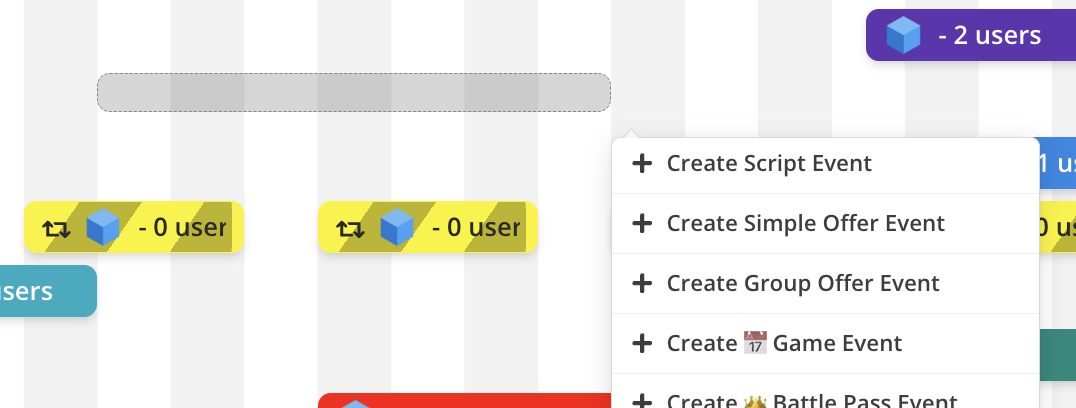
- Creating Game Events by drawing - On Dashboard calendar, draw visual bar from start date to finish date to create Game Event with Dates Range condition and continue setting up from there.
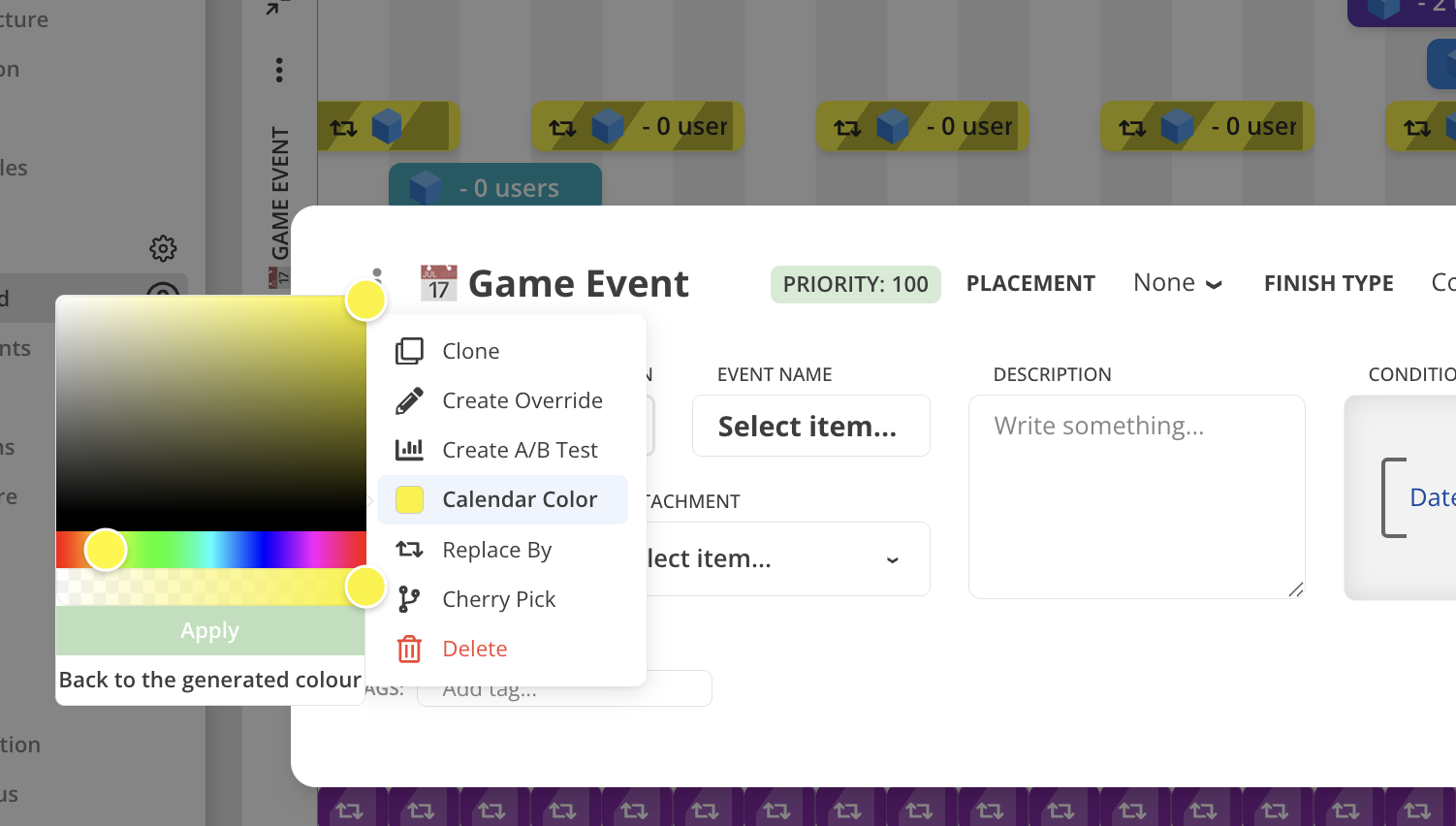
- Custom colors for Calendar - for Game Events and A/B tests select any color for visual bar representing in on the Calendar using context menu to open color picker.
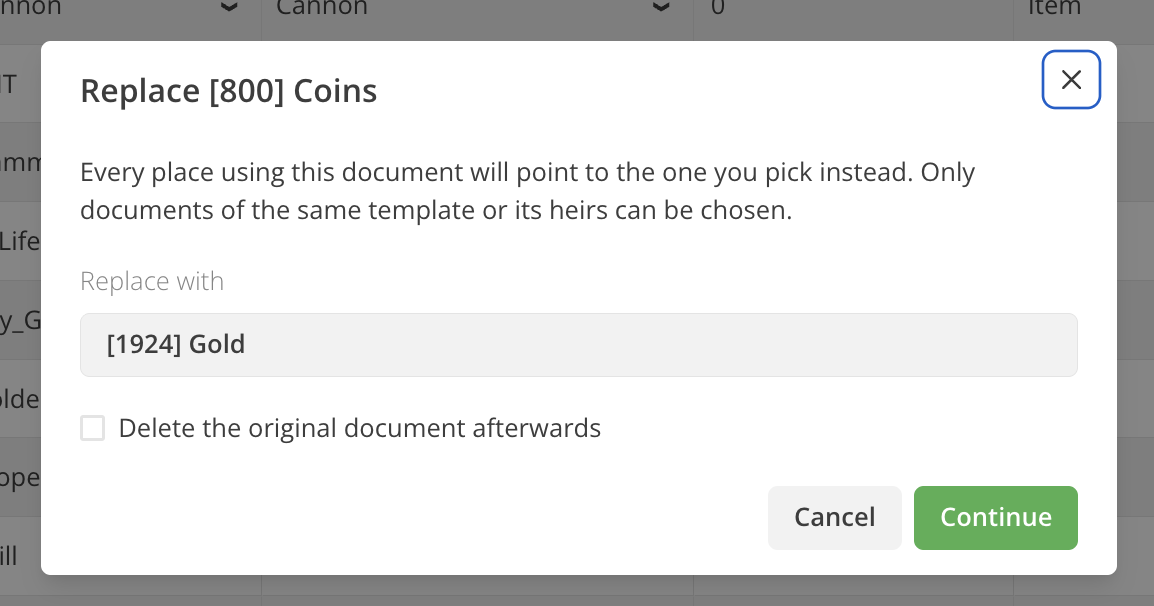
- Replace Document - for most of the documents it is now possible to batch replace them to another one from the same template
family. Want to change one Item to another Item everywhere? This is the way to do so. For theolddocument select Replace By in the context menu and chose thenewdocument to use insead. You will also have an option to deleteolddocument after replacement, if you don'y need it anymore.
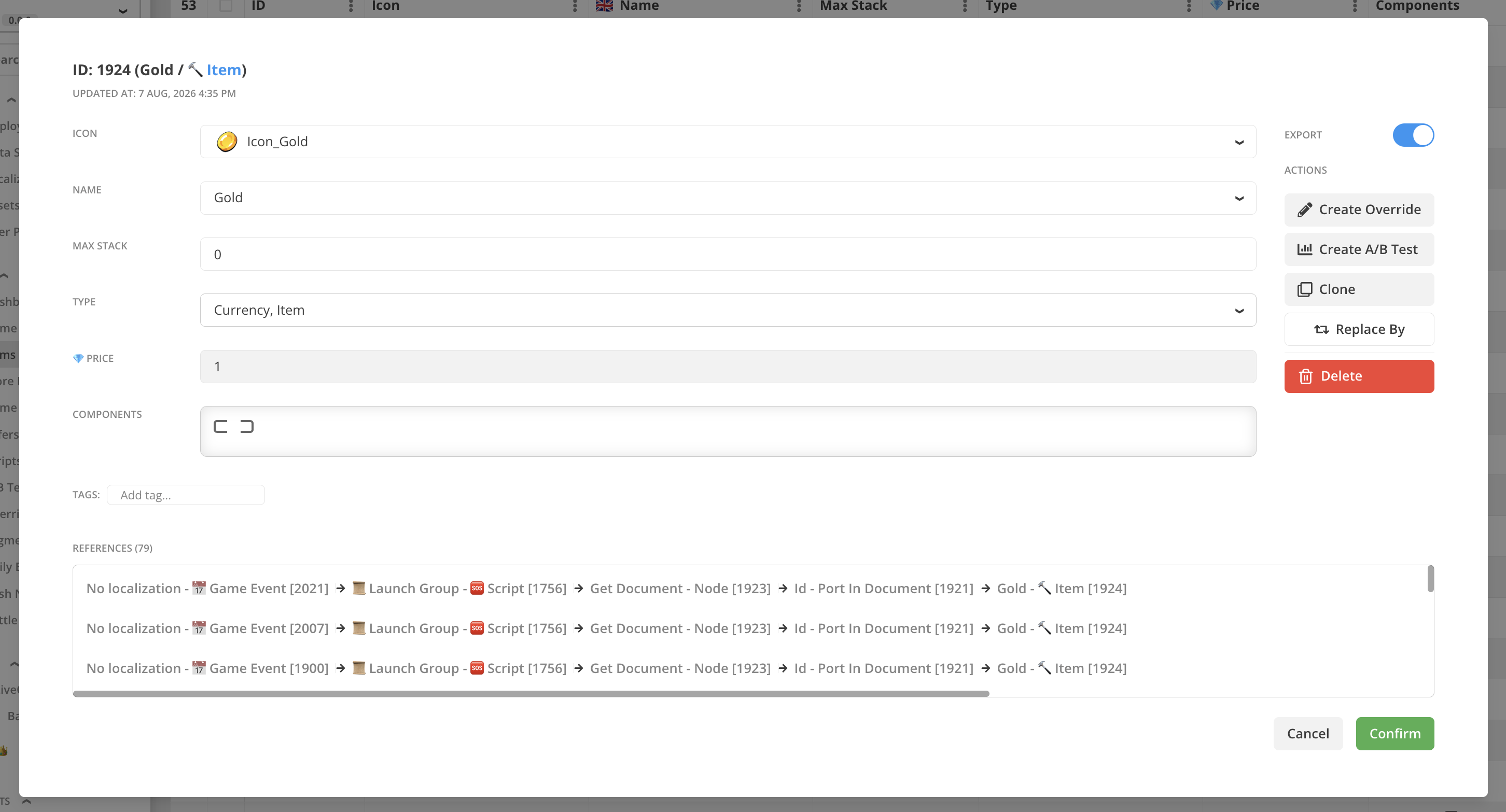
- Document References - for all documents opened via Document Modal (by clicking it's ID) Balancy now shows the list of all places where this document is referenced. Now you can easily check whene a document is mentioned or used by other documents.
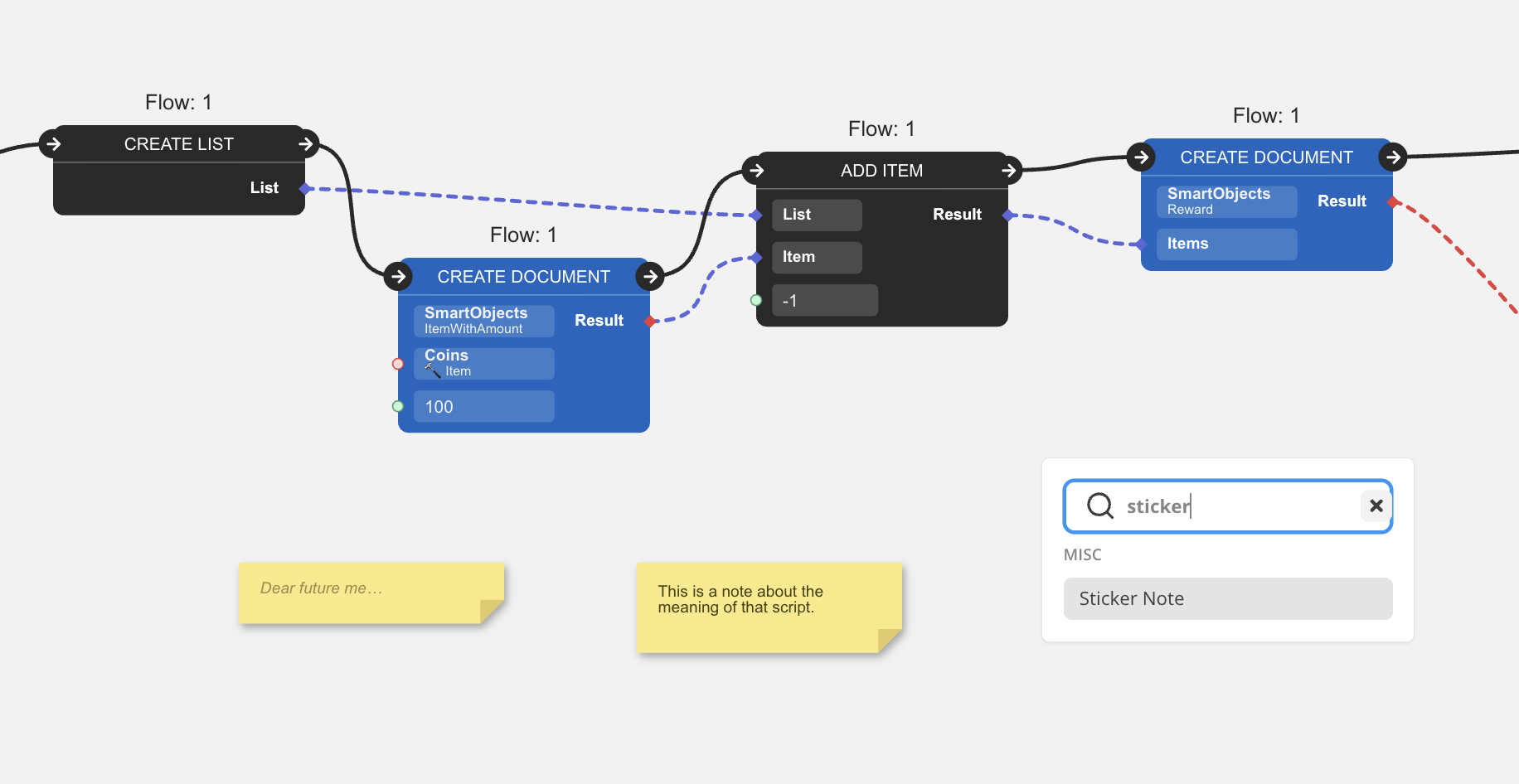
- Sticker Note VS Node -
New SDK Only!- you can now put sticker notes to the canvas of Visual Script editor to leave any note for your future self, if the logic of the script requires some annotations.Use only with New SDK!
AI / MCP
- DataObject template fields — AI can add asset-reference fields (images, fonts, audio, etc.) to templates.
- Animation AI tooling — add / rename / remove animation tracks, per-property easing, target an existing clip, warnings on overlapping events, and saving edits without marking the view "unsaved."
- UI Builder stability — stop the view being flagged "unsaved" just from selecting or opening it; keep font regeneration out of undo history; re-expand prefabs on AI reload; normalize CSS transforms; fix a lottie scaling issue.
- Store safety — warn when a real-money store item is created without an image.
Improvements and fixes
- VS flow validation improvements for data flows
- Long lists now not stretching table rows too much
- Template parameters of type
colornow set to black by default when created - Individual Revenue lines for offers on the Dashboard are fixed and showing properly
August 13, 2026 [New SDK 1.7.4]
Improvements
- One workflow for profile lists in Visual Scripting — read a list with Get Profile Value, change it with the regular List nodes, then write it back with Set Profile Value. Reading a list no longer makes a hidden copy, and writing one back keeps strongly-typed profile data in sync.
- Custom functions called from a visual script can now return their result asynchronously — the script waits for your game's response instead of continuing without it.
- Custom event and document info now cleans up after itself: an entry is released when its event or offer ends, setting it to null or an empty value clears it, and reading a missing entry no longer creates a blank record.
- Revenue analytics sends the classic
Global.NewPurchaseevent again, alongside the newerGlobal.NewPurchaseExt. - Real-money purchases of an offer now record the offer's attachments in the purchase history, matching what soft-currency purchases already did.
- Bundles that open automatically now stop after three nested levels and report it in the log, so a bundle that contains itself no longer keeps expanding.
Fixes
- Real-money purchases of offers with dynamic rewards now reliably grant the reward that was shown to the player, even when the offer closes or the game's content reloads while the payment is being confirmed.
- Dynamic rewards now correctly apply A/B test and segment overrides when the reward script finishes on a later frame.
- Adding an element to a typed profile list from your game code now creates an element of the correct type.
- Starting an event at the same moment the profile is reloaded no longer leaves that event in an inconsistent state.
- Visual scripts that finish while the profile is being reset now shut down cleanly instead of leaving stale state behind.
- Improved stability when profile data is reloaded while lists and nested objects are being read.
Breaking Changes
- An offer's reward is now fixed at the moment the offer activates. The reward is stored on the offer itself, so editing it in the dashboard no longer changes offers that are already active for a player — the change applies to offers activated afterwards. Offers activated by earlier SDK versions keep the reward they were created with.
- For offers with a dynamic reward, the "new offer activated" callback now arrives slightly later — once the reward script has finished — instead of during activation itself. Read the reward from the offer inside that callback.
- Custom event and document info is released when its event or offer ends. If your game needs that data afterwards, copy it out before the event or offer finishes. Setting custom info to null or an empty string now deletes the entry instead of storing an empty value.
- Get Profile Value returns the live list rather than a snapshot frozen at read time, so read-only List nodes always see the current contents. Mutating List nodes and For Each still work on their own copy.
Global.NewPurchaseis sent again, so dashboards and integrations that count purchase events will now receive bothGlobal.NewPurchaseandGlobal.NewPurchaseExt.
August 6, 2026 [New SDK 1.7.3]
New Features
- Dynamic Rewards — A store item can now attach a visual script that calculates its reward on the fly, so the reward an offer grants can depend on live game state instead of being a fixed value. The computed reward is available directly from the store item and is saved on the offer when it activates.
- Event State Targeting — Conditions that check another event can now match more than just "currently active" — they can also target players for whom that event is finished but still present, present in any state, or not present at all, so you can reach exactly the right audience based on a previous event's state.
Improvements
- Visual scripts can now work with built-in (embedded) lists and objects, not just items referenced by ID — so you can pass and process list-based data directly inside your scripts.
- Added access to soft-currency purchase history, along with extra purchase details such as the soft-currency price, session number, and multiplier.
Fixes
- Fixed incorrect time calculations when running on server time, which could cause events to start or end at the wrong moment.
July 31, 2026 [New SDK 1.7.2]
New Features
- Array & List Editing in Visual Scripting — Visual scripts can now read and modify individual elements of arrays and data collections (add, remove, and update items by index), making it possible to manage list-based game data directly from scripts.
- View-Open Failure Callback — Your game is now notified when an offer or event view fails to open, so you can show a fallback instead of leaving the player on a blank screen.
Improvements
- The SDK now automatically retries loading visual scripts after a temporary network error and repairs a corrupted local script cache on its own.
Fixes
- Fixed a rare crash that could occur when a game event or offer was deactivated.
- Fixed the app freezing when the SDK tried to load a piece of content that no longer existed.
- Fixed a black screen that could appear when opening a view right after the game's content was updated.
- Fixed shops and other overridable content (such as segments, daily bonuses, and tasks) sometimes showing outdated or duplicated entries when their content was overridden.
July 28, 2026 [New SDK 1.7.0]
Fixes
- Fixed game events and other condition-based content not triggering until the next session when a condition watched a profile field that hadn't been set yet — the change is now detected in the same session.
- Fixed the same delayed-trigger issue for conditions that check lists of profile data.
- Fixed a rare crash and gradual memory buildup involving list-based profile conditions when the game configuration reloads.
July 23, 2026 [New SDK 1.6.34]
New Features
- Cloud Storage for Custom Collections — Store and sync your own custom data collections in the cloud, alongside the player's profile.
Improvements
- The SDK now automatically retries downloading its configuration if the first attempt fails (for example, due to a temporary network issue) and waits until the configuration is ready before signing the player in.
Fixes
- Fixed rare crashes on first launch after install that could happen while the SDK was still downloading its configuration (most likely with no or a slow network connection).
- Fixed crashes when displaying WebView content (such as offers and events) on some Android devices with certain GPUs.
July 22, 2026 [New SDK 1.6.32]
New Features
- OnPreReset Visual Scripting Node — A new node that runs right before a script resets, so you can perform cleanup at the start of a reset.
- Config Load Failure Callback — A new
OnConfigFailedToLoadcallback lets your game know when the SDK can't download its configuration at startup (for example, when there's no network), so you can respond gracefully.
Fixes
- Fixed some profile data (such as event cooldowns) occasionally not being saved, which could cause game events to re-activate after an app restart.
- Fixed several crashes and stability issues in the Visual Scripting engine, especially around script resets, timers, and events being removed while their scripts were still running.
July 17, 2026 [New SDK 1.6.31]
Improvements
- Updated WebGL support.
Fixes
- Fixed an issue with the Android native libraries.
July 16, 2026 [New SDK 1.6.30]
New Features
- HooliPay Support — Added HooliPay as a supported payment provider.
Improvements
- Visual Scripting now supports passing arrays directly as list inputs.
- Reduced redundant work when reading the last or a random item from a Visual Scripting list.
Fixes
- Fixed notification data corruption on some 32-bit Android devices (e.g. Samsung J7) that could cause the triggering game event to arrive as null.
- Fixed text shadows not rendering in game UI WebViews on iOS versions below 16.4.
- Fixed the games list occasionally getting stuck while loading in the Balancy Config window in the Unity Editor.
- Fixed the sign-in status sometimes being misread in the Unity Editor.
- Fixed a crash when writing profile data through a reference that had been invalidated by a profile recreation.
- Fixed a crash that could occur when reading an object's parameters after the user profile was recreated or reset.
- Fixed additional crashes caused by accessing data that had already been destroyed after a profile recreation, including in Visual Scripting.
- Fixed Visual Scripting losing its trigger (event) context when a script's version changed, which could break scripts that depend on the triggering event.
- Fixed corrupt configuration downloads not being rejected, which could poison the local content cache.
- Fixed a view preload that could report success even when its content dependencies failed to load, leaving the view stuck.
- Fixed cloud-only mode not working correctly.
July 10, 2026 [AI Assistant]
New Features
- Connect Your Own AI (MCP) — You can now plug your own AI coding assistant (Claude Code, Codex, Cursor, Claude Desktop) directly into Balancy over MCP and have it work with your live game data — creating documents, offers, events, store items, prices, localizations, A/B tests and overrides, building UI Builder views, writing scripts, and answering questions about your project. All changes are routed through your open Balancy browser session for safety, so you can review every change before it's saved. Generate a token on the API Keys page to get started. See Connect Your Own AI (MCP).
Early access
MCP is brand new — experiment on a separate branch, not on production. See the safety notes.
July 8, 2026 [Web]
Web
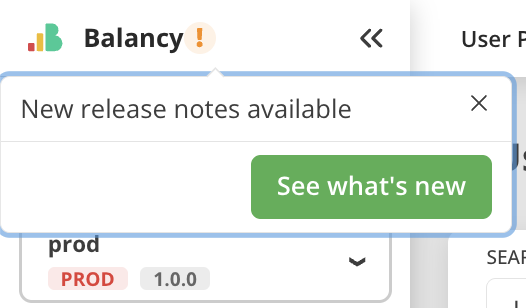
- Release Notes are not highlighted inside platform UI, so you will not miss it when update happens.
- Fixed permission issue for Publisher Account users. Two buttons were incorrectly gated behind edit permission for read-only viewing.
July 3, 2026 [New SDK 1.6.28]
Fixes
- Fixed several crashes in Visual Scripting that could occur when the user profile was recreated or reset while a script flow was still running.
- Fixed preload callbacks being lost when a cloud sync interrupted an in-progress content download, which could leave a view preload stuck and never complete.
July 1, 2026 [New SDK 1.6.27]
Fixes
- Fixed a crash when purchasing an item if the user profile was recreated while the purchase network request was still in flight.
- Fixed a crash caused by re-entrant execution in the Visual Scripting flow update loop.
- Fixed several crashes caused by accessing objects that had already been destroyed, particularly when C# or JavaScript wrappers held references across a profile recreation.
- Fixed a crash caused by stale condition subscriptions remaining active after a profile recreation, which could trigger callbacks into already-destroyed objects.
- Fixed a crash when an A/B test had no variants configured or all variants had zero weight.
- Fixed profile data loss on a fresh device: on the very first cloud sync, only the system section was saved locally — all other profile sections were missing on the next launch.
- Fixed Android WebView incorrectly suppressing shadows, text effects, and CSS filters in game UI content.
- Fixed Android WebView using the wrong dimensions when the device has on-screen navigation bars, causing the WebView to overlap or be clipped.
- Removed legacy CSS GPU-acceleration rules from the Android WebView that could interfere with game UI rendering on modern devices.
June 23, 2026 [New SDK 1.6.25]
New Features
- Frame-Budgeted Async Initialization — SDK initialization is now spread across multiple frames with a ~5ms per-frame budget, dramatically reducing main-thread frame spikes. On iOS, peak init spikes drop from 120–365ms to ~15–30ms. Cloud async init is enabled by default; local async init can be enabled via the
AsyncLocalInitlaunch flag.
Improvements
- Faster Initialization — Internal caching of parsed dictionaries and precomputed inheritance lookups significantly reduce initialization time (e.g., conditional template setup dropped from ~51ms to under 1ms).
- Linked Offers with Manual Remove — When a game event has
manualRemoveenabled and its condition expires, the linked offer now stays active until you explicitly callStopEventManually(), matching the expected behavior for manually managed events.
Fixes
- Fixed a crash in Visual Scripting when removing finished flows during an update loop, caused by internal list reorganization invalidating sibling flow data mid-iteration.
- Fixed a crash when accessing shop data if the shop or its pages were in an invalid state.
- Fixed a crash when ending a game event that had already been removed.
- Fixed shop slot multiplier overrides not being properly cleaned up during re-initialization, which could cause warnings in the log on subsequent launches.
- Fixed a possible issue where profile data could be partially updated between frames during cloud sync when async initialization was active.
June 21, 2026 [New SDK 1.6.24]
Improvements
- Async Profile Reset —
Profiles.Reset()now accepts anonCompletecallback, notifying you when the reset is fully finished. This is a breaking API change — existing calls without a callback will produce a compile error, prompting you to update your code.
Fixes
- Fixed an ANR (Application Not Responding) on Android that could occur during cloud profile sync, sign-out, or profile reset when background data processing was in progress.
- Fixed a crash in Visual Scripting when a flow referenced ports, nodes, or scripts that no longer exist in the current configuration.
- Fixed a crash that could occur during SDK shutdown when Visual Scripting nodes were being cleaned up while the user profile was already destroyed.
- Fixed a crash when opening a WebView (offer or event view) at the exact moment a data sync completed in the background.
- Fixed a possible error when refreshing profile lists during a data update if some list items were already released.
June 16, 2026 [New SDK 1.6.22]
Improvements
- Custom Shop Templates — Shops created with custom templates (inheriting from GameStoreBase) are now automatically detected and managed. The active shop is selected by highest priority among all matching shops.
- Improved error messages for Visual Scripting infinite loop detection, now showing the script name and ID.
Fixes
- Fixed a crash that could occur when a WebView sent a request while the SDK was updating user data in the background (e.g., during a cloud sync or profile refresh).
- Fixed the "Download Data" button in the Unity Editor sometimes failing with a "ZIP file not found" error when cached data from a previous session existed.
June 11, 2026 [New SDK 1.6.21]
New Features
- Firebase Authentication — Added Firebase as an authentication and account linking method.
- WebGL Platform — Added WebGL platform support for Unity builds.
- Enhanced Shop Notifications —
OnShopUpdatednow includes detailed change information: change type (ShopChanged,PageAdded,PageRemoved,SlotAdded,SlotRemoved,SlotItemChanged), page and slot indices, and shop identifier. This allows for more granular UI updates instead of rebuilding the entire shop. - Shop Item Override Detection — Shop slots now detect when their store item is modified by an override or A/B test at runtime and fire a
SlotItemChangednotification so the UI can update immediately. - Offer & Purchase Attachments — Attachments are now exposed on
OfferInfo,OfferGroupInfo,Purchase, andSoftPurchasein both Unity and TypeScript SDKs. UseHasAttachment()to check if a purchase was made with a specific tag.
Fixes
- Fixed null pointer crashes in the conditions system (comparison bounds, null condition checks, null profile fields).
- Fixed shop slot periodic timer not resetting correctly when using a custom UTC time provider.
- Fixed localization fallback: missing strings now correctly return the key instead of an empty string.
June 10, 2026 [New SDK 1.6.20]
Fixes
- Fixed profile corruption caused by NaN/Infinity values in JSON serialization. These values are now safely handled instead of truncating the profile file.
- Fixed several thread safety issues: profile serialization, SmartList access, and parameter getters are now properly synchronized.
- Fixed shop slot multiplier not persisting correctly after soft purchases.
- Fixed offline launch and related Android issues.
June 4, 2026 [New SDK 1.6.19]
Fixes
- Fixed authentication flow when
AutoLoginis set tofalse. - Fixed blank WebView on Android caused by script concatenation stripping trailing newlines.
June 1, 2026 [New SDK 1.6.17]
New Features
- Authentication & Account Linking — Reworked the authentication system with comprehensive documentation and a ready-to-use auth script covering all common scenarios. See the new Authentication & Account Linking guide.
- Added
forceLinksupport across all linking methods for resolving account conflicts. - New custom authentication flow: when
AutoLoginis disabled, you can now handle sign-in manually viaActions.Auth. The SDK fires a dedicatedAuthRequiredevent instead of relying on the CMS-ready signal. See Custom Auth Override. - New APIs: Sign Out, Unlink, Get Account Info.
- WebView now supports in-app authentication and account management screens.
- Added
- Shop — Added purchase multipliers for shop slots, including multiplier-aware purchase logic. Improved shop cooldown handling.
Improvements
- Device ID is now sourced consistently from the app configuration for every auth and link request.
- On web/JS, a stable device ID is now generated and persisted automatically when one isn't provided.
Fixes
- Fixed several crashes caused by cross-thread access during data download, script updates, and smart-object timers.
- Fixed inventory item counts after item removal.
- Fixed
NullReferenceExceptionduring model creation (Unity).
May 22, 2026 [New SDK 1.6.15]
New SDK
- Custom Conditions - have been improved, check the documentation for more details.
- Preloading & Caching - Balancy stores images, views, fonts, and other files on a CDN. When your game needs an asset, the SDK downloads it and caches it locally so subsequent loads are instant. This page covers the client-side API for controlling this process — checking cache status, preloading assets on demand, and tracking download progress.
April 23, 2026 [Web]
Web
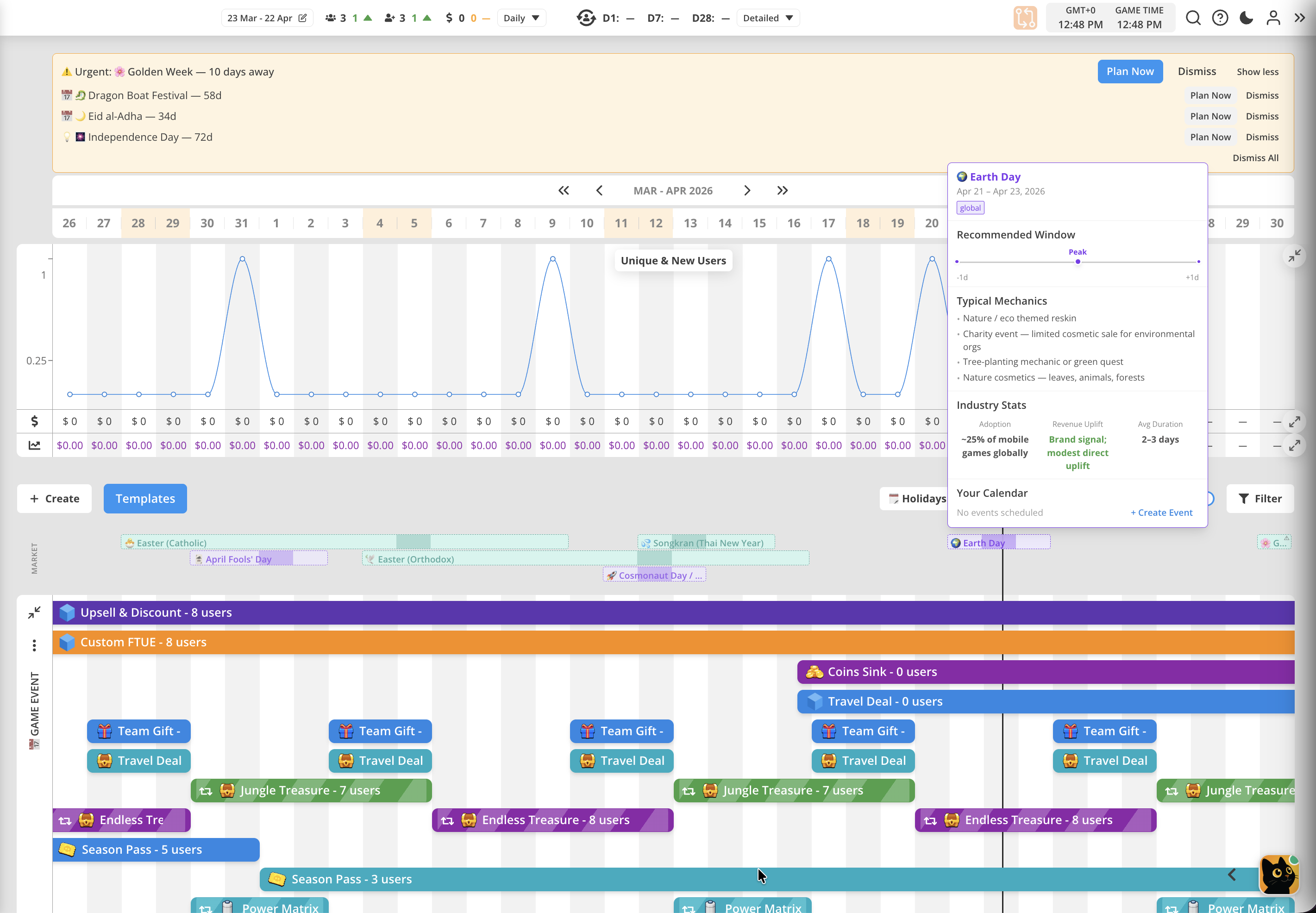
- New Feature - Public Holidays recommendations. On the Dashboard, it is now showing suggestions for LiveOps events related to some public holidays - global and regional. Each suggestion shows some ideas for mechanics and market benchmarks. You can start creating new game event from there, by placing new event into your own schedule. You can turn this feature off using toggle "Holiday Planning Reminders" in your User Account settings.
- Code Editor update - now code editor for JavaScripts (Views and Extensions) is opening as full-screen page.
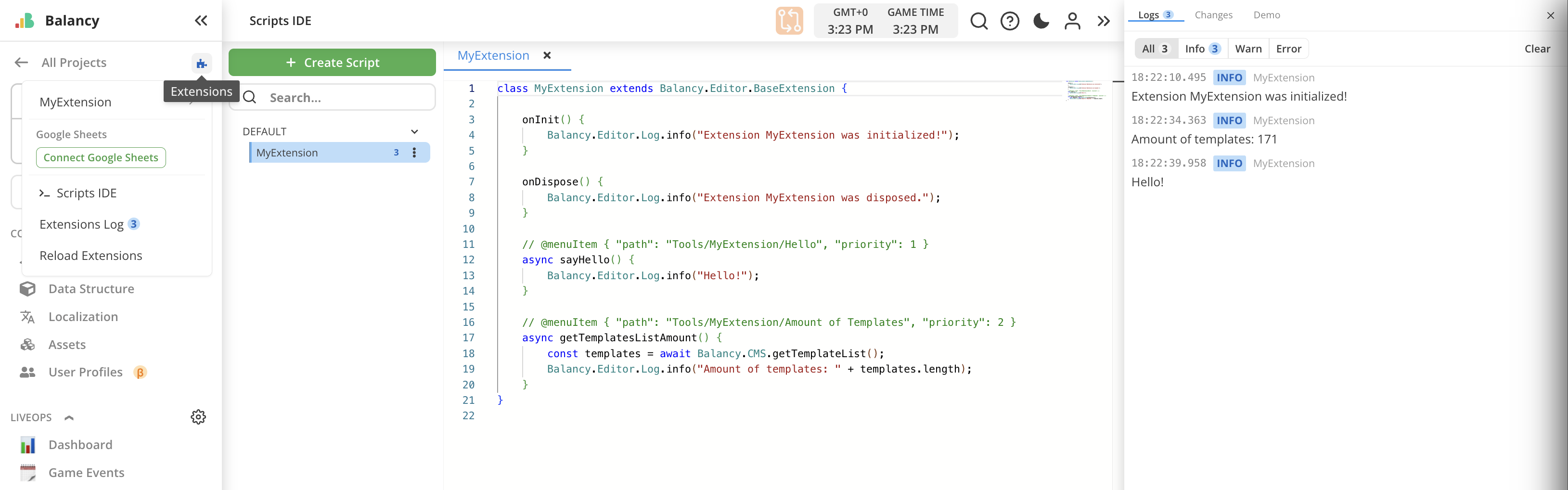
- Extensions can now work with
Google Spreadsheets. For this you will need to connect your personal google account in Extensions context menu. Also added methods for cloning documents, working with Products, read-only access to assets, registering for onChange of entity parameters, preSave and postSave hooks. Check the documentation for more details here.
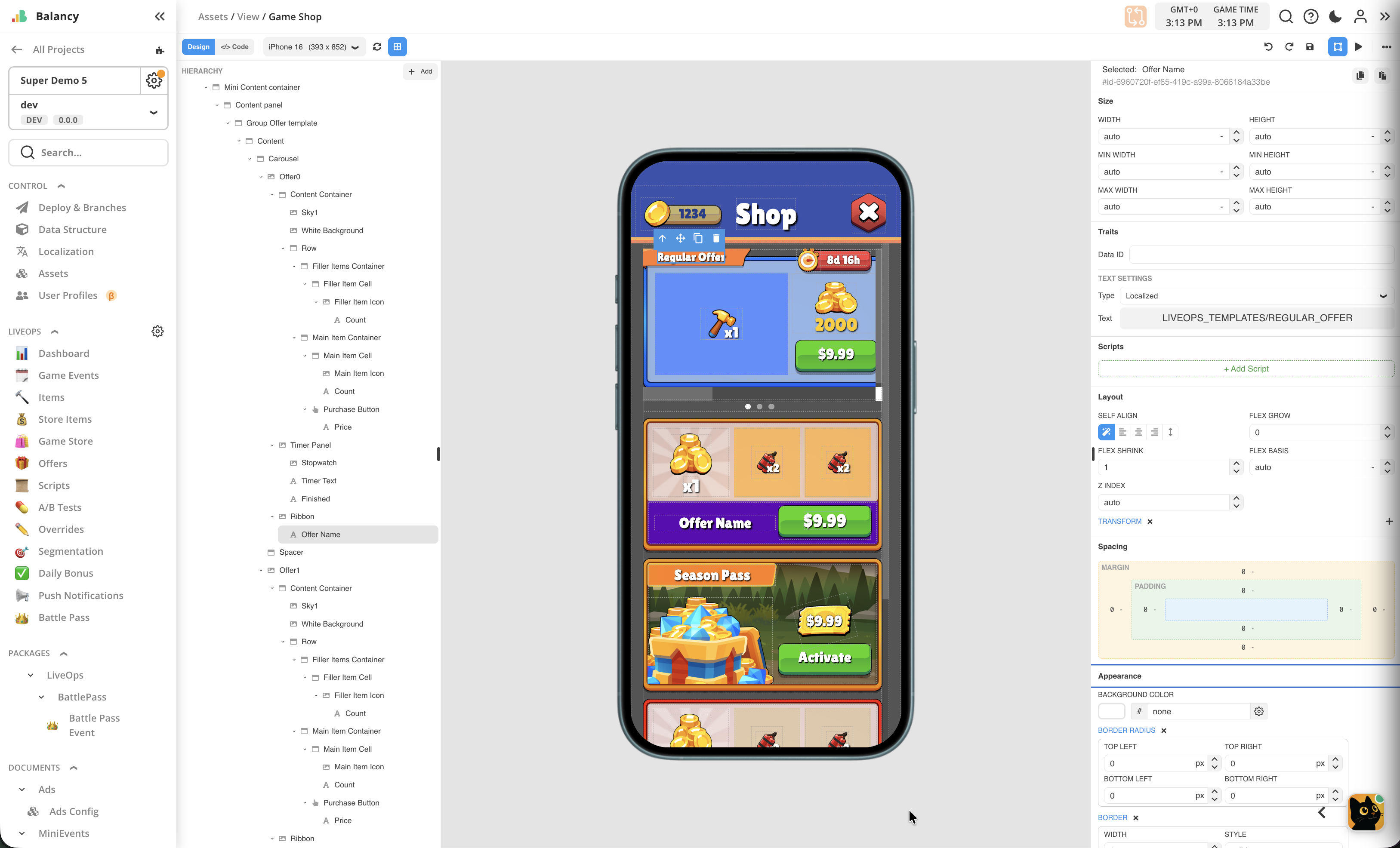
- UI Builder improvements - we significantly reworked UI layout for the UI Builder, making it more compact and better organized. Styles panel now contains all parameters in the single list. Controls made more simple. Tools panel has more space. See the full list of improvements below:
Full UI Builder Update Notes
New Features
-
Code Mode — A new full-screen Code editing mode is available directly inside the UI Builder. Switch between Design and Code modes using the toolbar toggle to edit scripts, HTML, CSS, and Bridge code inline without opening separate modals.
-
Empty Canvas Quick-Start — When starting with an empty View, a centered overlay appears with quick-add buttons for Row, Column, Container, Image, and Text, making it faster to begin building.
-
Row and Column Layout Blocks — New Row and Column blocks are available in the blocks panel for quickly creating horizontal and vertical layouts.
-
Custom CSS Section — A new "Custom CSS" section in the inspector lets you write raw CSS properties that aren't covered by the structured panels, giving you full control over component styling.
-
Aspect Ratio Controls — Image and Button components now have Aspect Ratio controls in the Traits section with Free / Fit W / Fit H mode buttons and a "Set Native Size" button that sets dimensions to the image's native resolution.
-
9-Slice Toggle — Slice controls are now gated behind a toggle switch. When disabled, slice inputs are hidden for a cleaner interface. Toggling back on restores previous settings.
-
Visual Box Model for Spacing — Margin and padding are now displayed as an interactive visual box model diagram (similar to browser DevTools), with inline-editable values and unit selectors.
-
Tablet and Desktop Device Previews — The device preview selector now includes tablet (iPad, iPad Pro) and desktop (Laptop HD, Full HD, 2K) options in addition to mobile devices.
-
Undo/Redo Toolbar Buttons — Undo and Redo actions now have visible buttons in the toolbar (previously only available via keyboard shortcuts).
Improvements
-
Unified Inspector Panel — The Style and Traits tabs have been merged into a single, scrollable inspector panel. All properties (Size, Layout, Spacing, Appearance, Typography, Animation, Scripts, Custom CSS) are now organized in one place.
-
Blocks Moved to Add Popover — The Blocks panel has moved from the right sidebar to a compact "+ Add" popover in the hierarchy panel header, freeing up inspector space and making it quicker to add elements.
-
Redesigned Toolbar — Toolbar buttons are now grouped into logical sections (Edit, View, overflow menu). Less-used actions like Copy, Paste, Fonts, and developer tools are tucked into an overflow menu for a cleaner look.
-
Compact Inspector Controls — All inspector inputs are now smaller and more space-efficient, fitting more properties on screen without scrolling.
-
Reorganized Inspector Sections — "Flex" has been renamed to "Layout," "Decorations" renamed to "Appearance." Opacity moved to Appearance, transform moved to Layout. Properties are reordered for a more intuitive flow.
-
Visual Flex Direction and Alignment — Flex direction and alignment properties now use icon-based radio buttons instead of dropdown menus, making layout configuration faster and more visual.
-
Redesigned Scripts Section — Scripts attached to a component are now shown as compact cards with a badge count and a dashed "+ Add" button.
-
Hierarchy Panel Icons — Hierarchy items now show type-specific icons (container, image, text, audio, etc.) for easier identification of components at a glance.
-
Add Popover Repositioned — The Add popover now opens to the right of the button instead of overlapping the hierarchy panel, so you can still see the hierarchy while dragging blocks.
-
Redesigned Device Panel — Landscape toggle and device mockup toggle are now icon buttons with tooltips instead of text switches, saving toolbar space.
-
Simplified Device List — Removed near-duplicate device models, keeping distinct devices for a cleaner selection.
-
Display Flex by Default — Container, Image, Button, and Lottie components now default to
display: flex. Existing Views are automatically migrated to preserve their current appearance. -
Hierarchy Drop Zone — You can now drop blocks into empty space below the hierarchy tree to append them as the last child of the root container.
-
Larger Prefab Previews — Prefab thumbnails in the Add popover are now larger and easier to see.
-
Code Editor Loading States — The code editor now shows a loading spinner while content loads and an error message if loading fails, instead of appearing blank.
-
Auto-Format on Tab Switch — Code editor content is now automatically formatted each time you switch tabs, ensuring consistent formatting.
Bug Fixes
-
Spacing Section Stale Values — Fixed an issue where the Spacing section could display outdated margin/padding values after selecting a different component.
-
Click-to-Add Elements Not Movable — Fixed a bug where elements added by clicking (instead of dragging) from the Add popover could not be moved in the hierarchy afterward. They also now insert next to the selected element instead of at the end.
-
Spacing Unit Selector Overflow — Fixed the "rem" unit selector text overflowing and covering the number in Spacing inputs.
-
Properties Panel Overflow — Fixed content in the properties panel overflowing outside its boundaries.
-
Canvas Disappearing on Mode Switch — Fixed the canvas disappearing when switching from Code mode back to Design mode.
-
Code Editor Infinite Loading — Fixed the Scripts IDE page getting stuck in an infinite loading state.
-
Code Editor Save Issues — Fixed several issues where saving in the code editor could save stale content, and Ctrl+S not working after switching from a read-only tab.
-
Spacing Section Loading Delay — Fixed a noticeable delay when opening the Spacing section.
-
Script Edit Opens Wrong Tab — Fixed the "Edit" button on a script opening the first tab instead of the correct script tab in Code mode.
-
Inspector Accordion Toggle — Fixed accordion sections in the inspector panel not expanding/collapsing correctly in some cases.
-
Visibility Toggle Conflicts — Fixed the visibility toggle conflicting with display flex defaults by switching to a CSS-based approach.
April 22, 2026 [New SDK 1.6.6]
New SDK
-
Persistent WebView Mode (PrepareWebView method) - Added support for persistent WebView mode, which keeps a single WebView instance alive across multiple view loads. Instead of creating and destroying a WebView for each view, you can now pre-initialize it once and swap content in and out. After preparation, views opened via the standard API will reuse the existing WebView — the shell page stays loaded and only the view content is injected/cleared. This eliminates the WebView creation overhead on each view open. You can continue using the SDK without calling PrepareWebView() — the classic per-view WebView flow works exactly as before.
-
Animation File Loading Fix - Fixed
.banimanimation files failing to load in native WebView environments (iOS WKWebView, Android WebView). Animation file content is now read through the SDK's native bridge (GetFileContent action), ensuring reliable loading across all platforms. Added.banimto the Android text resource preload list so that pre-downloaded animation files are correctly loaded from StreamingAssets on Android. -
iOS Build Fix - Fixed a missing
[DllImport("__Internal")]attribute on _balancySetEmergencyExitEnabled that caused an EntryPointNotFoundException on iOS builds. -
Reduced Console Noise - Removed ~80 verbose console.log/console.info calls from the WebView bridge. Cache operations, prefab loading steps, UI preparation phases, and per-request diagnostics no longer flood the console. Errors and warnings are preserved.
April 8, 2026 [Web, New SDK 1.5.2]
Web
-
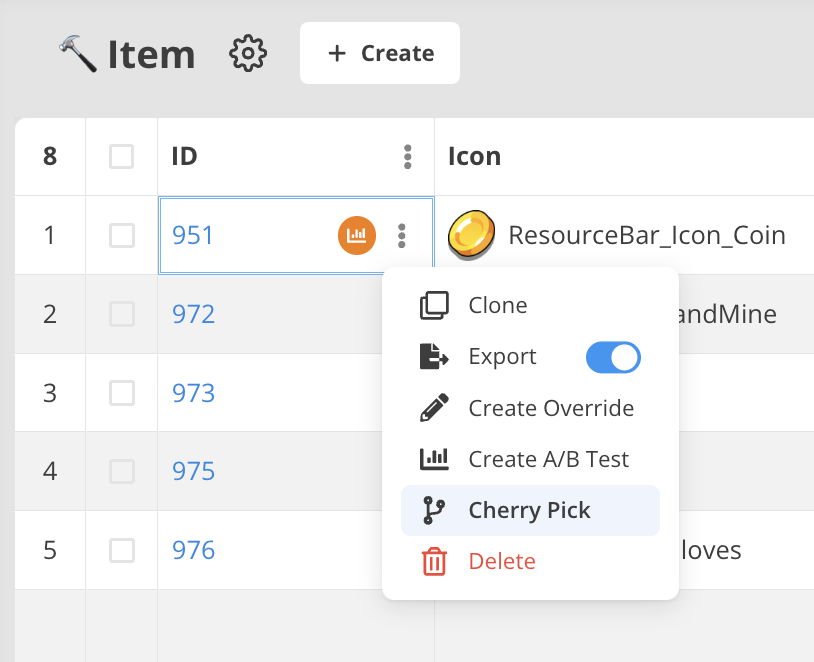
NEW MAJOR FEATURE: Cherry-picking
- For documents and assets it is now possible to cherry-pick a single entity and copy it to another branch. Make sure you're on the branch containing required document. This will be source branch. Select
Cherry Pickoption from context menu to initiate the process:
- For documents and assets it is now possible to cherry-pick a single entity and copy it to another branch. Make sure you're on the branch containing required document. This will be source branch. Select
-
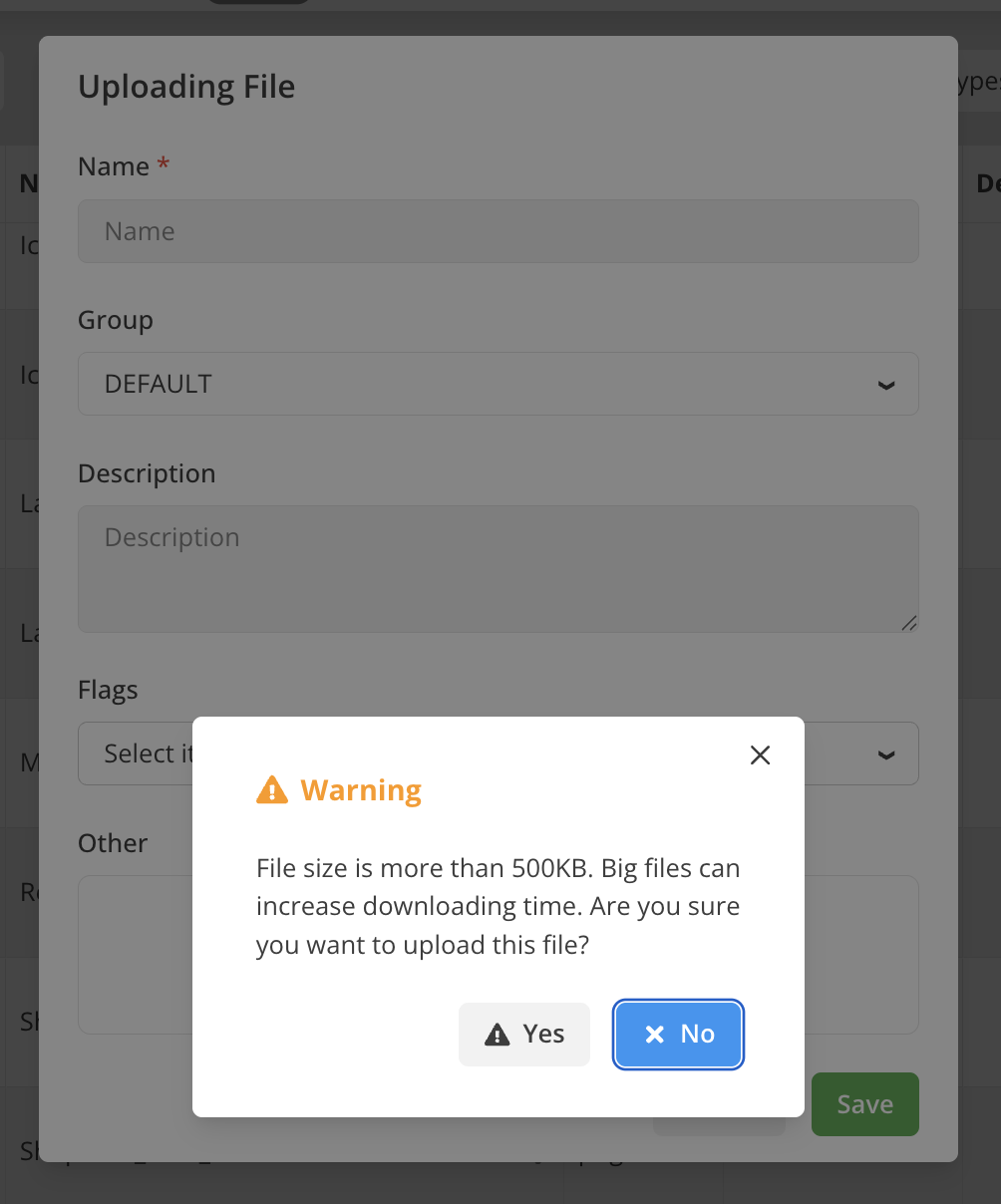
Warning for large file size while uploading image assets. Large files can potentially lead to increased loading times and performance issues. We now show warning for files larger than 500KB before uploading them into CDN.
-
Many minor UX improvements and polishing.
New SDK
- New APIs
GetProduct— look up a single product by ID without manual filteringSetCustomUTCTimeProvider/ResetCustomUTCTimeProvider— plug in a custom UTC time source- Data change subscriptions:
SubscribeForParamChange,SubscribeForChangesand matching unsubscribe methods
- Configuration
AppConfig.RequireReceiptValidation— toggle server-side receipt validation (default:true)
- Improvements
- Automatic platform-correct product resolution when multiple CMS products share the same base ID
- Purchases now complete correctly even if the original offer expires mid-transaction
OnPaymentIsReadyfires reliably on late callback registration — timing issue resolved
- Stability
- Improved shutdown/reinitialization behavior in Unity
- Fixed Android asset loading
- Additional safeguards against product and resource loading failures
March 30, 2026 [Web]
Web
-
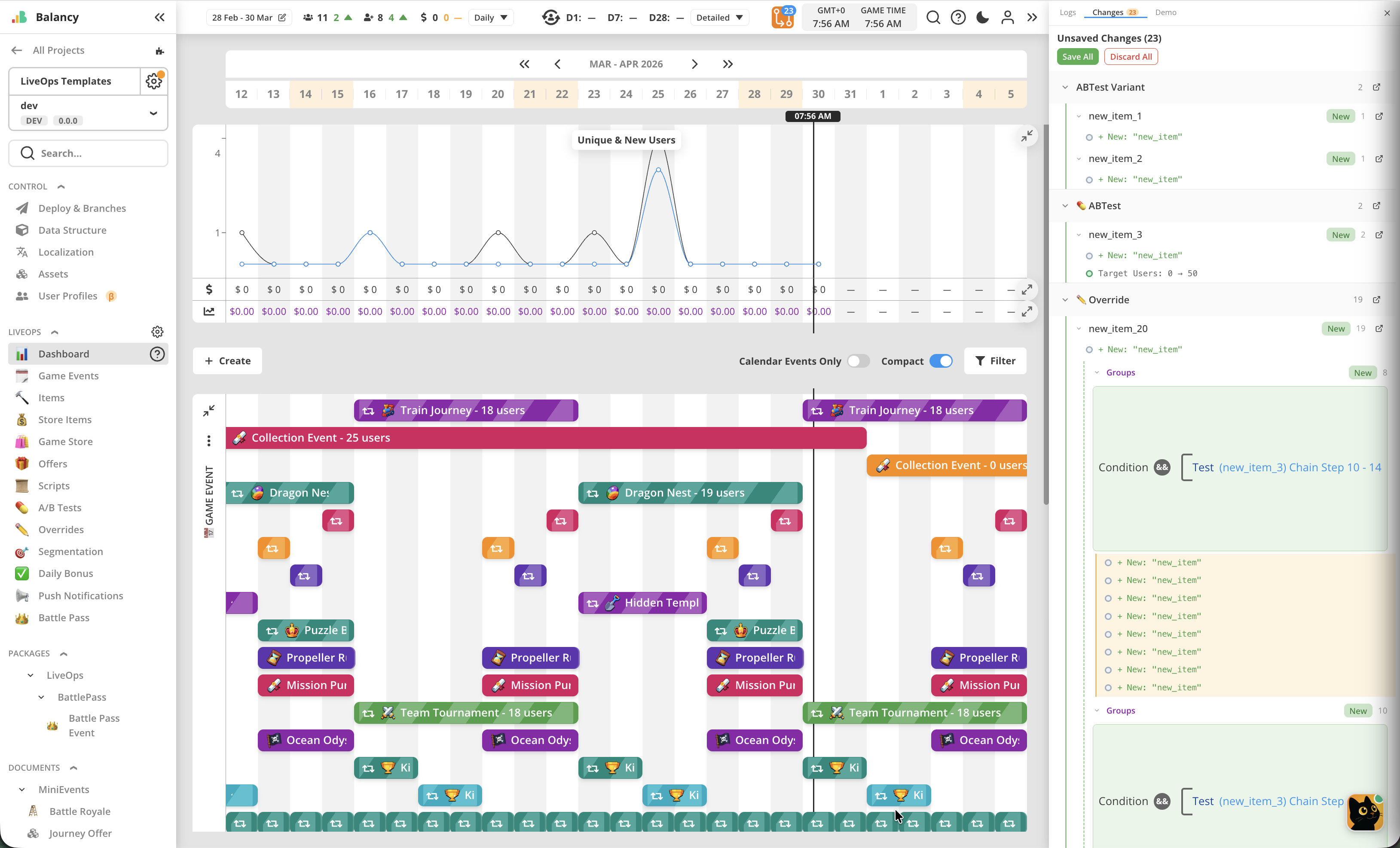
Saving changes is significantly reworked. Now it is allowed to switch between pages and make changes at different places at the same time. All the changes will be shown in Changes log, added to the panel on the right side of the screen. You can open it to review unsaved changes by clicking the icon with counter on the top bar. Unsaved changes can be discarded without saving. For your convenience, Save All and Discard All buttons are available outside of the change log, if you don’t want to review changes before taking any actions. As before, unsaved changes are not available for Deploy.
-
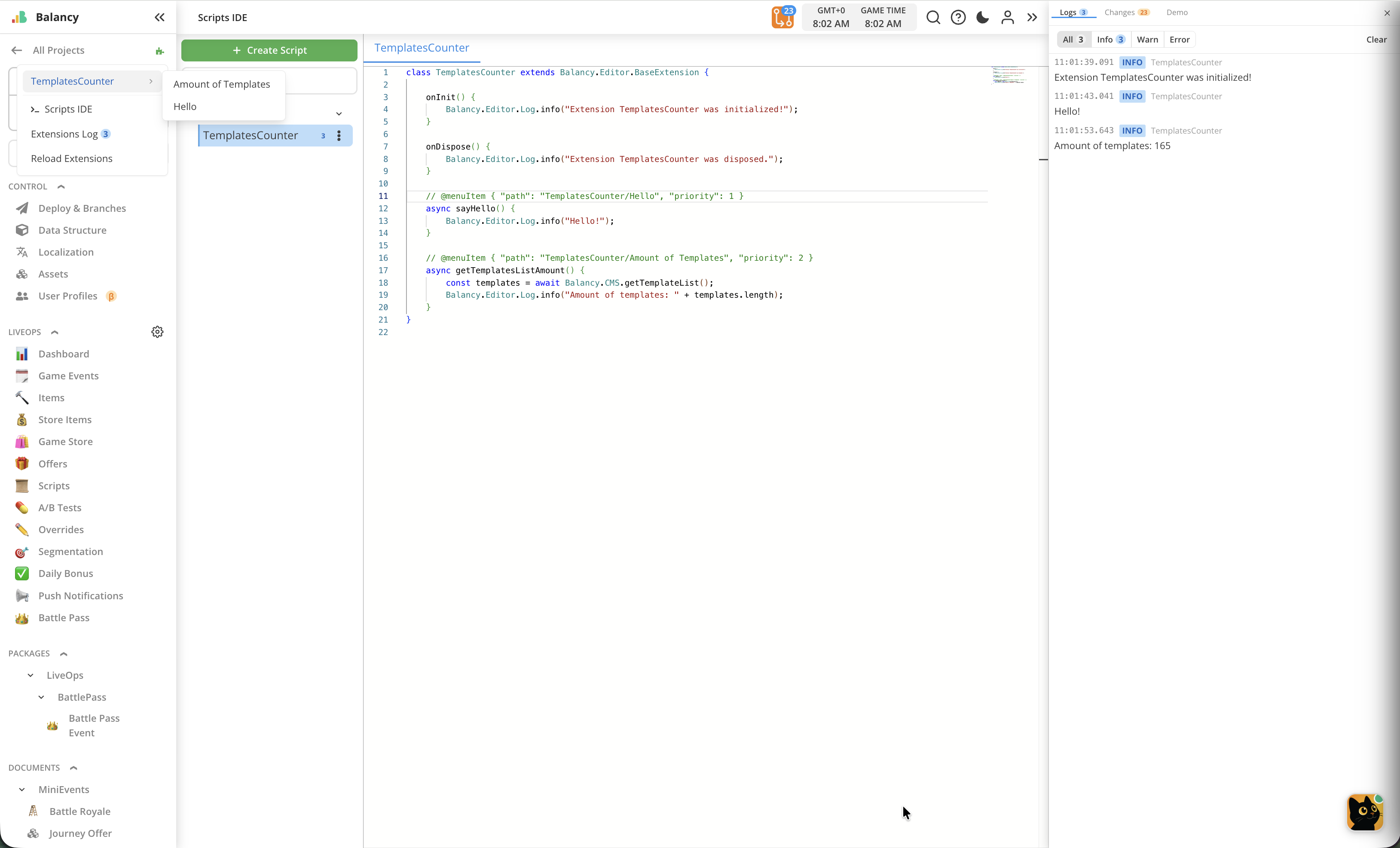
Reworked saving made it possible to introduce new feature: Extensions. Now you can write your own JavaScripts to manipulate documents in CMS. Now it is possible to make batch editing, automated validations, conditional changes and many more. Please read the documentation for more details.
-
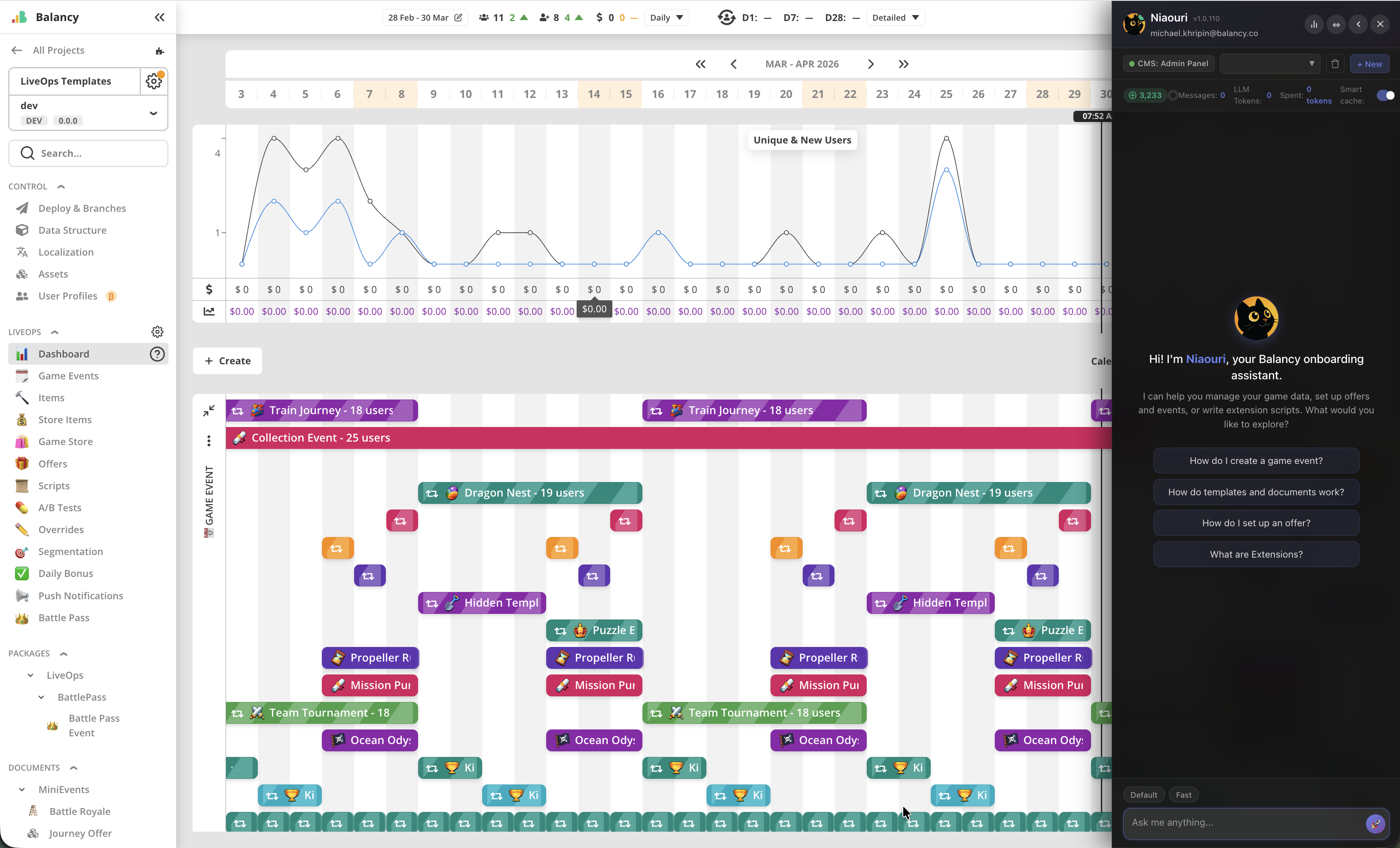
Last, but not less important - please welcome Balancy AI Assistant: Nia. This cute kitty will help you with onboarding, understanding documentation, writing Extensions, and even much more in the future. Nia is available on every screen by clicking on the portrait icon in the bottom right corner. It is aware of your project context, can answer questions about CMS and both Unity C# and TypeScript versions of SDK. Tokens replenish every 6 hours. 10000 tokens are provided as welcome bonus. Default and Fast modes of work are available, feel free to test them as you wish. Your feedback is extremely valuable for us, if you’re satisfied or not satisfied with Niaouri’s services, please use thumbs up/thumbs down icons in its replies and write some note about your experience.
March 6, 2026 [New SDK 1.4.0]
New SDK
- Visual Scripting: Script Completion Callbacks — All script launch methods (
RunScriptById,RunScriptByName,ScriptRef.Launch) now accept an optionalonCompletecallback that fires when the script finishes, providing the exit port name and output port values. Learn more. - Visual Scripting: TypeScript RunFunctionManager — TypeScript SDK now supports the Run Method node via
RunFunctionManager.register(). Register functions by path at startup to be called from Visual Scripting graphs. Learn more. - StopEventManually — New API to programmatically terminate active game events before their natural expiry, with configurable cooldown override. Available on
GameEventandEventInfoinstances. Learn more. - DeactivateOffer from Code — New
DeactivateOffer()/deactivateOffer()method on offer info objects to immediately deactivate active offers or offer groups from SDK code. Learn more. - App Lifecycle Notifications — New
NotifyAppPause/NotifyAppResumeAPI for informing the SDK about app background/foreground transitions, improving analytics session tracking. Learn more. - CMS Model Types (TypeScript) — First-class TypeScript types for
Vector2,Vector3,Vector4,Vector2Int,Vector3Int,RangeInt, andRangeFloat, importable from@balancy/core. Learn more. - WebView nested prefab resolution fix (recursive up to depth 5).
- WebView JSON parsing hardening — malformed messages no longer crash the injection pipeline.
- Visual Scripting output port parsing fix for
JsonUtility-serialised arrays. - Various small fixes and improvements.
February 19, 2026 [Web]
Web
-
NEW MAJOR FEATURE: Reverting Changes
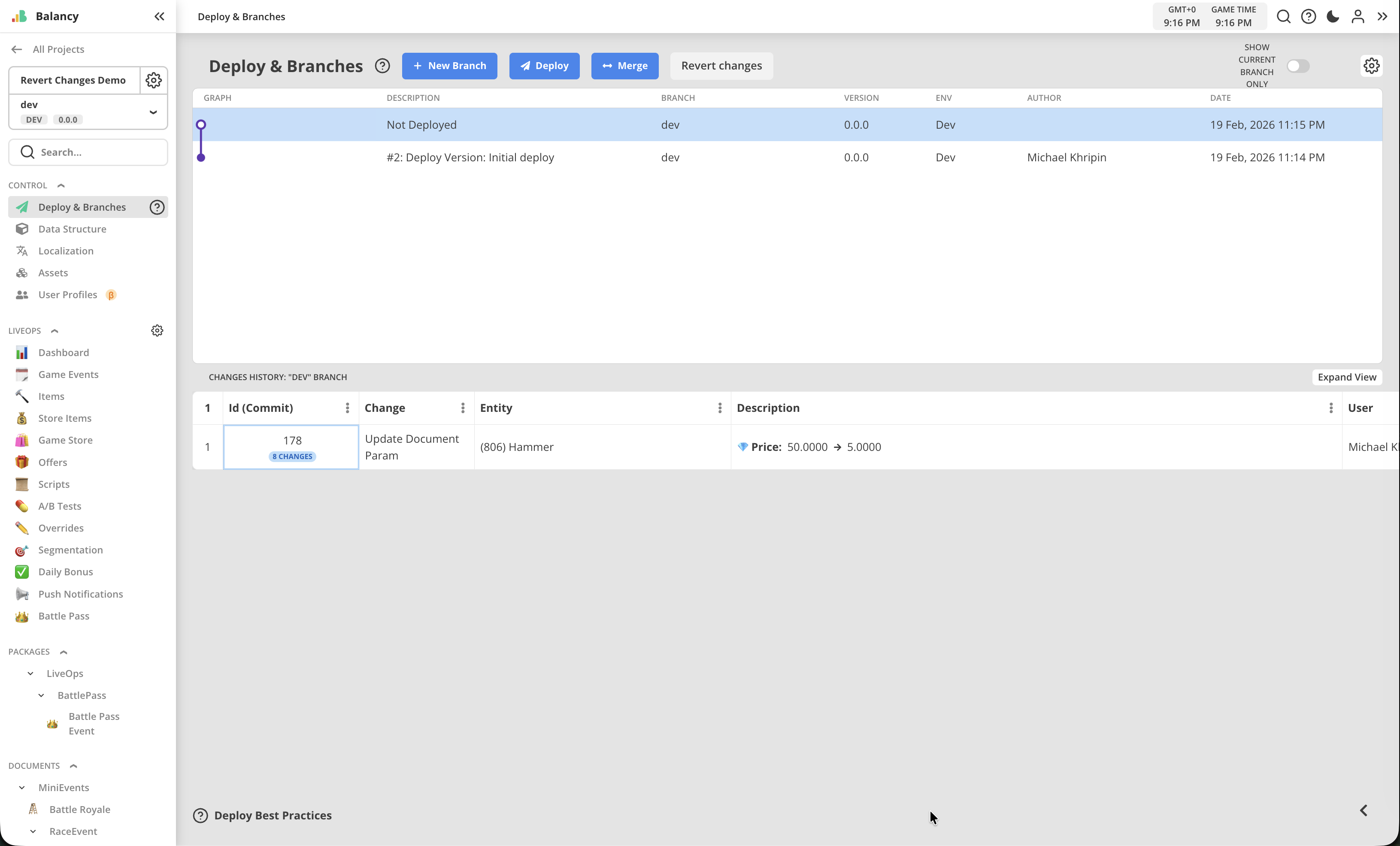
- In this MVP version of the feature we now allow to discard all undeployed changes till the point of the last deploy.
- Reverting operation is not reversible.
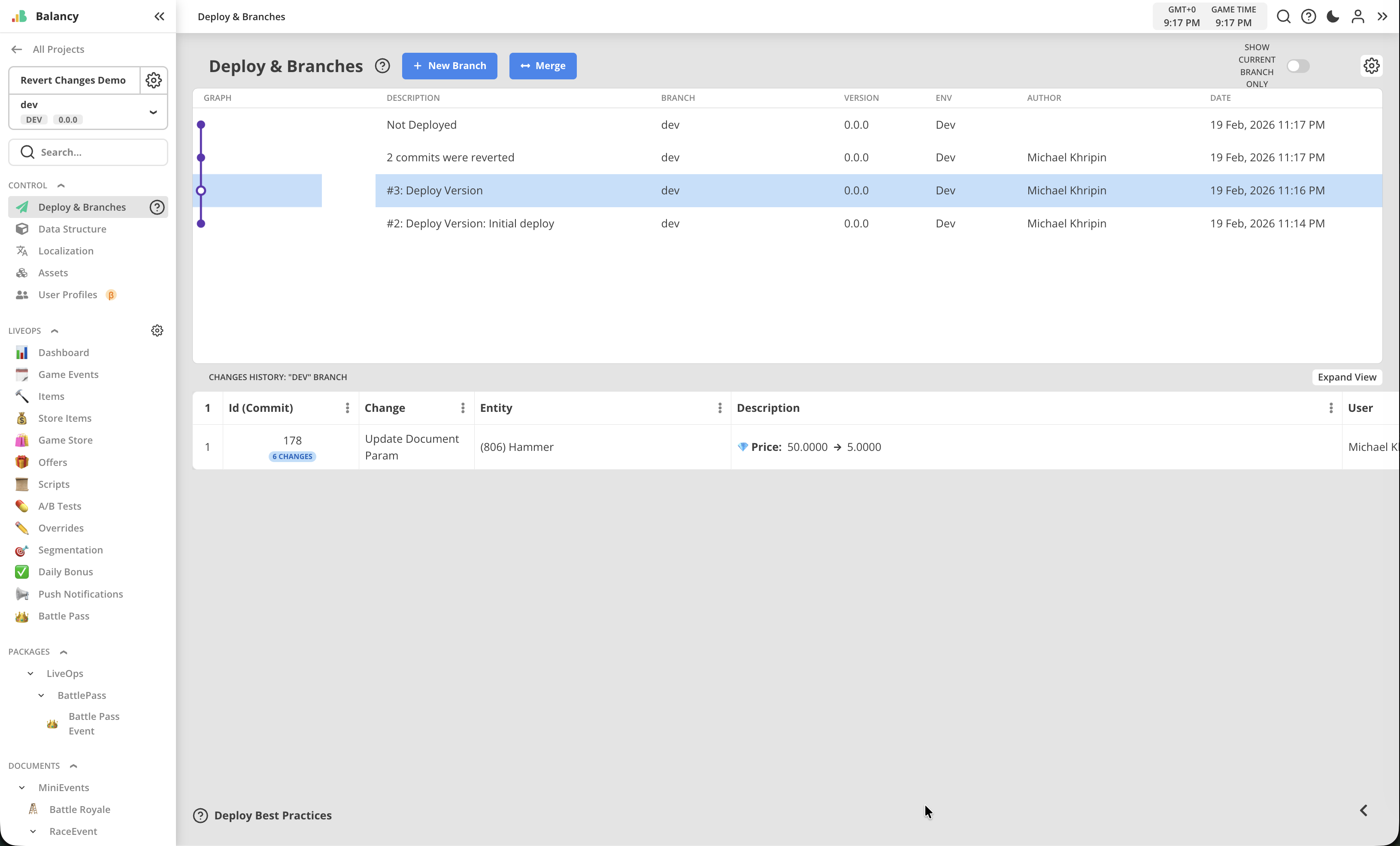
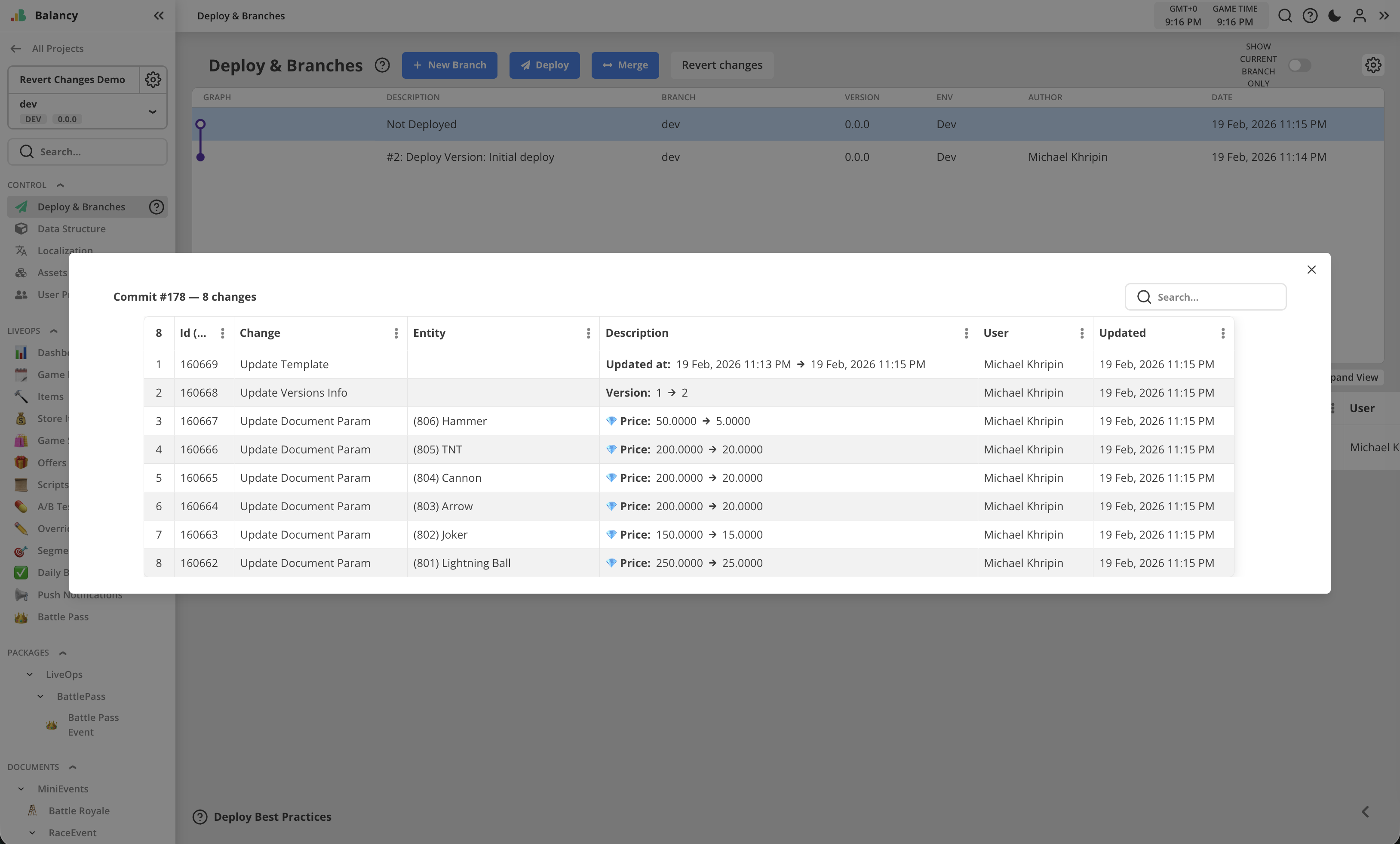
- Changes history now shows changes grouped into commits. One commit includes all changes made manually before Save button was pressed, plus system changes for versions and timestamps.
- Commit group can be opened as a popup to check the list of all changes.
- It is now impossible to make "empty" deploy. You cannot deploy if there are no undeployed changes.
February 13, 2026 [New SDK 1.3.0]
New SDK
- API to work with CustomEventInfo.
- API to work with Tasks (to restore or get progress).
- Now you can make VisualScripts as parameters and launch them whenever you need.
- Fixed the problem with Singletons Cleanup, when closing the app (Relevant mostly for Unity and PC builds).
- Many small fixes and improvements.
February 5, 2026 [New SDK 1.2.4]
New SDK
- Added Logic, ConditionalTemplate, and improved Singletons. Check Direct Conditions API for more information.
- DailyBonus fixes (there was a warning when checking the available reward).
- Support SmartList for simple types.
- Updated Webview SDK to support prefabs.
February 2, 2026 [Web]
Web
-
NEW MAJOR FEATURE: Prefabs System
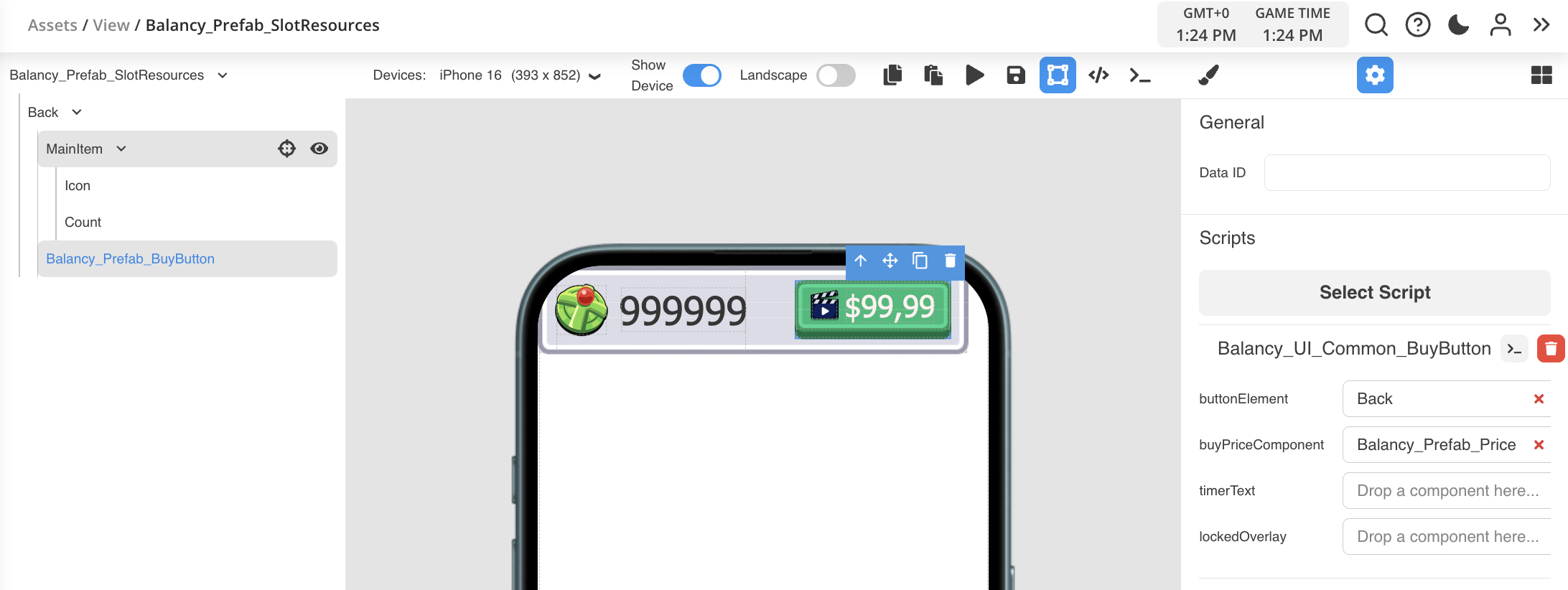
- Balancy's Prefab & Component System brings Unity-like patterns to web UI development.
- Build reusable templates, attach script behaviors, and compose complex interfaces from simple building blocks.
- New public package "Balancy UI Prefabs" is available in the catalog, to demonstrate the following:
- Buy Button prefab
- Item With Amount prefab
- Simple Game Shop slots for resources
- Offer slot for Game Shop
- Simple Offer View build with prefabs
- Group Offer View built with prefabs
- Game Shop View built with prefabs
- Prefabs are using built-in scripts for their logic
-
Assets Page rework
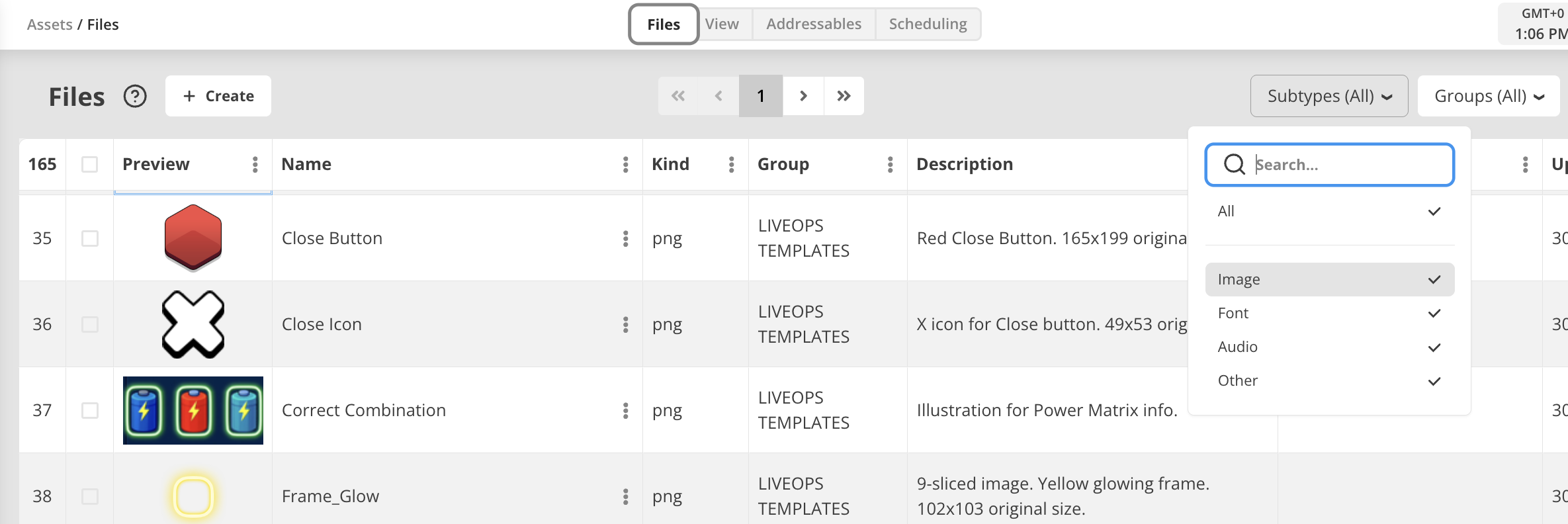
- Images, Fonts, Audio, Other tabs are now transformed into a single Files tab.
- Files tab now has Sub-type filter to select files from above mentioned categories
- File Upload popup now auto-detects sub-type and places files into these 4 categories based on file extension
- Original file name is now remembered, so you will know what was the source file for uploaded asset. File name can be see in the tooltip for file extension shown in Kind column. Updating existing asset with another file will change the source file name.
-
Many minor QoL fixes and improvements for platform UI.
January 15, 2026 [New SDK v1.2.1]
New SDK
We continued to implement features that existed in the old plugin, the following were added to the new SDK for backward compatibility:
- Performance improvements for old devices
- All missing nodes added for Visual Scripting
- Addressables Support
- Proper support for Singletons
- Improved logic for watching ads
- Assets Scheduling
- Custom Conditions Support
December 17, 2025 [Web]
Web
-
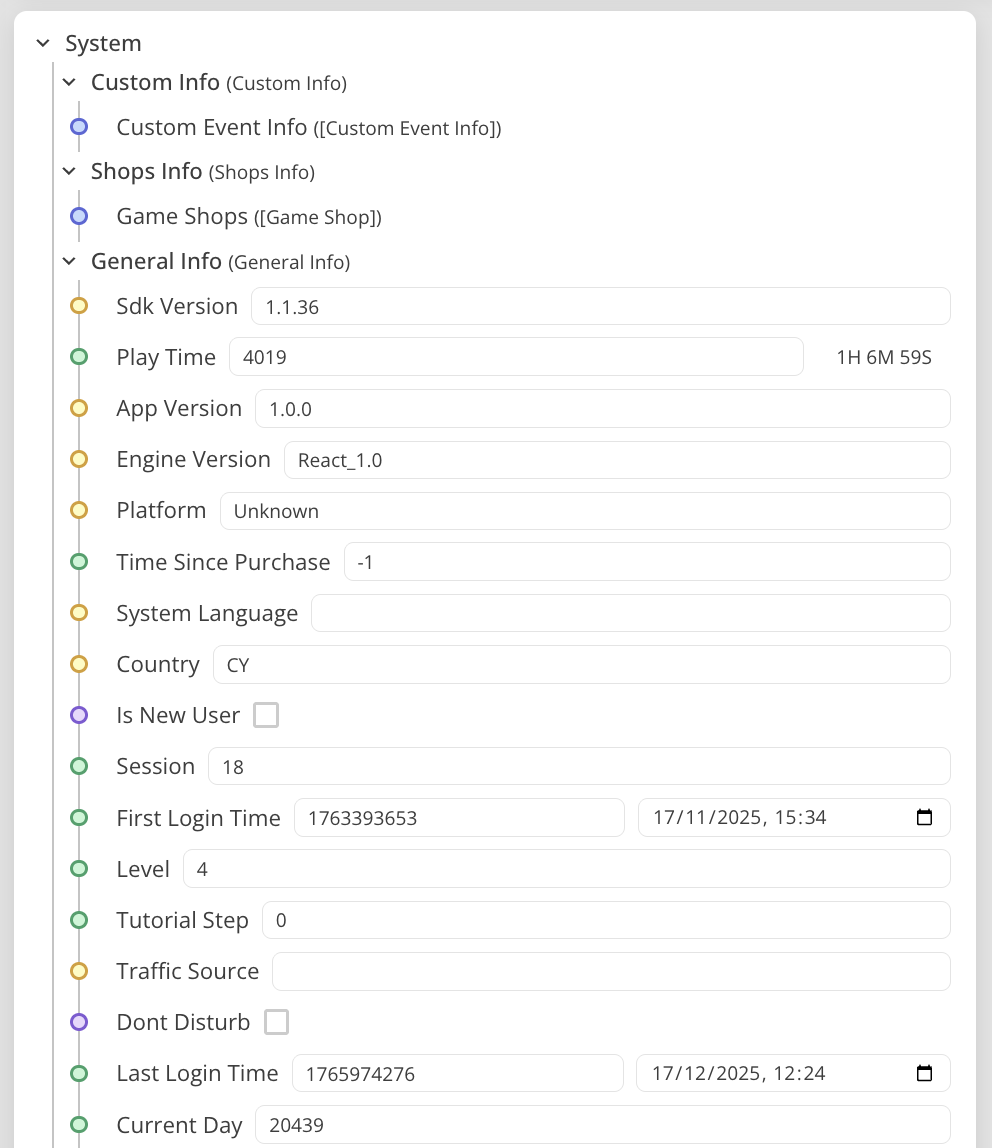
Some system user properties are now editable in proper date-time or duration format.
-
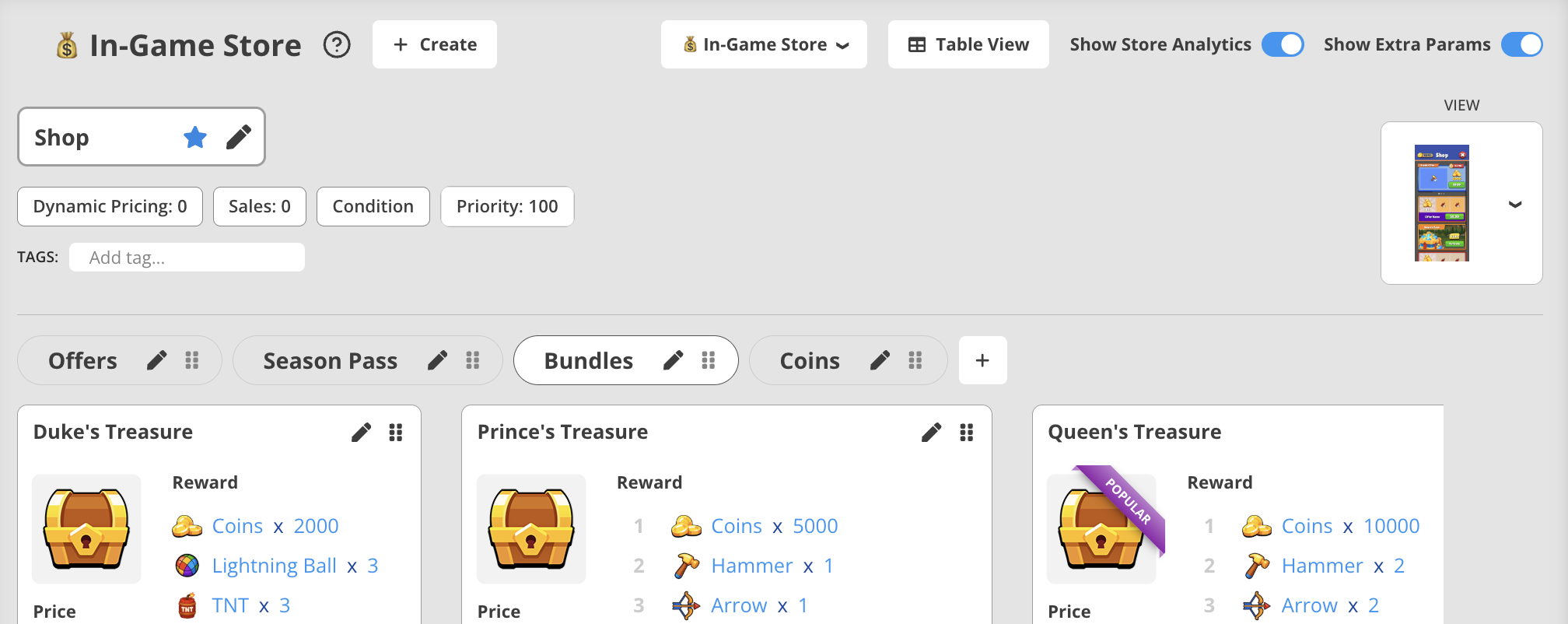
In-Game Store page improved to show View parameter.
-
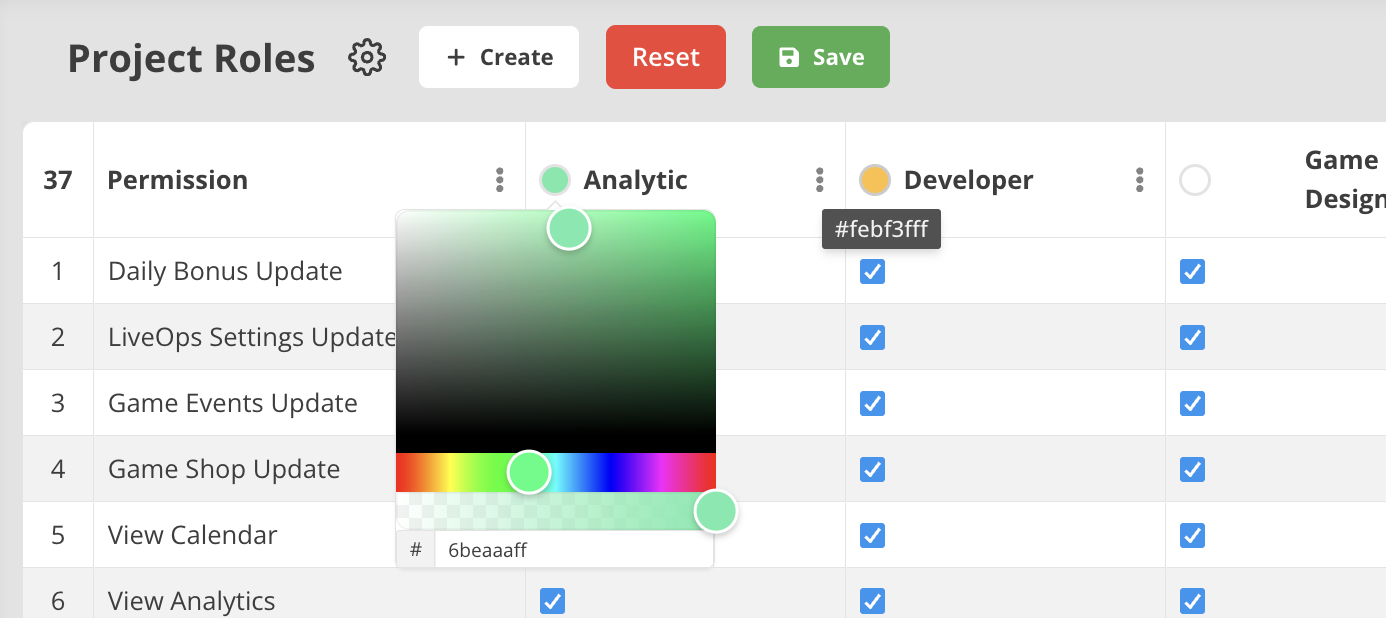
Publisher Account update:
- New permissions for Cloning and Deleting projects were added.
- For members, search can be done by roles.
- All roles now can have individual colours.
-
UI Builder update:
- Aspect Ratio for image elements can now be reset back to original values.
- For sounds, there is now audio player embedded for quickly checking of the assets assigned.
- For images, there is now small preview shown of what asset is assigned to the element.
November 25, 2025 [Web]
Web
-
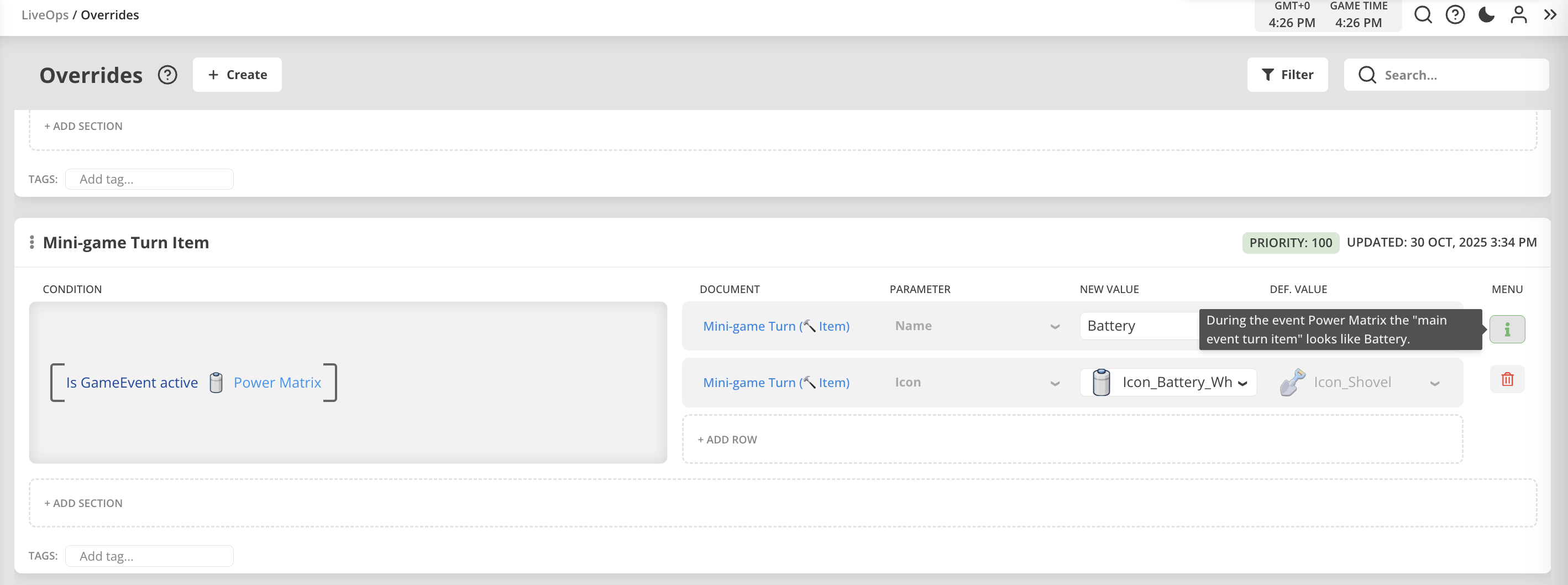
Override comments were reworked to save extra space for override settings. Comments can be viewed and edited by using (i) button in the panel on the right side of the override's section. Also shown as a tooltip when mouse hovering over the button. 'Delete section' button also added to this panel and always visible.
-
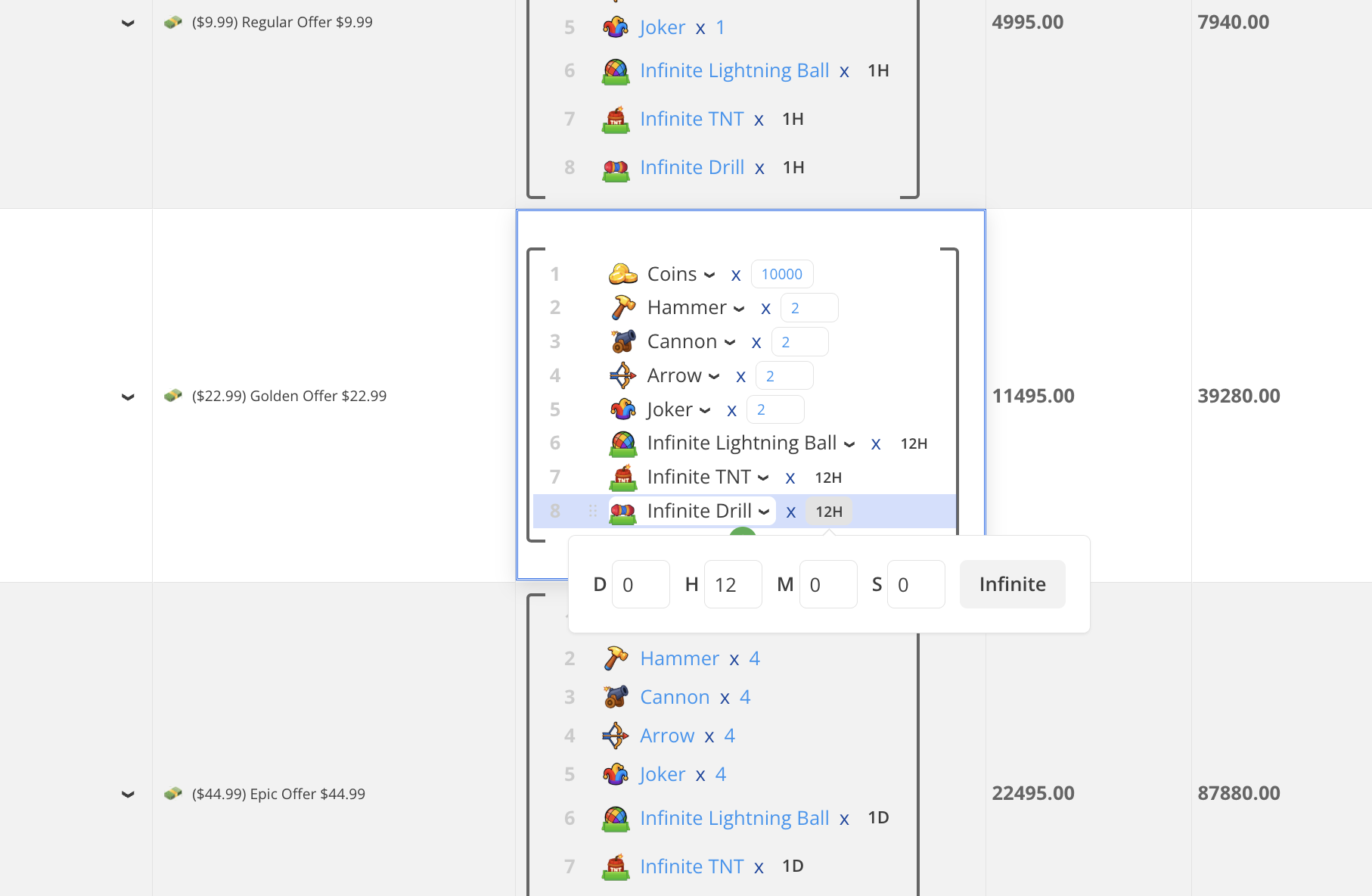
Items with Decay logic are now showing amount as proper duration.
-
In UI Builder new 'reverse-spin' animation was added into Extra section of CSS styles.
-
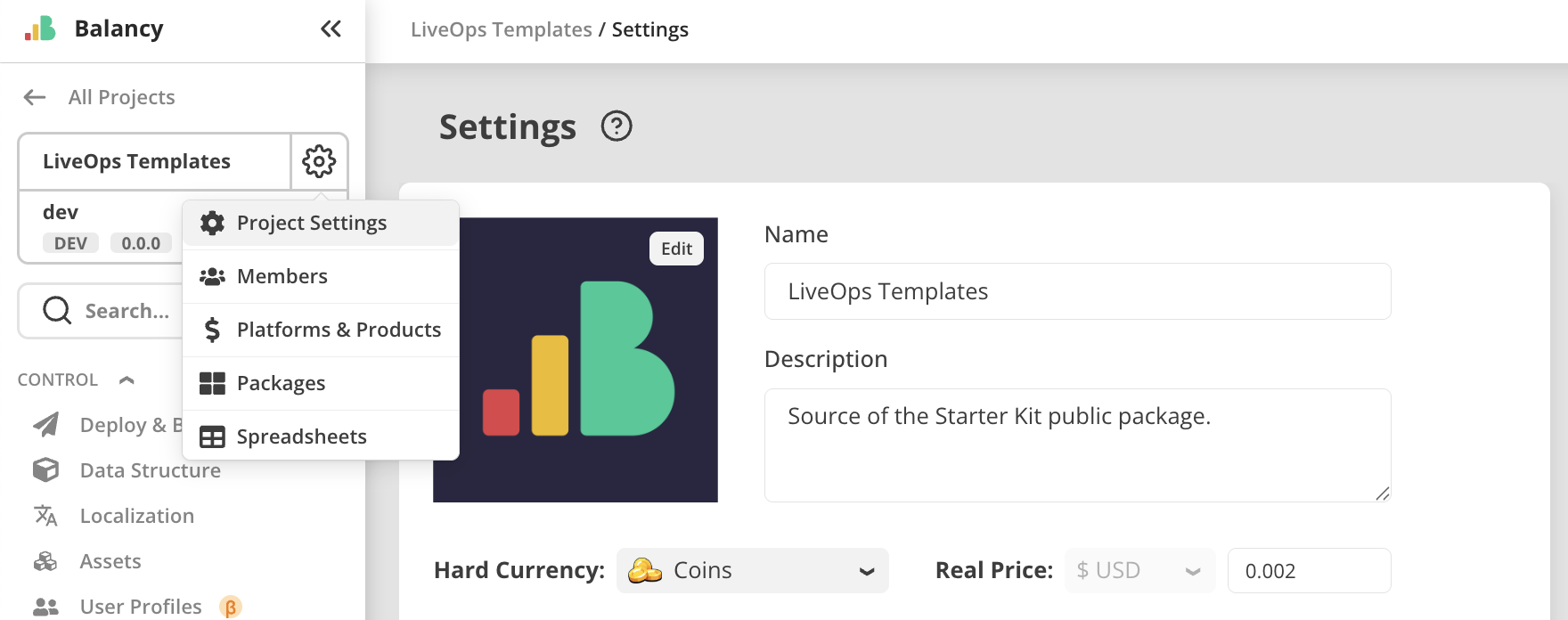
In project settings it is now possible to add icon.
November 17, 2025 [Web]
Web
-
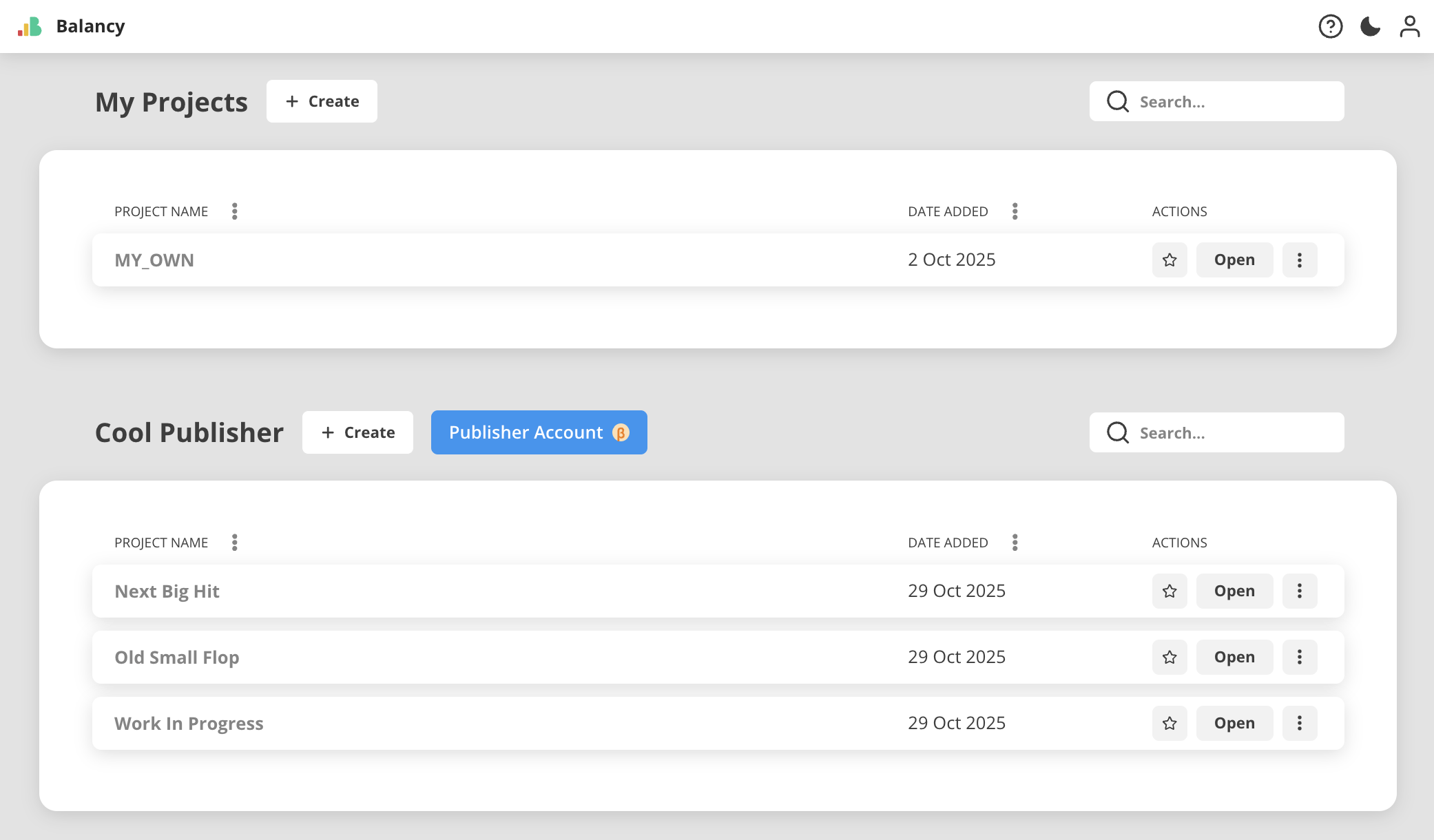
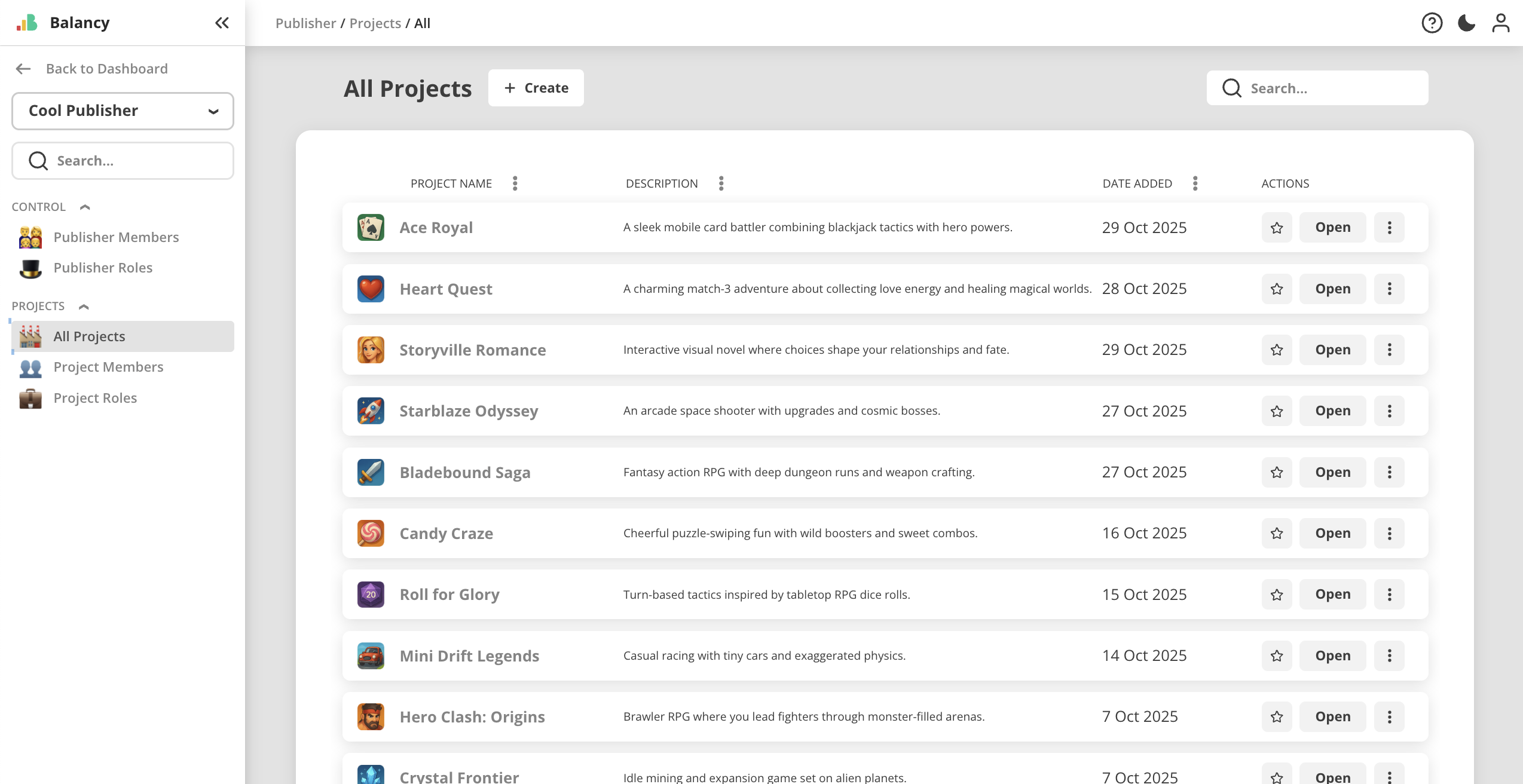
NEW MAJOR FEATURE: Publisher Account
- Collect all your projects as portfolio and manage members access in one place
- Lots of granular permissions allowing to create different member roles, depending on your workflow
- Supporting roles on both Publisher and Project levels
- Working with internal packages made much easier
- Available by request, please contact Balancy team if you'd like to have a try
November 14, 2025 [Web]
Web
-
In project settings it is now possible to rename project and add description.

-
On "My Projects" dashboard these descriptions are now visible in the list.

-
Projects now additionally labeled with colored abbreviation to stand out visually. In the upcoming update we will implement adding project icons as well.
-
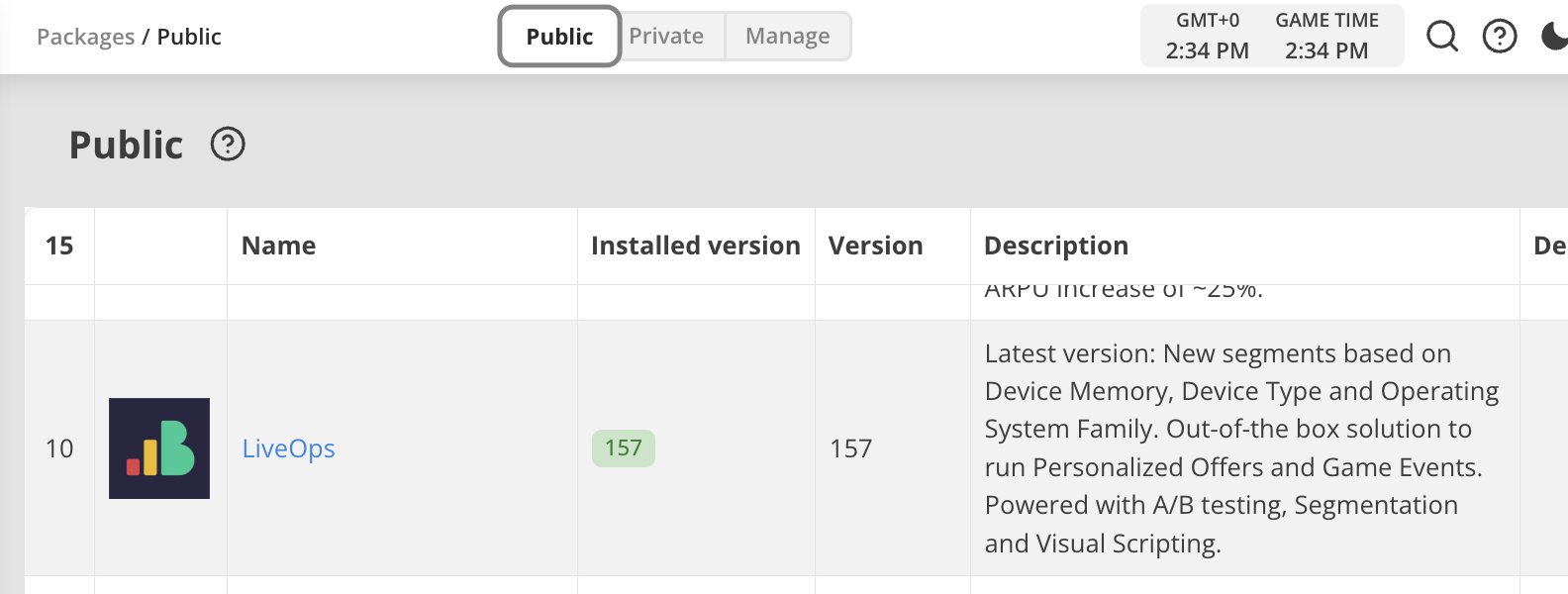
Packages page structure was reworked. Now it has 3 tabs:
- Public - contains all public packages created by Balancy team for common use.
- Private - contains all private packages created by users for internal use inside their projects.
- Manage - contains tools for creating and managing new packages
November 3, 2025 [Web]
Web
- New JavaScript Editor integrated into UI Builder
- Now showing Balancy bridge source code in read-only tab in JavaScript Editor, so it is possible now to look up for function implementations
- Save confirmation added into JavaScript Editor
- Added real mobile devices screen overlay to help with view's layout planning
- Audio asset type is added to Assets page. You can now upload and store audio files the same way as images.
- Sounds are now supported for buttons in UI Builder. Audio asset can now be set up for button component.
- UI Builder now checks for changes in Localised Strings (keys and values) upon opening views and updates the elements accordingly.
October 31, 2025 [Web, Starter Kit]
Starter Kit package
-
Version 30 of Starter Kit package is released.
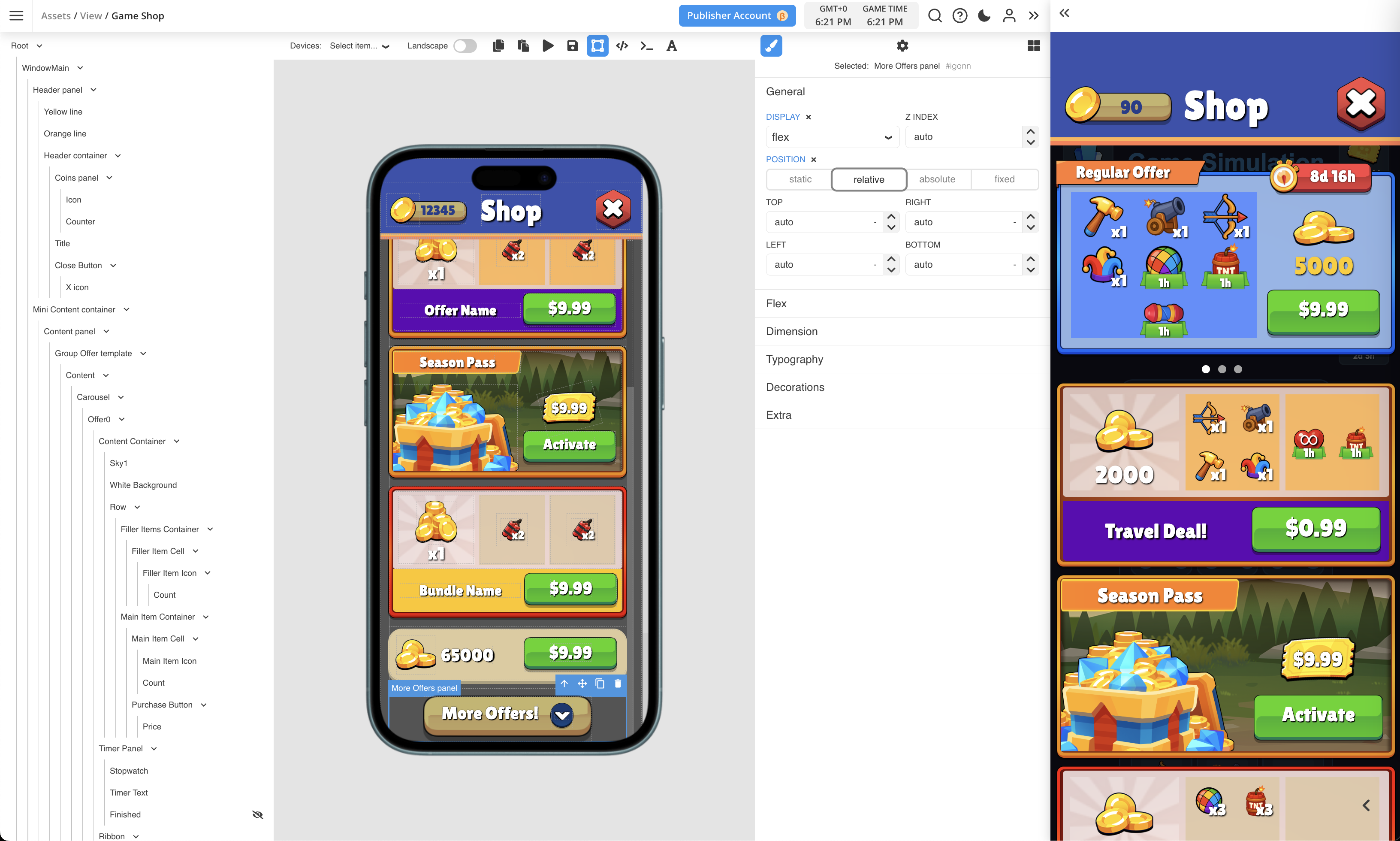
- Game Shop view example added to demonstrate how it is possible to creata game shop purely inside Balancy by using Views technology.
- Currently Game Shop doesn't have any animations. They will be added in future updates.
Web
- Version 157 of LiveOps package released:
- Views are now awailable for A/B testing in Game Events, Offers and Game Shop.
October 22, 2025 [Web, Starter Kit]
Starter Kit package
- Version 27 of Starter Kit package is released.
- Animated icons. Demostrated with clock animation in all Views.
- Waiting spinner animation in Views, when waiting for IAP confirmation.
- Minor layout fixes in all example Views.
- JS code cleaned up and better structured in all Views.
Web
- LiveOps package version 156 released:
- Game Store template now has View parameter, so it is possible to build game shops using UI Builder
- Demo App now supports Game Store views, allowing to open it from main screen. Button appears only if a View is attached to the shop.
September 25, 2025 [Web, Starter Kit]
Web
- LiveOps package version 154 released:
- Game Events now have additional parameters: Cooldown and Manual Remove. Read more about it here.
- Item now has additional parameter: Components. Read more about Components System.
- UI Builder update:
- Copy-Paste function for visual elements
- Find/Replace functions for JS editor
- Spin animation support via CSS
- Navigation panel improvements
- various minor fixes
- Demo App now supports updated LiveOps package
- Items with
decaycomponent are being spent every second - Game Events with
Manual Removeshow "Finished" state after deactivation
- Items with
Starter Kit package
- Version 25 of Starter Kit package is released. Also included into "Starter Kit" demo project on your Dashboard. It contains:
- Calendar with scheduled 8 LiveOps activities
- Season Pass example. Activation phase reworked.
- Power Matrix mini-game example. Rewards list window added, opens by tapping on current level reward.
- Tower Climb winstreak event
- Car Race mini-challenge event
- Simple Offer
- Group Offer 3in1
- 2 Chain Deals with 2 different layouts
- Full support for Items with
Bundlecomponent. Bundles now opened using full-screen claiming window.
August 4, 2025 [New SDK]
The first release of the new SDK.