Conditions
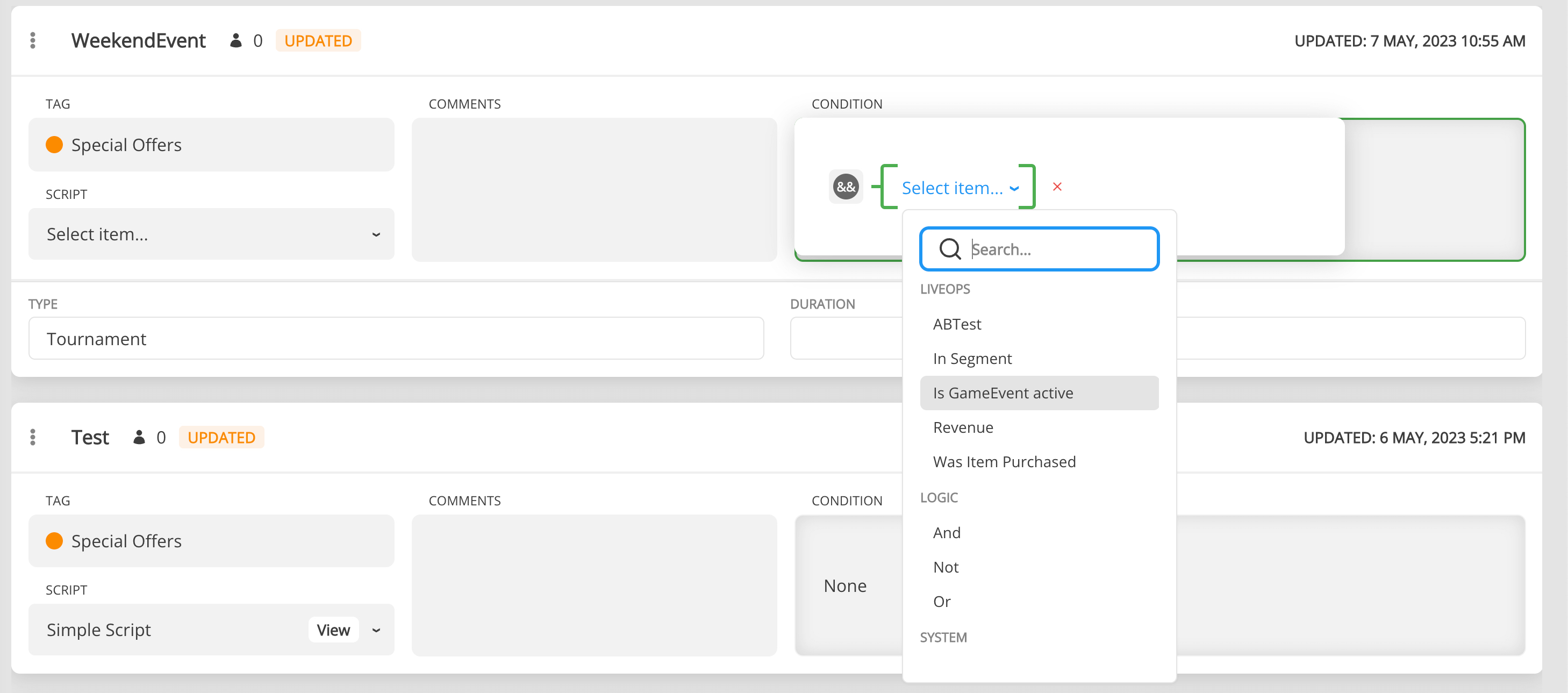
Conditional logic can be applied to any document. Currently, we use it to run Game Events. Any condition starts with one of 2 logical operators And / Or. Then you can add any other types of conditions. The conditions can be as complex and nested as you want.
- Dates Range, Day Of The Week, and Time Of The Day are conditions based on a specific time.
- ABTest Condition checks if the user was assigned to a specific A/B Test and Variant.
- GameEvent State checks the state of a specified GameEvent in the player's active event list — active, finished, present, or absent (see below). Formerly Active Event / Is GameEvent active.
- Segment Condition checks if the user belongs to a specific Segment.
- Revenue checks if the user has generated a specific amount of in-app/ads revenue(count) during certain days.
- Was Item Purchased checks if a StoreItem was purchased at least once.
- Was Product Purchased checks if a Product was purchased at least once.
- Primitive allows you to use any custom User Properties.
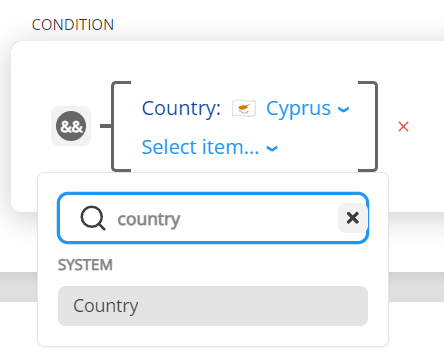
- Country checks if the user is from the specified country.
Note: Please use this Country condition under the System category instead of getting the custom Country User Property from Primitive condition.
GameEvent State
The GameEvent State condition (previously Is GameEvent active) checks the state of a referenced Game Event in the player's active event list (SmartInfo.GameEvents). Besides the GameEvent reference, it has a State parameter:
| State | Passes when the referenced event… |
|---|---|
| Active | is present in the active list and not finished (the classic behavior). |
| Finished | is present in the active list and already finished (e.g. manualRemove). |
| Present | is present in the active list, whether running or finished. |
| Not Present | is not present in the active list at all. |
Distinguish 'finished but present' from 'never had it'
Events with Manual Remove enabled can finish but stay in the active list until removed. The old Not(Is GameEvent active) pattern matched both "finished but still present" players and players who never had the event. Use State = Finished to target only the former — for example, to start a recovery event for players whose previous event ended:
GameEvent State
  GameEvent = Previous Event
  State = Finished
Backward compatible
Active is the default. Existing conditions saved as Is GameEvent active are read as State = Active and behave exactly as before.
Active list only + fails closed
This condition inspects the active event list, not event history — for "finished N days ago"-style checks, use profile/list-based conditions over persistent data. Also, if the referenced GameEvent can't be resolved (deleted or broken reference), the condition fails for every state, including Not Present, so a broken reference can't silently pass for all players.
Logic Class - Direct Condition API
When you add a Condition parameter to your documents (like GameEvents, Offers, or custom templates), you get access to the Logic class - a powerful API for working with conditions directly at runtime.
How to Access Logic
Conditions are accessed as parameters from parent documents, not by ID:
// Get event and access its condition
var weekendEvent = Balancy.CMS.GetModelByUnnyId<GameEvent>("789"); // Use actual numeric ID
var eventCondition = weekendEvent?.Condition; // Logic instance

if (eventCondition != null && eventCondition.CanPass())
{
    Debug.Log("Weekend event is available - show to player");
    ShowWeekendSale();
}
Available Methods
CanPass()
Check if the condition passes right now.
bool CanPass()
Returns: true if condition passes, false otherwise
Example:
var vipOffer = Balancy.CMS.GetModelByUnnyId<GameOffer>("1234");
var offerCondition = vipOffer?.Condition;

if (offerCondition != null && offerCondition.CanPass())
{
    Debug.Log("VIP offer is available - show to player");
    ShowVIPOffer(vipOffer);
}
else
{
    Debug.Log("VIP offer not available");
}
SubscribeForStatusChange()
Get notified when the condition status changes (passes or fails).
void SubscribeForStatusChange(Action<bool> callback)
Parameters:
callback: Action<bool>- Function called when condition status changestrue= condition just passedfalse= condition just failed
Example:
private Balancy.Models.SmartObjects.Conditions.Logic _eventCondition;

void Start()
{
    // Get weekend event and access its condition
    var weekendEvent = Balancy.CMS.GetModelByUnnyId<GameEvent>("789");
    _eventCondition = weekendEvent?.Condition;

    if (_eventCondition != null)
    {
        // Subscribe to condition changes
        _eventCondition.SubscribeForStatusChange(OnWeekendStatusChanged);

        // Check initial state
        UpdateWeekendUI(_eventCondition.CanPass());
    }
}

void OnWeekendStatusChanged(bool isActive)
{
    Debug.Log($"Weekend event is now: {(isActive ? "ACTIVE" : "INACTIVE")}");
    UpdateWeekendUI(isActive);

    if (isActive)
    {
        ShowWeekendBanner();
        PlayEventMusic();
    }
    else
    {
        HideWeekendBanner();
        RestoreNormalMusic();
    }
}

void OnDestroy()
{
    // Clean up subscription
    if (_eventCondition != null)
    {
        _eventCondition.UnsubscribeFromStatusChange();
    }
}
UnsubscribeFromStatusChange()
Remove subscription to prevent memory leaks.
void UnsubscribeFromStatusChange()
Important: Always unsubscribe when the component is destroyed or no longer needs updates.
Example:
void OnDestroy()
{
    // Clean up
    if (_flashSaleCondition != null)
    {
        _flashSaleCondition.UnsubscribeFromStatusChange();
    }
}
GetSecondsLeftBeforeDeactivation()
Get time remaining before the condition becomes false (useful for countdowns).
int GetSecondsLeftBeforeDeactivation()
Returns:
- Seconds remaining (0+)
- int.MaxValue if condition has no time limit
Example:
var flashSale = Balancy.CMS.GetModelByUnnyId<GameEvent>("456");
var saleCondition = flashSale?.Condition;

if (saleCondition != null && saleCondition.CanPass())
{
    int secondsLeft = saleCondition.GetSecondsLeftBeforeDeactivation();

    if (secondsLeft > 0 && secondsLeft < int.MaxValue)
    {
        // Show countdown
        TimeSpan timeLeft = TimeSpan.FromSeconds(secondsLeft);
        countdownText.text = $"Sale ends in: {timeLeft:hh\\:mm\\:ss}";

        // Update every second
        InvokeRepeating(nameof(UpdateCountdown), 1f, 1f);
    }
}
GetSecondsBeforeActivation()
Get time until the condition becomes true (useful for "coming soon" timers).
int GetSecondsBeforeActivation()
Returns:
- Seconds until activation (0+)
- int.MaxValue if condition has no start time
Example:
var upcomingEvent = Balancy.CMS.GetModelByUnnyId<GameEvent>("2001");
var eventCondition = upcomingEvent?.Condition;

if (eventCondition != null && !eventCondition.CanPass())
{
    int secondsUntil = eventCondition.GetSecondsBeforeActivation();

    if (secondsUntil > 0 && secondsUntil < int.MaxValue)
    {
        // Show "coming soon" timer
        TimeSpan timeUntil = TimeSpan.FromSeconds(secondsUntil);
        comingSoonText.text = $"Starts in: {timeUntil:dd\\:hh\\:mm\\:ss}";
    }
}
Complete Example: Dynamic Event UI
Here's a complete example showing all Logic methods working together:
public class DynamicEventUI : MonoBehaviour
{
    [Header("Event Configuration")]
    public string eventUnnyId = "1234"; // Set in Inspector

    [Header("UI References")]
    public GameObject eventPanel;
    public Text statusText;
    public Text countdownText;

    private Logic _eventCondition;

    void Start()
    {
        // Get event and access its condition
        var gameEvent = Balancy.CMS.GetModelByUnnyId<GameEvent>(eventUnnyId);
        _eventCondition = gameEvent?.Condition;

        if (_eventCondition != null)
        {
            // Subscribe to condition changes
            _eventCondition.SubscribeForStatusChange(OnEventStatusChanged);

            // Check initial state
            UpdateUI(_eventCondition.CanPass());
        }
        else
        {
            Debug.LogWarning($"Event {eventUnnyId} or its condition not found");
            eventPanel.SetActive(false);
        }
    }

    void OnEventStatusChanged(bool isActive)
    {
        Debug.Log($"Event status changed: {isActive}");
        UpdateUI(isActive);
    }

    void UpdateUI(bool isActive)
    {
        if (isActive)
        {
            ShowActiveState();
        }
        else
        {
            ShowInactiveState();
        }
    }

    void ShowActiveState()
    {
        eventPanel.SetActive(true);
        statusText.text = "EVENT LIVE NOW!";
        statusText.color = Color.green;

        // Check if event has time limit
        int secondsLeft = _eventCondition.GetSecondsLeftBeforeDeactivation();

        if (secondsLeft > 0 && secondsLeft < int.MaxValue)
        {
            // Show countdown
            countdownText.gameObject.SetActive(true);
            InvokeRepeating(nameof(UpdateCountdown), 0f, 1f);
        }
        else
        {
            // No time limit
            countdownText.gameObject.SetActive(false);
        }
    }

    void ShowInactiveState()
    {
        CancelInvoke(nameof(UpdateCountdown));

        // Check if event will start soon
        int secondsUntil = _eventCondition.GetSecondsBeforeActivation();

        if (secondsUntil > 0 && secondsUntil < int.MaxValue)
        {
            // Show "coming soon"
            eventPanel.SetActive(true);
            statusText.text = "COMING SOON";
            statusText.color = Color.yellow;
            countdownText.gameObject.SetActive(true);
            InvokeRepeating(nameof(UpdateComingSoon), 0f, 1f);
        }
        else
        {
            // Event not scheduled
            eventPanel.SetActive(false);
        }
    }

    void UpdateCountdown()
    {
        int secondsLeft = _eventCondition.GetSecondsLeftBeforeDeactivation();

        if (secondsLeft > 0 && secondsLeft < int.MaxValue)
        {
            TimeSpan timeLeft = TimeSpan.FromSeconds(secondsLeft);
            countdownText.text = $"Ends in: {timeLeft:hh\\:mm\\:ss}";
        }
        else
        {
            CancelInvoke(nameof(UpdateCountdown));
            countdownText.gameObject.SetActive(false);
        }
    }

    void UpdateComingSoon()
    {
        int secondsUntil = _eventCondition.GetSecondsBeforeActivation();

        if (secondsUntil > 0 && secondsUntil < int.MaxValue)
        {
            TimeSpan timeUntil = TimeSpan.FromSeconds(secondsUntil);
            countdownText.text = $"Starts in: {timeUntil:dd\\:hh\\:mm\\:ss}";
        }
        else
        {
            CancelInvoke(nameof(UpdateComingSoon));
            // Event should be active now, will be handled by OnEventStatusChanged
        }
    }

    void OnDestroy()
    {
        // Clean up subscriptions
        if (_eventCondition != null)
        {
            _eventCondition.UnsubscribeFromStatusChange();
        }

        CancelInvoke();
    }
}
Use Cases
- Event UI Management - Show/hide event banners when conditions change
- Countdown Timers - Display time remaining for limited-time offers
- Coming Soon Timers - Show when upcoming content will unlock
- Feature Gates - Enable/disable features based on player conditions
- Dynamic Content - Load different content when conditions change (time-of-day, player level)
Best Practices
// ✅ GOOD - defensive null checks
var premiumOffer = Balancy.CMS.GetModelByUnnyId<GameOffer>("3456");
var condition = premiumOffer?.Condition;
if (condition != null && condition.CanPass())
{
    ShowPremiumFeature();
}

// ❌ BAD - crash if null
var premiumOffer = Balancy.CMS.GetModelByUnnyId<GameOffer>("3456");
if (premiumOffer.Condition.CanPass()) // NullReferenceException!
{
    ShowPremiumFeature();
}

// ✅ GOOD - always unsubscribe
void OnDestroy()
{
    if (_condition != null)
    {
        _condition.UnsubscribeFromStatusChange();
    }
}

// ❌ BAD - memory leak
void OnDestroy()
{
    // Forgot to unsubscribe!
}
Custom Conditions
Built-in conditions cover common cases (time, profile fields, segments, A/B tests, etc.), but sometimes you need evaluation logic only your game code can provide — "player completed the tutorial", "player is in a guild", "device has specific hardware", and so on.
Custom Conditions let you define conditions in the CMS dashboard and provide evaluation logic from your game code.
Setup
- In the Balancy dashboard, create a new template inherited from Custom Condition. Add any parameters you need (int, string, bool, etc.).
- Mark the template with the Partial flag.
- Run code generation. The SDK generates a class for your condition.
- Create your implementation file inside the Balancy folder but outside the AutoGeneratedCode folder (to avoid data loss on re-generation). For example,
Assets/Balancy/Custom/.
Implementation
Override three methods: CanPassCustom() for evaluation, Subscribe() to listen for changes, and Unsubscribe() to clean up.
// MyCustomCond.Impl.cs — your file (partial class)
namespace Balancy.Models
{
    public partial class MyCustomCond
    {
        public override bool CanPassCustom()
        {
            // ParamInt is auto-generated from the CMS parameter
            return PlayerData.Level >= ParamInt;
        }

        public override void Subscribe()
        {
            PlayerData.OnLevelChanged += OnLevelChanged;
        }

        public override void Unsubscribe()
        {
            PlayerData.OnLevelChanged -= OnLevelChanged;
        }

        private void OnLevelChanged(int newLevel)
        {
            // Trigger re-evaluation when game state changes
            ForceUpdate();
        }
    }
}
import { SmartObjectsConditionsCustom } from '@balancy/core';

class MyCustomCond extends SmartObjectsConditionsCustom {
    private boundHandler = () => this.forceUpdate();

    public canPassCustom(): boolean {
        return gameState.level >= this.getIntParam("paramInt");
    }

    public subscribe(): void {
        gameState.on('levelChanged', this.boundHandler);
    }

    public unsubscribe(): void {
        gameState.off('levelChanged', this.boundHandler);
    }
}
API Reference
| Method | Description |
|---|---|
CanPassCustom() / canPassCustom() |
Override to provide evaluation logic. Returns true/false. Default: false. |
Subscribe() / subscribe() |
Override to subscribe to game events. Called when condition enters evaluation tree. |
Unsubscribe() / unsubscribe() |
Override to unsubscribe from game events. Called when condition leaves evaluation tree. |
ForceUpdate() / forceUpdate() |
Triggers re-evaluation of this condition and propagates changes up the condition tree. |
You can also trigger re-evaluation by UnnyId without having the condition instance:
Balancy.CustomConditions.ForceUpdate("condition-unny-id");
CustomConditions.forceUpdate("condition-unny-id");
Note
CanPassCustom() is called synchronously — keep it fast. Avoid network calls or heavy computation. Cache expensive values and call ForceUpdate() when the cache changes.
Note
Custom conditions work inside the condition tree like any other condition — you can combine them with built-in conditions using And/Or/Not logic.
Conditional Template
ConditionalTemplate is a special template type that automatically activates and deactivates documents based on conditions. All our built-in features: GameEvent, In-Game Shop, Segmentation, Overrides and A/B tests are built on top of it. Balancy automatically tracks the Conditions and Priorities of all Conditional Templates and notifies you when something changes.
How It Works
- Create multiple documents from your ConditionalTemplate (e.g., Summer Sale, Winter Sale, Default Offer)
- Add conditions to each document (e.g., date ranges, player level, A/B test)
- Set priorities for manual sorting (optional - SDK does NOT filter by priority)
- Balancy continuously evaluates conditions and returns ALL documents with passing conditions
Important: The SDK returns ALL active documents - it does NOT automatically filter by priority. The priority field is available for YOUR use (sorting, selection logic). Only when ConditionalTemplate is used as a Singleton base does the SDK automatically use priority to select a single document.
Priority Behavior
- A/B Tests and Overrides use priority to determine which override takes precedence when multiple overrides target the same parameter. The override with the HIGHEST priority wins.
- In-Game Store uses ConditionalTemplate to support multiple stores. If multiple stores have passing conditions, the SDK returns all of them. You can use priority to sort and select which store to display.
- Standalone ConditionalTemplates - SDK returns ALL documents with passing conditions. Priority is a field for manual sorting if needed.
- Singletons (see below) - SDK automatically uses priority to select the highest-priority document with a passing condition.
API Usage
1. Get All Active Documents
// Get ALL currently active documents (SDK returns all with passing conditions)
var activeOffers = Balancy.CMS.GetActiveConditionalTemplates<SeasonalOffer>(includeChildren: true);

Console.WriteLine($"Active offers: {activeOffers.Length}");

// Sort by priority manually (priority is for YOUR use)
var sortedOffers = activeOffers.OrderByDescending(o => o.Priority);

foreach (var offer in sortedOffers)
{
    Console.WriteLine($"  {offer.Name}: Priority {offer.Priority}, Discount {offer.Discount}%");
}

// Show highest priority offer
if (sortedOffers.Any())
{
    ShowOffer(sortedOffers.First());
}
2. Subscribe to Activation/Deactivation
// Subscribe to be notified when documents activate or deactivate
Balancy.CMS.SubscribeConditionalTemplate<SeasonalEvent>((active, deactivated) =>
{
    // Handle newly activated events
    foreach (var evt in active)
    {
        Debug.Log($"Event activated: {evt.Name}");
        StartEvent(evt);
        ShowEventNotification(evt);
    }

    // Handle deactivated events
    foreach (var evt in deactivated)
    {
        Debug.Log($"Event deactivated: {evt.Name}");
        EndEvent(evt);
        HideEventBanner(evt);
    }
});

// Don't forget to unsubscribe when no longer needed
Balancy.CMS.UnsubscribeConditionalTemplate<SeasonalEvent>();
Use Cases
- Multiple active seasonal events - Summer Sale + Weekend Bonus both active simultaneously
- Player-specific offers - Multiple offers eligible for the same player
- A/B test variants - Multiple variants with passing conditions
- Feature flags - Multiple features enabled at once
- Difficulty variants - Different reward tiers based on player level
Singletons
Singleton is a template type with exactly one active instance per player. There are two types:
1. Regular Singleton
Always returns the same document. Use for static global settings that never change.
var gameSettings = Balancy.CMS.GetSingleton<GameSettings>();
var current = gameSettings.Get(); // Always returns the same document
2. ConditionalTemplate Singleton
Automatically switches between documents based on conditions and priority. This is the powerful option for dynamic configurations.
How It Works
- Create a Singleton template that inherits from ConditionalTemplate
- Create multiple documents (e.g., Summer Theme, Winter Theme, Default Theme)
- Add conditions to each document (e.g., date ranges)
- Set priorities (higher = takes precedence)
- Balancy automatically selects the highest-priority document with a passing condition
When conditions change (e.g., season changes), Balancy automatically switches to the new highest-priority document and triggers the OnChanged callback.
API Usage
// Get singleton wrapper
var gameSettings = Balancy.CMS.GetSingleton<GameSettings>();

// Access current value (SDK auto-selects by priority + condition for ConditionalTemplate singletons)
var currentSettings = gameSettings.Get();
if (currentSettings != null)
{
    Debug.Log($"Current theme: {currentSettings.Theme}");
    Debug.Log($"Difficulty: {currentSettings.Difficulty}");
}

// Subscribe to changes (for ConditionalTemplate singletons)
// OnChanged triggers when conditions change and different document becomes active
gameSettings.OnChanged += settings =>
{
    Debug.Log($"Settings changed to: {settings?.UnnyId}");
    if (settings != null)
    {
        ApplyNewSettings(settings);
        Debug.Log($"New theme applied: {settings.Theme}");
    }
};
Example: Seasonal Theme Singleton
After creating a custom Singleton, inherit it from ConditionalTemplate to enable automatic switching:

Setup: - SummerTheme (Priority: 100, Condition: June-August) - WinterTheme (Priority: 100, Condition: December-February) - DefaultTheme (Priority: 0, Condition: none - fallback)
Behavior:
- During summer: SDK automatically selects SummerTheme (highest priority + passing condition)
- During winter: SDK automatically selects WinterTheme (highest priority + passing condition)
- Other times: SDK selects DefaultTheme (no condition, always passes)
- When season changes: OnChanged callback fires with new theme
Example: A/B Testing Singleton Configuration
You can A/B Test your singleton configurations. For instance, to test a special config for non-payers:
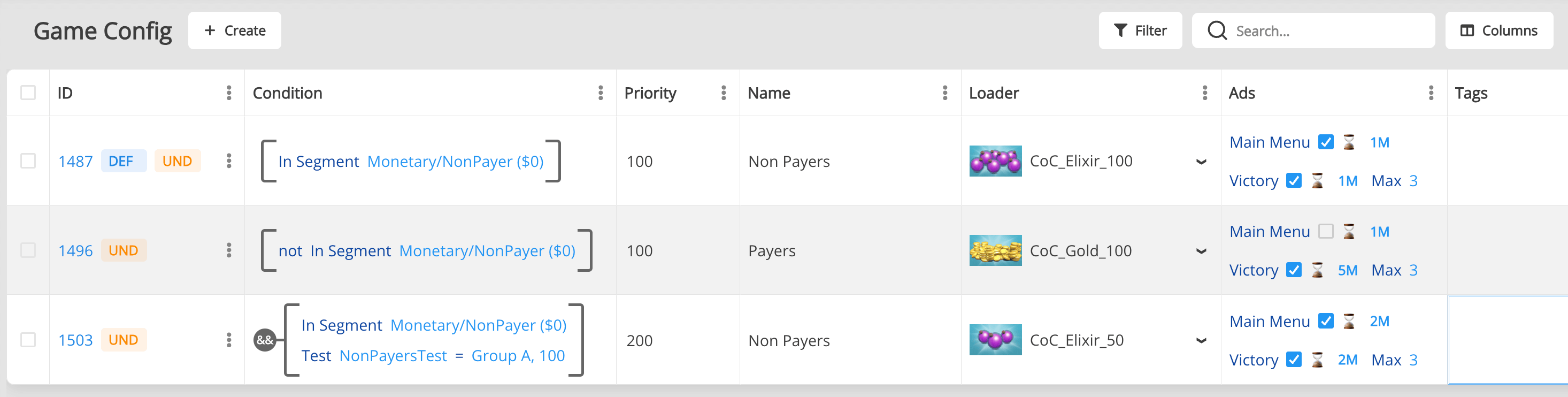
Setup: - Default Config (Priority: 0, Condition: none) - VIP Config (Priority: 50, Condition: Player spent > $10) - AB Test Config (Priority: 100, Condition: Non-payer + A/B Test Group A)
The SDK will automatically select the highest-priority config with a passing condition.
Helpful information
Conditional Templates and Singletons are initialized during the Init all Managers. You can start using them as soon as Balancy is ready.
Static Conditions (AppVersion, Country, Platform, A/B Test): These don't change during a session. Once Balancy is ready, you have accurate data.
Dynamic Conditions (Time, User Properties like level): These can change during a session. Balancy will notify you through callbacks:
- ConditionalTemplates: Use SubscribeConditionalTemplate to track activation/deactivation
- Singletons: Use OnChanged callback to track when the active document switches
Best Practice: Don't cache Singletons. Always access them directly via DataEditor.GameConfig.Get() to ensure you have the most up-to-date data.