Editor Extensions
Editor Extensions let you write custom JavaScript tools that run inside the Balancy Editor. Use them to automate workflows, manipulate CMS data programmatically, and build team-specific utilities — all from within the browser.
Extensions run in a sandboxed Web Worker and communicate with the editor via RPC. All API methods are asynchronous — always use await.
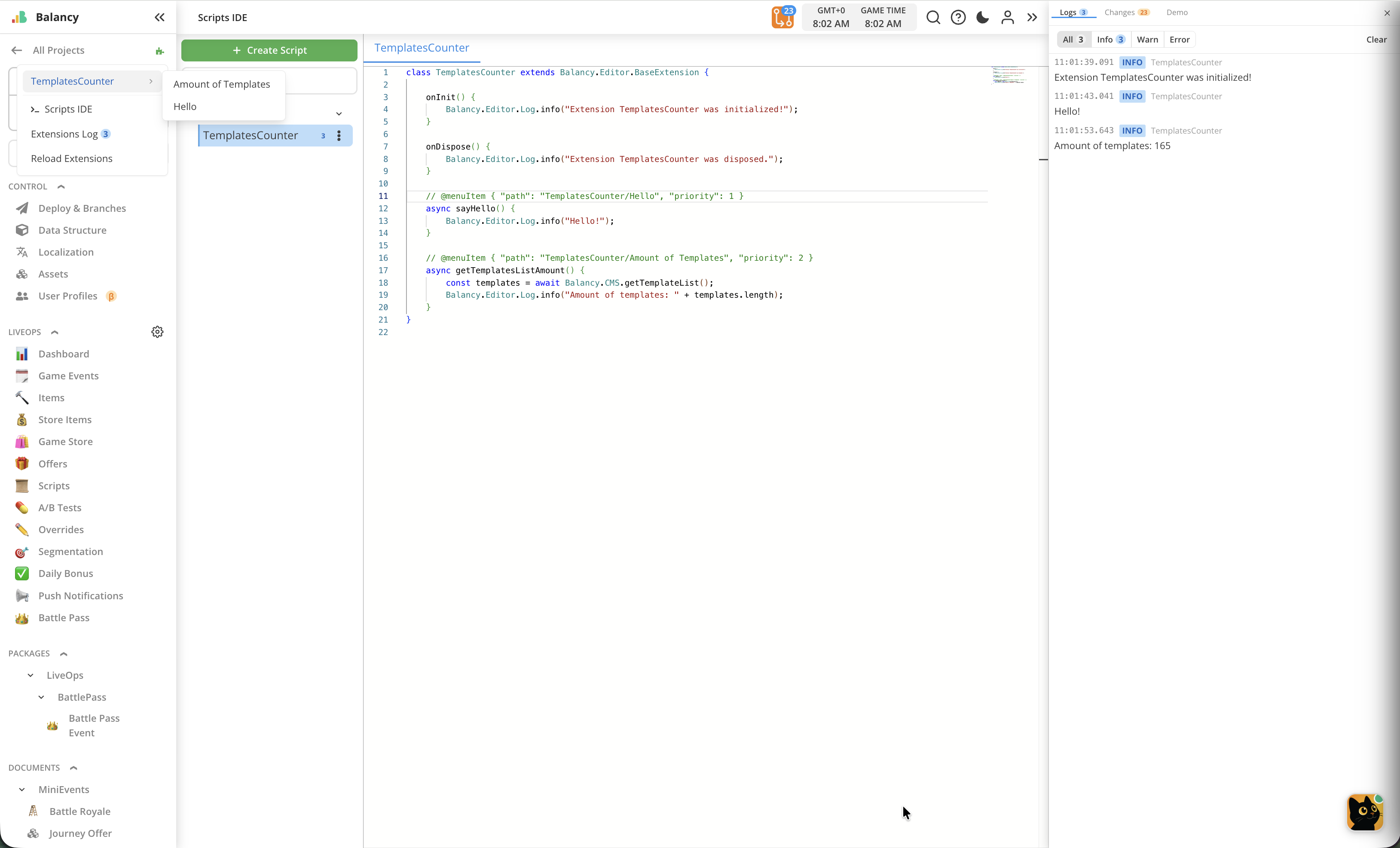
Quick Start
Create a new JavaScript DataObject in the Balancy Editor with the following structure:
class MyExtension extends Balancy.Editor.BaseExtension {
    async onInit() {
        Balancy.Editor.Log.info("MyExtension loaded!");
    }

    // @menuItem { "path": "Tools/My Tool/Say Hello", "priority": 10 }
    async sayHello() {
        const items = await Balancy.CMS.getModels("SmartObjects.Item");
        Balancy.Editor.Log.info("Found " + items.length + " items");
    }
}
The extension will:
- Run
onInit()when the editor loads. - Register a Say Hello action under Tools > My Tool in the Extensions menu (puzzle icon in the header bar).
- When clicked, query all
SmartObjects.Itemdocuments and log the count.
Extension Lifecycle
BaseExtension
All extensions must extend Balancy.Editor.BaseExtension. The class provides default no-op implementations for all lifecycle methods.
class MyExtension extends Balancy.Editor.BaseExtension {
    // Override any lifecycle methods you need
}
The class name (e.g. MyExtension) is used as the extension's unique identifier. It appears in log entries and menu item IDs.
Lifecycle Methods
| Method | When Called | Return Value |
|---|---|---|
async onInit() |
Once, when the extension bundle is loaded and bootstrapped | void |
async onDispose() |
When extensions are reloaded or the editor is closed | void |
async preSave(ctx) |
Before a save operation. Can block the save. | true or { block: true, reason: "..." } |
async postSave(ctx) |
After a save operation completes. Receives context with ID mappings. | void |
Example:
class SetupExtension extends Balancy.Editor.BaseExtension {
    async onInit() {
        Balancy.Editor.Log.info("Extension initialized");
        // Pre-load data, set up state, etc.
    }

    async onDispose() {
        Balancy.Editor.Log.info("Extension disposed");
        // Clean up resources
    }
}
preSave — Validation Before Save
Called before save. If any extension returns { block: true, reason: "..." }, the save is aborted and a toast notification shows the reason. Extensions are called sequentially; the first rejection stops the chain.
The context object contains:
| Field | Type | Description |
|---|---|---|
ctx.changedEntities |
Array<{ unnyId, templateName, changedParams }> |
Entities that will be saved |
Return values:
true(or no return /undefined) — allow save{ block: true, reason: "..." }— block save with the given reason
Safety
If preSave() throws an error or times out (5 seconds), the save is allowed — buggy extensions cannot permanently block saves.
Example — validate prices before save:
class Validator extends Balancy.Editor.BaseExtension {
    async preSave(ctx) {
        for (const entity of ctx.changedEntities) {
            const model = await Balancy.CMS.getModelByUnnyId(entity.unnyId);
            if (model && model.Price < 0) {
                return { block: true, reason: "Price cannot be negative on " + entity.templateName };
            }
        }
        return true;
    }
}
postSave — Post-Save Hook
Called after a save operation completes. Receives ID mappings for newly created entities and the list of saved entities.
| Field | Type | Description |
|---|---|---|
ctx.idMapping |
Record<string, string> |
Old temporary IDs → new server-assigned IDs |
ctx.changedEntities |
Array<{ unnyId, templateName, changedParams }> |
Entities that were saved |
Example:
class SaveLogger extends Balancy.Editor.BaseExtension {
    async postSave(ctx) {
        for (const entity of ctx.changedEntities) {
            Balancy.Editor.Log.info("Saved: " + entity.templateName + " #" + entity.unnyId);
        }
        for (const [oldId, newId] of Object.entries(ctx.idMapping)) {
            Balancy.Editor.Log.info("New entity: " + oldId + " → " + newId);
        }
    }
}
onChange — Entity Parameter Change Callbacks
@onChange Annotation
Annotate methods with // @onChange { ... } to register them as entity parameter change handlers. When a user edits a field in the editor, matching handlers are called after a short debounce (300ms).
The annotation must be a single-line comment on the line immediately before the method definition.
Syntax:
// @onChange { "template": "SmartObjects.Item", "param": "BasePrice" }
async onPriceChanged(change) {
    // ...
}
The JSON payload:
| Field | Type | Required | Default | Description |
|---|---|---|---|---|
template |
string |
No | — | Template name to watch. Matches the template and all its child templates (inheritance). Omit to match all templates. |
param |
string |
No | — | Parameter name to watch. Omit to match all parameters. |
Change Object
The handler receives a change object:
| Field | Type | Description |
|---|---|---|
unnyId |
string |
The entity's user-visible ID |
templateName |
string |
Full template name (e.g. "SmartObjects.Item") |
paramName |
string |
The name of the changed parameter |
newValue |
any |
The new value |
oldValue |
any |
The previous value |
Template Inheritance
If a handler watches "SmartObjects.Item", it also matches entities of child templates (e.g. "SmartObjects.Weapon" if Weapon extends Item).
Re-entrant Safety
Changes made by an @onChange handler (e.g. calling Balancy.CMS.updateModel inside the handler) do not trigger further @onChange handlers. This prevents infinite loops.
Example — auto-calculate discounted price:
class PriceCalculator extends Balancy.Editor.BaseExtension {
    // @onChange { "template": "SmartObjects.Item", "param": "BasePrice" }
    async onPriceChanged(change) {
        const model = await Balancy.CMS.getModelByUnnyId(change.unnyId);
        await Balancy.CMS.updateModel({
            $unnyId: change.unnyId,
            $type: change.templateName,
            DiscountedPrice: model.BasePrice * 0.9,
        });
        Balancy.Editor.Log.info(
            "Updated DiscountedPrice for #" + change.unnyId +
            ": " + change.oldValue + " → " + change.newValue
        );
    }

    // @onChange { "template": "SmartObjects.Item" }
    async onAnyItemFieldChanged(change) {
        // Fires for any param change on Item (and child templates)
        Balancy.Editor.Log.info(
            change.templateName + " #" + change.unnyId +
            ": " + change.paramName + " changed"
        );
    }

    // @onChange {}
    async onAnythingChanged(change) {
        // Fires for every entity param change in the editor
    }
}
Menu Items
@menuItem Annotation
Annotate methods with // @menuItem { ... } to register them as clickable actions in the Extensions dropdown menu (puzzle icon in the header bar).
The annotation must be a single-line comment on the line immediately before the method definition.
Syntax:
// @menuItem { "path": "Tools/Category/Action Name", "priority": 10 }
async myMethod() {
    // ...
}
The JSON payload must be valid JSON with the following fields:
| Field | Type | Required | Default | Description |
|---|---|---|---|---|
path |
string |
Yes | — | Slash-separated menu path. The last segment is the display label. |
priority |
number |
No | 0 |
Sorting order. Higher values appear first in the menu. |
Path Hierarchy
The path field defines where the action appears in the menu hierarchy:
"Tools/Action"— appears directly in the dropdown as "Action""Tools/Category/Action"— appears under a "Category" submenu"Tools/Category/SubCategory/Action"— nested submenu under "Category > SubCategory"
The leading Tools/ segment is stripped automatically (the puzzle icon already represents "Tools"). So "Tools/Test/Log Info" becomes Test > Log Info in the menu.
If you omit the Tools/ prefix (e.g. "MyCategory/Action"), it still works — MyCategory becomes a top-level submenu.
Priority
Items with higher priority values appear at the top of their group. Items with equal priority are shown in the order they were registered.
// @menuItem { "path": "Tools/Important Action", "priority": 100 }
async importantAction() { /* shown first */ }

// @menuItem { "path": "Tools/Less Important", "priority": 10 }
async lessImportant() { /* shown second */ }

// @menuItem { "path": "Tools/Default Priority" }
async defaultPriority() { /* shown last (priority 0) */ }
Logging API
Balancy.Editor.Log
Log messages appear in the Extensions Log panel (accessible from the puzzle icon dropdown).
| Method | Description |
|---|---|
Balancy.Editor.Log.info(message, data?) |
Informational message (blue badge) |
Balancy.Editor.Log.warn(message, data?) |
Warning message (yellow badge) |
Balancy.Editor.Log.error(message, data?) |
Error message (red badge) |
Parameters:
| Parameter | Type | Required | Description |
|---|---|---|---|
message |
string |
Yes | The log message text. Non-strings are coerced via String(). |
data |
any |
No | Additional data displayed as expandable JSON in the log panel. Must be serializable (no Promises, Functions, DOM elements, etc.). |
Example:
Balancy.Editor.Log.info("Processing started");
Balancy.Editor.Log.warn("Item count is low", { count: 2, threshold: 10 });
Balancy.Editor.Log.error("Failed to update", { unnyId: "40071", reason: "not found" });
Always await async results before logging
The data parameter is sent via postMessage and must be structured-clone-compatible. Do not pass Promises, Functions, or unresolved async results.
// WRONG — logs a Promise object, causes postMessage error
const result = Balancy.CMS.getModelByUnnyId("40071");
Balancy.Editor.Log.info("result", result);

// CORRECT
const result = await Balancy.CMS.getModelByUnnyId("40071");
Balancy.Editor.Log.info("result", result);
CMS API
The Balancy.CMS namespace provides methods to read and write CMS documents. All methods are asynchronous and return Promises — always use await.
Expanded Model Format
The CMS API uses an "expanded model" JSON format designed to be human-friendly:
$unnyId(string) — The document's user-visible ID (e.g."40071"). Auto-assigned on create. Used as the target identifier inupdateModel/updateModels.$type(string) — The template name (e.g."SmartObjects.Item"). Required for all write operations.- Field names match template parameter names exactly (e.g.
Name,Level,Condition). - Primitive fields — stored as their native JS types:
number,string,boolean. - Component fields — expanded inline as nested objects with their own
$unnyIdand$type. - Document references — stored as GUID strings (not expanded).
- Lists of components — arrays of expanded component objects.
- Lists of primitives — arrays of native values.
Example expanded model:
{
    "$unnyId": "40071",
    "$type": "SmartObjects.GameEvent",
    "Name": "Daily Login",
    "Priority": 5,
    "IsActive": true,
    "Condition": {
        "$unnyId": "40072",
        "$type": "Conditions.LevelCondition",
        "MinLevel": 10,
        "MaxLevel": 50
    },
    "Rewards": [
        {
            "$unnyId": "40073",
            "$type": "SmartObjects.Reward",
            "Amount": 100,
            "ItemId": "abc-def-123"
        }
    ]
}
Reading Data
getModelByUnnyId
Retrieve a single document by its ID, fully expanded.
const model = await Balancy.CMS.getModelByUnnyId(unnyId);
| Parameter | Type | Description |
|---|---|---|
unnyId |
string |
The document's user-visible ID (e.g. "40071") |
Returns: object | null — The expanded model, or null if no entity with that ID exists.
Example:
const item = await Balancy.CMS.getModelByUnnyId("40071");
if (item == null) {
    Balancy.Editor.Log.warn("Item not found");
    return;
}
Balancy.Editor.Log.info("Item name: " + item.Name);
getModels
Retrieve all documents of a given template type, fully expanded.
const models = await Balancy.CMS.getModels(templateName, includeChildren?);
| Parameter | Type | Default | Description |
|---|---|---|---|
templateName |
string |
— | Full template name (e.g. "SmartObjects.Item") |
includeChildren |
boolean |
true |
If true, also returns entities of templates that inherit from the named template |
Returns: object[] — Array of expanded models. Empty array if the template doesn't exist or has no entities.
Example:
// Get all items (including child template entities)
const allItems = await Balancy.CMS.getModels("SmartObjects.Item");

// Get only exact-type items (no child templates)
const exactItems = await Balancy.CMS.getModels("SmartObjects.Item", false);

Balancy.Editor.Log.info("Found " + allItems.length + " items");
getTemplateList
Retrieve template descriptors (schema metadata), optionally filtered by name. Useful for discovering available templates, their fields, and inheritance hierarchies.
const templates = await Balancy.CMS.getTemplateList(templateName?);
| Parameter | Type | Default | Description |
|---|---|---|---|
templateName |
string |
— | Optional. Filter to this template and all templates that inherit from it. Omit for all templates. |
Returns: Array<TemplateDescriptor> — Array of template descriptors. Empty array if the template name doesn't exist.
Each template descriptor contains:
{
    "name": "SmartObjects.Item",
    "displayName": "Item",
    "description": "A game item",
    "templateType": "Document",
    "parentTemplate": "SmartObjects.BaseItem",
    "fields": [
        {
            "name": "Name",
            "type": "String",
            "required": true,
            "description": null
        },
        {
            "name": "Rewards",
            "type": "List",
            "subType": "Component",
            "refTemplate": "SmartObjects.Reward",
            "required": false,
            "description": "Rewards given on use"
        }
    ]
}
Template descriptor fields
| Field | Type | Description |
|---|---|---|
name |
string |
Full template name (e.g. "SmartObjects.Item") |
displayName |
string |
Human-readable display name |
description |
string \| null |
Template description |
templateType |
string |
One of: "Document", "Component", "Singleton", etc. |
parentTemplate |
string \| null |
Parent template name (if using inheritance), or null |
fields |
FieldDescriptor[] |
Array of field descriptors |
Field descriptor fields:
| Field | Type | Description |
|---|---|---|
name |
string |
Parameter name |
type |
string |
Data type (e.g. "Integer", "String", "LocalizedString", "List", "EntityRef") |
subType |
string \| undefined |
For List types, the element type (e.g. "Component", "Primitive") |
refTemplate |
string \| undefined |
For EntityRef and List of components, the referenced template name |
required |
boolean |
Whether the field is required |
description |
string \| null |
Field description |
Example:
// Get all templates
const all = await Balancy.CMS.getTemplateList();
Balancy.Editor.Log.info("Total templates: " + all.length);

// Get a specific template and its children
const items = await Balancy.CMS.getTemplateList("SmartObjects.Item");
for (const tmpl of items) {
    Balancy.Editor.Log.info(tmpl.name + " has " + tmpl.fields.length + " fields");
}

// Discover fields of a template
const [tmpl] = await Balancy.CMS.getTemplateList("SmartObjects.Item");
if (tmpl) {
    const fieldNames = tmpl.fields.map(f => f.name + " (" + f.type + ")");
    Balancy.Editor.Log.info("Fields: " + fieldNames.join(", "));
}
Writing Data
All write operations are reflected in the editor immediately — a subsequent getModelByUnnyId returns the updated values. Changes are undoable via Ctrl+Z.
createModel
Create a new document. Pass a flat object with $type and any fields you want to set.
const created = await Balancy.CMS.createModel(doc);
| Parameter | Type | Description |
|---|---|---|
doc |
object |
Flat object. Must contain $type with the template name. Other fields are optional — omitted fields use template defaults. |
Returns: object | null — The created expanded model with an auto-assigned $unnyId.
Throws:
- If
$typeis missing or not a string - If the template name in
$typedoesn't exist - If a non-object is passed (with a hint if you accidentally pass a JSON string)
Example:
const newItem = await Balancy.CMS.createModel({
    $type: "SmartObjects.Item",
    Name: "New Sword",
    Price: 100,
    IsActive: true,
});
Balancy.Editor.Log.info("Created item with ID: " + newItem.$unnyId);
updateModel
Update a single document. Pass a flat object with $unnyId (target) and $type (template name). Only other fields present are updated (partial update). Fields not included are left unchanged.
const updated = await Balancy.CMS.updateModel(doc);
| Parameter | Type | Description |
|---|---|---|
doc |
object |
Flat object with $unnyId, $type, and the fields to update. Same shape as what getModelByUnnyId returns — read it, change a field, pass it back. |
Returns: object | null — The updated expanded model, or null if the entity doesn't exist.
Throws:
- If
$unnyIdis missing or not a string - If
$typeis missing or doesn't match the entity's actual template
Example — update primitive fields:
const updated = await Balancy.CMS.updateModel({
    $unnyId: "40071",
    $type: "SmartObjects.Item",
    Name: "Updated Name",
    Price: 200,
});
Balancy.Editor.Log.info("Updated:", updated);
Example — read-modify-write pattern:
// Read the current document
const item = await Balancy.CMS.getModelByUnnyId("40071");

// Modify fields
item.Price = item.Price * 2;
item.Name = "Double Price " + item.Name;

// Write back — $unnyId and $type are already in the object
const updated = await Balancy.CMS.updateModel(item);
Example — update a component field:
const updated = await Balancy.CMS.updateModel({
    $unnyId: "40071",
    $type: "SmartObjects.GameEvent",
    Condition: {
        $type: "Conditions.LevelCondition",
        MinLevel: 20,  // only MinLevel is updated
    },
});
Example — update a list of components:
// Read the current document
const doc = await Balancy.CMS.getModelByUnnyId("40071");

// Modify the list (e.g., change a field, remove an element)
doc.Rewards[0].Amount = 999;
doc.Rewards.splice(2, 1); // remove 3rd element

// Write back — $unnyId and $type are already in the object
const updated = await Balancy.CMS.updateModel(doc);
How component lists work internally
- Existing components are matched by
$type— if a component with the same$typealready exists, it is updated in place. - New components (with a
$typenot found in the existing list) are created automatically. - Components removed from the array are dropped from the list (orphaned entities are cleaned up on deploy).
- The order of the array is preserved.
updateModels
Batch-update multiple documents in a single undo/redo group. One Ctrl+Z undoes all changes.
const results = await Balancy.CMS.updateModels(docs);
| Parameter | Type | Description |
|---|---|---|
docs |
Array<object> |
Array of flat objects, each with $unnyId, $type, and the fields to update |
Returns: Array<object | null> — Array of updated expanded models (one per input). null for entities that don't exist.
Example:
const items = await Balancy.CMS.getModels("SmartObjects.Item");
if (items.length < 2) return;

const results = await Balancy.CMS.updateModels([
    { $unnyId: items[0].$unnyId, $type: items[0].$type, Name: "Batch A" },
    { $unnyId: items[1].$unnyId, $type: items[1].$type, Name: "Batch B" },
]);
Balancy.Editor.Log.info("Updated " + results.length + " items");
cloneModel
Clone (duplicate) a document by its ID. Creates an exact copy of the document with all its data.
- Component references (inline entities owned by the document) are recursively cloned.
- Document references, products, images, and other standalone entities are kept as-is.
The operation is undoable via Ctrl+Z.
const clone = await Balancy.CMS.cloneModel(unnyId);
| Parameter | Type | Description |
|---|---|---|
unnyId |
string |
The document's user-visible ID (e.g. "40071") |
Returns: object — The expanded model of the newly created clone with a new auto-assigned $unnyId.
Example:
const original = await Balancy.CMS.getModelByUnnyId("40071");
Balancy.Editor.Log.info("Original: " + original.Name);

const clone = await Balancy.CMS.cloneModel("40071");
Balancy.Editor.Log.info("Clone ID: " + clone.$unnyId);
Localization API
The Balancy.Localization namespace provides methods to manage localization groups, keys, and translations. All methods are asynchronous — always use await.
Key Format: "GROUP/KEY"
All methods that identify a localization string use the "GROUP/KEY" format:
"UI/welcome_title"— keywelcome_titlein groupUI"DEFAULT/my_key"— keymy_keyin theDEFAULTgroup
Always specify the group. Bare keys without a group are not accepted.
In CMS write operations (createModel, updateModel), use the "GROUP/KEY" format directly for any LocalizedString field. The system resolves the key to its internal GUID and auto-creates the group and key if they don't exist.
Reading Localization Data
getGroups
Get all localization groups.
const groups = await Balancy.Localization.getGroups();
// [{ guid: "abc-123", path: "UI" }, { guid: "def-456", path: "DEFAULT" }, ...]
Returns: Array<{ guid: string, path: string }>
getStrings
Get all localization strings, optionally filtered by group.
// All strings
const all = await Balancy.Localization.getStrings();

// Strings in a specific group
const uiStrings = await Balancy.Localization.getStrings("UI");
| Parameter | Type | Required | Description |
|---|---|---|---|
group |
string |
No | Group path to filter by (e.g. "UI"). Omit for all strings. |
Returns: Array<{ guid, key, group, description, translations, export }>
Each string object:
{
    "guid": "abc-123",
    "key": "welcome_title",
    "group": "UI",
    "description": "Title shown on the welcome screen",
    "translations": { "en": "Welcome!", "fr": "Bienvenue!" },
    "export": true
}
getStringByKey
Get a single localization string by "GROUP/KEY".
const str = await Balancy.Localization.getStringByKey("UI/welcome_title");
if (str != null) {
    Balancy.Editor.Log.info("English: " + str.translations.en);
}
| Parameter | Type | Required | Description |
|---|---|---|---|
key |
string |
Yes | "GROUP/KEY" format (e.g. "UI/welcome_title") |
Returns: { guid, key, group, description, translations, export } | null
getLanguages
Get all languages configured in the project.
const langs = await Balancy.Localization.getLanguages();
// [{ guid: "...", code: "en", name: "English", localizedName: "English", enabled: true }, ...]
Returns: Array<{ guid, code, name, localizedName, enabled }>
Managing Groups
createGroup
Create a new localization group.
const group = await Balancy.Localization.createGroup("Game/Messages");
Balancy.Editor.Log.info("Created group: " + group.path);
| Parameter | Type | Required | Description |
|---|---|---|---|
path |
string |
Yes | Group path (e.g. "UI", "Game/Messages") |
Returns: { guid, path }
Throws: If a group with the same path already exists.
deleteGroup
Delete a localization group. The group must have no strings — delete all strings first.
await Balancy.Localization.deleteGroup("Game/Messages");
| Parameter | Type | Required | Description |
|---|---|---|---|
path |
string |
Yes | Group path to delete |
Returns: { success: true }
Throws: If the group has strings (delete them first) or if the group doesn't exist.
Managing Strings
createString
Create a new localization string. Auto-creates the group if it doesn't exist.
const str = await Balancy.Localization.createString({
    key: "welcome_title",
    group: "UI",
    translations: { en: "Welcome!", fr: "Bienvenue!" },
    description: "Welcome screen title",
});
Balancy.Editor.Log.info("Created: " + str.group + "/" + str.key);
| Parameter | Type | Required | Description |
|---|---|---|---|
key |
string |
Yes | Key name (without group prefix), e.g. "welcome_title" |
group |
string |
Yes | Group path, e.g. "UI" |
translations |
Record<string, string> |
No | Language translations, e.g. { en: "Hello", fr: "Bonjour" } |
description |
string |
No | Description of the string |
Returns: { guid, key, group, description, translations, export }
Throws: If the key already exists in the group.
updateString
Update a localization string's translations and/or metadata.
// Update translations
await Balancy.Localization.updateString({
    key: "UI/welcome_title",
    translations: { en: "Hello!", de: "Hallo!" },
});

// Rename and move
await Balancy.Localization.updateString({
    key: "UI/welcome_title",
    newKey: "greeting_title",
    newGroup: "Game",
});
| Parameter | Type | Required | Description |
|---|---|---|---|
key |
string |
Yes | "GROUP/KEY" to identify the string, e.g. "UI/welcome_title" |
translations |
Record<string, string> |
No | Language translations to update (partial — only listed languages are changed) |
description |
string |
No | New description |
newKey |
string |
No | Rename the key |
newGroup |
string |
No | Move to a different group (path, auto-created if missing) |
Returns: { guid, key, group, description, translations, export }
Throws: If the key is not found. If a language code in translations doesn't exist.
deleteString
Delete a localization string by "GROUP/KEY".
await Balancy.Localization.deleteString("UI/welcome_title");
| Parameter | Type | Required | Description |
|---|---|---|---|
key |
string |
Yes | "GROUP/KEY" format, e.g. "UI/welcome_title" |
Returns: { success: true }
Throws: If the key is not found.
Using Localization in CMS Operations
When creating or updating documents via Balancy.CMS, use "GROUP/KEY" format for any LocalizedString field. The system resolves the key to its internal GUID — and auto-creates the group and key if they don't exist.
const item = await Balancy.CMS.createModel({
    $type: "SmartObjects.Item",
    Name: "UI/item_sword_name",
    Description: "UI/item_sword_desc",
});
Strings must contain a / separator. Raw GUIDs are not accepted and will throw an error.
Reading: LocalizedString fields are returned in "GROUP/KEY" format (e.g. "UI/welcome_title"). Use Balancy.Localization.getStringByKey() to retrieve the full translation details including all languages.
Products API
The Balancy.Products namespace lets you manage in-app purchase products. Products are identified by their itemId (SKU string, e.g. "com.game.gems_100"). All methods are asynchronous.
| Method | Description |
|---|---|
getProducts() |
Get all products |
getProduct(itemId) |
Get one product by SKU |
createProduct(product) |
Create a new product |
updateProduct(product) |
Partial update by itemId |
deleteProduct(itemId) |
Delete a product |
Reading Products
// Get all products
const products = await Balancy.Products.getProducts();

// Get one product by SKU
const product = await Balancy.Products.getProduct("com.game.gems_100");
if (product != null) {
    Balancy.Editor.Log.info(product.name + " — $" + product.price);
}
Managing Products
// Create
const product = await Balancy.Products.createProduct({
    itemId: "com.game.gems_500",
    name: "500 Gems",
    type: "Consumable",
    price: 4.99,
    platform: "AndroidGooglePlay",
});

// Update (partial — only specified fields change)
const updated = await Balancy.Products.updateProduct({
    itemId: "com.game.gems_500",
    price: 3.99,
});

// Delete
await Balancy.Products.deleteProduct("com.game.gems_500");
Product object format
{
    itemId: "com.game.gems_100",       // SKU string
    name: "100 Gems",                  // Display name
    description: "A bag of 100 gems",  // Description
    type: "Consumable",                // "Consumable" | "NonConsumable" | "Subscription"
    price: 0.99,                       // Price
    platform: "AndroidGooglePlay",     // Platform name
    localizedName: "UI/gems_100",      // GROUP/KEY format, or null
    localizedDescription: "UI/gems_100_desc",
    icon: "12345",                     // DataObject id, or null
}
Platform values: "Undefined", "Facebook", "FbInstant", "AndroidGooglePlay", "IosAppStore", "NutakuPCBrowser", "NutakuSPBrowser", "NutakuAndroid", "NutakuClientGames", "AndroidSamsung", "AmazonStore", "Yoomoney", "MicrosoftStore", "Erolabs", "Steam", "WebGL"
Using Products in CMS Operations
Product reference fields accept an itemId string in createModel / updateModel. The system auto-resolves the itemId to the product's internal identifier.
const item = await Balancy.CMS.createModel({
    $type: "SmartObjects.Item",
    LinkedProduct: "com.game.gems_100",
});
Objects API
The Balancy.Objects namespace provides read-only access to data objects (images, audio, fonts, JSON files, etc.). Objects are identified by their numeric id (a string like "12345").
Note
Object creation and file uploads are not supported through the extensions API because they require HTTP multipart uploads.
| Method | Description |
|---|---|
getObjects(type?) |
Get all objects, optionally filtered by type |
getObject(id) |
Get one object by numeric id |
findObjectsByName(name) |
Find objects by exact name match |
Reading Objects
// All objects
const allObjects = await Balancy.Objects.getObjects();

// Only images
const images = await Balancy.Objects.getObjects("Image");
Balancy.Editor.Log.info("Images: " + images.length);

// Get one by id
const obj = await Balancy.Objects.getObject("12345");

// Find by name
const icons = await Balancy.Objects.findObjectsByName("icon_gem.png");
Object format
{
    id: "12345",                       // Numeric id string
    name: "icon_gem.png",              // File name
    type: "Image",                     // Type name
    ext: ".png",                       // File extension
    fileUrl: "https://...",            // Full file URL
    thumbnailUrl: "https://...",       // Thumbnail URL (for images)
    group: "icons",                    // Group/folder name, or null
}
Object type values: "Image", "UIObject", "Addressable", "Addressables", "View", "Font", "Audio", "Json", "Unspecified", "JavaScript", "EditorScript"
Using Objects in CMS Operations
DataObject reference fields (e.g. for images, icons) accept a numeric id string in createModel / updateModel:
const sprites = await Balancy.Objects.findObjectsByName("icon_sword.png");
if (sprites.length > 0) {
    await Balancy.CMS.updateModel({
        $unnyId: "42",
        $type: "SmartObjects.Item",
        Icon: sprites[0].id,  // e.g. "12345"
    });
}
Spreadsheets API
The Balancy.Spreadsheets namespace lets extensions read and write Google Sheets directly. This enables workflows like importing/exporting game data, syncing localization, or generating reports.
Prerequisites
Before using the Spreadsheets API, you must connect your Google account:
- Click the puzzle icon (Extensions menu) in the header bar
- In the Google Sheets section, click Connect Google Sheets
- A Google sign-in popup will appear — select your account and grant access
- Once connected, the section shows your email and a Disconnect link
Connection scope
The connection persists until you close the browser tab (or click Disconnect). If you refresh the page within the same tab, the connection is restored automatically. If a script calls any Balancy.Spreadsheets method without an active connection, it receives an error.
Sheet tab names
Range parameters use the exact sheet tab name. Non-English locales have localized default names (e.g. "Лист1" in Russian). Use getSheets() to discover actual names programmatically.
Methods
| Method | Description |
|---|---|
getSheets(spreadsheetId) |
List all sheet tabs |
readRange(spreadsheetId, range) |
Read cells (returns 2D array) |
writeRange(spreadsheetId, range, values) |
Write cells |
appendRows(spreadsheetId, range, values) |
Append rows after existing data |
clearRange(spreadsheetId, range) |
Clear cell values (keeps formatting) |
batchRead(spreadsheetId, ranges) |
Read multiple ranges in one request |
batchWrite(spreadsheetId, data) |
Write multiple ranges in one request |
createSheet(spreadsheetId, title) |
Create a new sheet tab |
deleteSheet(spreadsheetId, title) |
Delete a sheet tab by title |
Reading Data
// List all sheet tabs
const sheets = await Balancy.Spreadsheets.getSheets(SPREADSHEET_ID);
Balancy.Editor.Log.info("Tabs:", sheets);

// Read a range
const data = await Balancy.Spreadsheets.readRange(SPREADSHEET_ID, "Sheet1!A1:D10");
Balancy.Editor.Log.info("Rows: " + data.length, data);

// Read multiple ranges at once
const results = await Balancy.Spreadsheets.batchRead(SPREADSHEET_ID, [
    "Items!A1:D100",
    "Weapons!A1:F50",
]);
Writing Data
// Write to a range (overwrites existing values)
await Balancy.Spreadsheets.writeRange(SPREADSHEET_ID, "Sheet1!A1:C2", [
    ["Name", "Price", "Active"],
    ["Sword", 100, true],
]);

// Append rows after existing data
await Balancy.Spreadsheets.appendRows(SPREADSHEET_ID, "Sheet1!A:C", [
    ["Bow", 75, true],
    ["Shield", 50, false],
]);

// Write multiple ranges at once
await Balancy.Spreadsheets.batchWrite(SPREADSHEET_ID, [
    { range: "Items!A1:B2", values: [["Name", "Price"], ["Sword", 100]] },
    { range: "Config!A1:A1", values: [["Last updated: " + new Date().toISOString()]] },
]);

// Clear a range (keeps formatting)
await Balancy.Spreadsheets.clearRange(SPREADSHEET_ID, "Sheet1!A1:Z1000");
Managing Sheets
// Create a new sheet tab
const sheet = await Balancy.Spreadsheets.createSheet(SPREADSHEET_ID, "Export");

// Delete a sheet tab
await Balancy.Spreadsheets.deleteSheet(SPREADSHEET_ID, "Export");
Full Example — Export and Import via Google Sheets
class SheetSyncExtension extends Balancy.Editor.BaseExtension {
    static SPREADSHEET_ID = "1BxiMVs0XRA5nFMdKvBdBZjgmUUqptlbs74OgVE2upms";

    async onInit() {
        Balancy.Editor.Log.info("SheetSyncExtension ready");
    }

    // @menuItem { "path": "Tools/Sheets/Export Items", "priority": 50 }
    async exportItems() {
        var sid = SheetSyncExtension.SPREADSHEET_ID;
        var sheets = await Balancy.Spreadsheets.getSheets(sid);
        var tabName = sheets[0].title;

        var items = await Balancy.CMS.getModels("SmartObjects.Item");
        if (items.length === 0) {
            Balancy.Editor.Log.warn("No items to export");
            return;
        }

        var rows = [["ID", "Name", "Price", "Active"]];
        for (var i = 0; i < items.length; i++) {
            var item = items[i];
            rows.push([item.$unnyId, item.Name, item.Price, item.IsActive]);
        }

        await Balancy.Spreadsheets.clearRange(sid, tabName + "!A:Z");
        var result = await Balancy.Spreadsheets.writeRange(sid, tabName + "!A1", rows);
        Balancy.Editor.Log.info(
            "Exported " + items.length + " items (" + result.updatedCells + " cells)"
        );
    }

    // @menuItem { "path": "Tools/Sheets/Import Items", "priority": 49 }
    async importItems() {
        var sid = SheetSyncExtension.SPREADSHEET_ID;
        var sheets = await Balancy.Spreadsheets.getSheets(sid);
        var tabName = sheets[0].title;

        var data = await Balancy.Spreadsheets.readRange(sid, tabName + "!A2:D10000");
        if (data.length === 0) {
            Balancy.Editor.Log.warn("No data in sheet");
            return;
        }

        var updates = [];
        for (var i = 0; i < data.length; i++) {
            var row = data[i];
            if (!row[0]) continue;
            updates.push({
                $unnyId: String(row[0]),
                $type: "SmartObjects.Item",
                Name: String(row[1]),
                Price: Number(row[2]),
            });
        }

        var results = await Balancy.CMS.updateModels(updates);
        Balancy.Editor.Log.info("Imported " + results.length + " items from sheet");
    }
}
Data Types Reference
How each Balancy data type is represented in the expanded model:
| Data Type | JS Type | Notes |
|---|---|---|
| Integer | number |
|
| Float | number |
|
| Long | number |
|
| String | string |
|
| Boolean | boolean |
|
| Enum | number |
Enum integer value |
| Duration | number |
Seconds |
| Date | string |
ISO date string |
| Color | string |
Hex color string |
| Localized String | string \| null |
Read: "GROUP/KEY" format. Write: "GROUP/KEY" (auto-resolves/creates). |
| Entity Ref (Component) | object |
Expanded inline as nested object with $unnyId, $type |
| Entity Ref (Document) | string |
Entity GUID string |
| Template | string \| null |
Template name (e.g. "SmartObjects.Item") |
| TemplateParam | string \| null |
Parameter name |
| List (Primitive) | array |
Array of primitive values |
| List (Component) | array |
Array of expanded component objects |
| List (Document Ref) | array |
Array of entity GUID strings |
| List (TemplateParam) | string |
Dot-notation path (e.g. "GeneralInfo.Level") |
| DataObject | string \| null |
Read: numeric id string (e.g. "12345"). Write: numeric id (auto-resolves). |
| Product | string \| null |
Read: itemId string (e.g. "com.game.gems_100"). Write: itemId (auto-resolves). |
| BaseData | string |
GUID |
Error Handling
All CMS API errors are propagated as rejected Promises. If an error occurs inside a @menuItem method, it is automatically caught and logged to the Extensions Log as an error entry.
// @menuItem { "path": "Tools/Safe Action", "priority": 10 }
async safeAction() {
    try {
        const result = await Balancy.CMS.updateModel({
            $unnyId: "99999",
            $type: "SmartObjects.Item",
            Name: "Test",
        });
        if (result == null) {
            Balancy.Editor.Log.warn("Entity not found");
            return;
        }
        Balancy.Editor.Log.info("Updated!", result);
    } catch (e) {
        Balancy.Editor.Log.error("Update failed: " + e.message);
    }
}
Common errors:
| Error | Cause |
|---|---|
"$type mismatch: expected X, got Y" |
The $type in your JSON doesn't match the entity's actual template |
"Unknown template: X" |
The template name in $type doesn't exist in the game |
"createEntity requires $type in expandedJson" |
Missing $type field in createModel |
"expected $unnyId to be a string, got ..." |
Wrong argument type passed to updateModel |
"expected an object with $type, got string. Hint: ..." |
Passed a JSON string instead of a JS object |
"Google Sheets not connected. Please connect via the Extensions menu (puzzle icon)." |
Called a Balancy.Spreadsheets method without connecting first |
"Permission denied: ..." |
The spreadsheet is not shared with the connected Google account |
"Unable to parse range: SheetName!A1:C3" |
Sheet tab name doesn't match any tab — check exact name with getSheets() |
Limitations
- Execution environment: Scripts run in a Web Worker. No DOM access (
document,window), nofetch, nolocalStorage. - No imports: Scripts cannot import external modules. All code must be self-contained.
- Serialization: All data passed between the extension and the editor goes through
postMessage(structured clone). Promises, Functions, DOM elements, and circular references cannot be transferred. - Single class per script: While multiple classes can technically exist, each script should define one extension class for clarity.
- Save hooks:
preSavecan block saves by returning{ block: true, reason: "..." }. IfpreSavethrows or times out (5s), the save proceeds.postSavereceivesidMappingandchangedEntitiescontext. - Hot reload: Automatic reload on script change is not yet implemented. Use "Reload Extensions" from the menu.
- Localized strings: Read operations return the
"GROUP/KEY"format. Write operations accept"GROUP/KEY"strings only (auto-resolved/created; raw GUIDs are not accepted). UseBalancy.Localizationfor full CRUD on localization data. - Google Sheets connection: The connection is per browser tab. It persists across page refreshes within the same tab, but is lost when the tab is closed. Users must reconnect after opening a new browser session.
Examples
Batch Rename Items
class BatchRenameExtension extends Balancy.Editor.BaseExtension {
    async onInit() {
        Balancy.Editor.Log.info("BatchRenameExtension ready");
    }

    // @menuItem { "path": "Tools/Batch/Add Prefix to All Items", "priority": 50 }
    async addPrefix() {
        const items = await Balancy.CMS.getModels("SmartObjects.Item");
        if (items.length === 0) {
            Balancy.Editor.Log.warn("No items found");
            return;
        }

        const updates = items.map(function(item) {
            return {
                $unnyId: item.$unnyId,
                $type: item.$type,
                Name: "[SALE] " + item.Name,
            };
        });

        const results = await Balancy.CMS.updateModels(updates);
        Balancy.Editor.Log.info("Renamed " + results.length + " items");
    }
}
Create Item with Components
class ItemFactoryExtension extends Balancy.Editor.BaseExtension {
    async onInit() {
        Balancy.Editor.Log.info("ItemFactoryExtension ready");
    }

    // @menuItem { "path": "Tools/Factory/Create Test Item", "priority": 30 }
    async createTestItem() {
        const created = await Balancy.CMS.createModel({
            $type: "SmartObjects.Item",
            Name: "Auto-Created Item",
            Price: 42,
            IsActive: true,
        });

        if (created == null) {
            Balancy.Editor.Log.error("Failed to create item");
            return;
        }

        Balancy.Editor.Log.info("Created: " + created.$unnyId, created);
    }
}
Inspect and Modify a Document
class InspectorExtension extends Balancy.Editor.BaseExtension {
    async onInit() {
        Balancy.Editor.Log.info("InspectorExtension ready");
    }

    // @menuItem { "path": "Tools/Inspector/Log First Item", "priority": 20 }
    async logFirstItem() {
        const items = await Balancy.CMS.getModels("SmartObjects.Item");
        if (items.length === 0) {
            Balancy.Editor.Log.warn("No items");
            return;
        }
        Balancy.Editor.Log.info("First item:", items[0]);
    }

    // @menuItem { "path": "Tools/Inspector/Double First Item Price", "priority": 19 }
    async doublePrice() {
        const items = await Balancy.CMS.getModels("SmartObjects.Item");
        if (items.length === 0) {
            Balancy.Editor.Log.warn("No items");
            return;
        }

        const item = items[0];
        const currentPrice = item.Price || 0;
        const updated = await Balancy.CMS.updateModel({
            $unnyId: item.$unnyId,
            $type: item.$type,
            Price: currentPrice * 2,
        });
        Balancy.Editor.Log.info(
            "Price changed: " + currentPrice + " -> " + updated.Price,
            updated
        );
    }
}
Working with Component Lists
class ComponentListExtension extends Balancy.Editor.BaseExtension {
    async onInit() {
        Balancy.Editor.Log.info("ComponentListExtension ready");
    }

    // @menuItem { "path": "Tools/Components/Modify List", "priority": 15 }
    async modifyComponentList() {
        const docs = await Balancy.CMS.getModels("MyTemplate");
        if (docs.length === 0) return;

        const doc = docs[0];
        Balancy.Editor.Log.info("Before:", doc);

        // Modify a component field in the list
        if (doc.MyComponents && doc.MyComponents.length > 0) {
            doc.MyComponents[0].SomeField = 999;
        }

        // Remove the last component from the list
        if (doc.MyComponents && doc.MyComponents.length > 1) {
            doc.MyComponents.pop();
        }

        // Write back — $unnyId and $type are already in the object
        const updated = await Balancy.CMS.updateModel(doc);
        Balancy.Editor.Log.info("After:", updated);
    }
}
Clone and Modify
class CloneExtension extends Balancy.Editor.BaseExtension {
    // @menuItem { "path": "Tools/Clone/Clone First Event", "priority": 15 }
    async cloneFirstEvent() {
        const events = await Balancy.CMS.getModels("SmartObjects.GameEvent");
        if (events.length === 0) {
            Balancy.Editor.Log.warn("No events found");
            return;
        }

        // Clone (components are recursively duplicated)
        const clone = await Balancy.CMS.cloneModel(events[0].$unnyId);
        Balancy.Editor.Log.info("Cloned: " + clone.Name, clone);

        // Modify the clone
        const updated = await Balancy.CMS.updateModel({
            $unnyId: clone.$unnyId,
            $type: clone.$type,
            Priority: 0,
            IsActive: false,
        });
        Balancy.Editor.Log.info("Modified clone:", updated);
    }
}