How to Start
Initialization
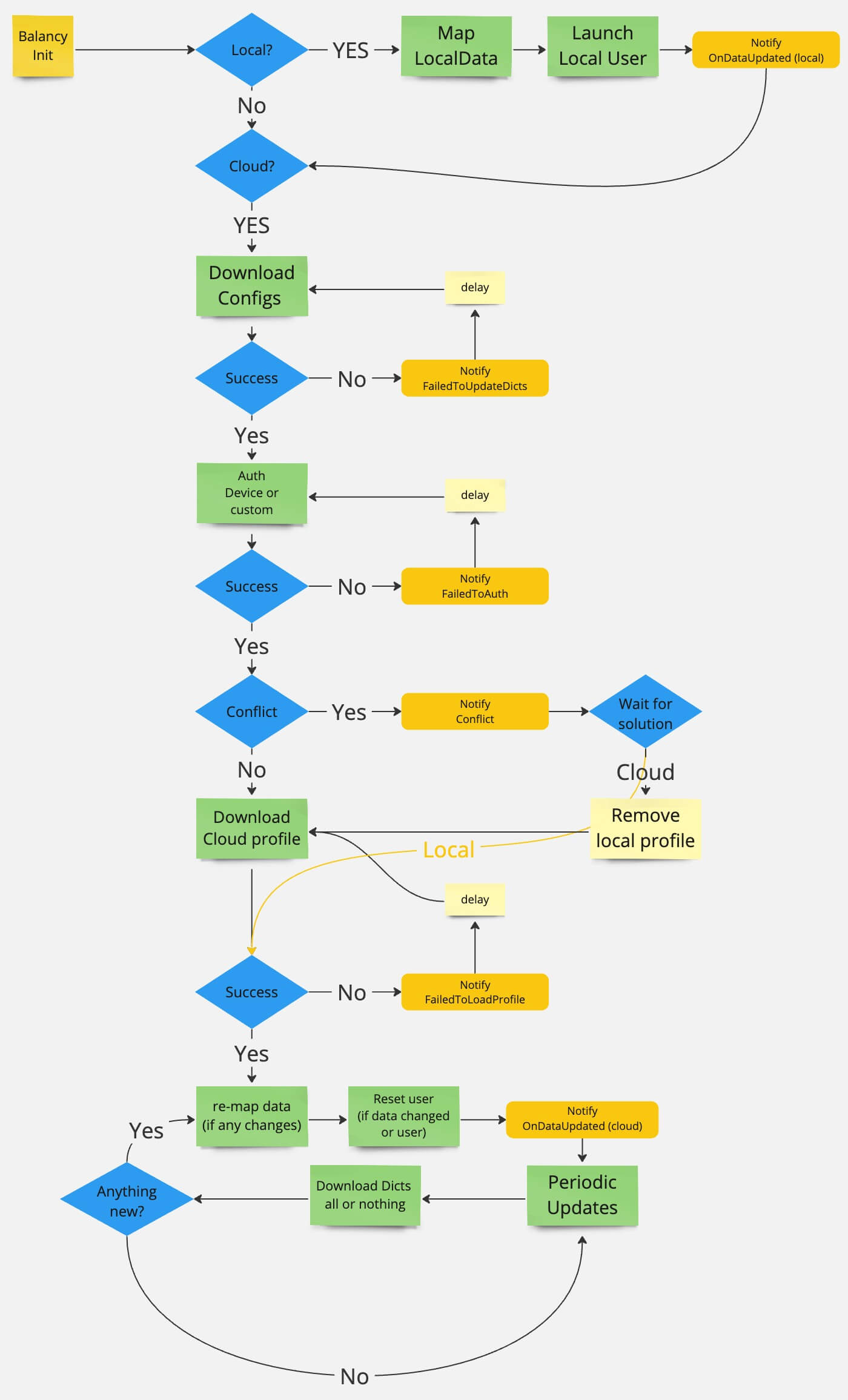
The first step is to init the Balancy SDK, it might take some time depending on your content size and the init setup. The SDK will download the necessary data from the server and cache it locally. The SDK will also check for updates periodically. Usually the initialization is complete within a second, but in some cases might take longer.
var config = new AppConfig
{
    ApiGameId = "<GAME_ID>",
    PublicKey = "<PUBLIC_KEY>",
    Environment = Constants.Environment.Development,
    OnProgressUpdateCallback = (fileName, progress) =>
    {
        Debug.Log($"Launch progress {(int)(progress * 100)}% - {fileName}");
    }
};
Balancy.Main.Init(config);
const config = AppConfig.create({
    apiGameId: "<GAME_ID>",
    publicKey: "<PUBLIC_KEY>",
    environment: Environment.Development,
});
await Balancy.Main.init(config);
Initialization Parameters
Explore and customize your initialization with the following parameters to enhance your game’s integration with Balancy:
Mandatory Parameters
| Mandatory Parameters | Default Value | Description |
|---|---|---|
| ApiGameId | null |
A unique GUID associated with your game. |
| PublicKey | null |
Essential public key needed for various game operations. |
| Environment | Development |
Specifies the Balancy connection environment. Learn More. |
Mandatory parameters are crucial for the initialization process and must be provided to ensure a successful connection with Balancy. You can find them in the dashboard of your game project.
Additional Parameters
| Additional Parameters | Default Value | Description |
|---|---|---|
| AutoLogin | true |
When true, the user is automatically authenticated by device ID during initialization. |
| DevicePlatform | autodetect |
Identifies the device platform used at launch (IPhonePlayer, Android, etc...). |
| BalancyPlatform | autodetect |
Identifies the payment platform used at launch. |
| LaunchType | All |
Defines which data Balancy can use: Local and/or Cloud. |
| UpdateType | FullUpdate |
Dictates the type and extent of content updates during runtime. |
| UpdatePeriod | 600 |
Defines the time (in seconds) between subsequent attempts to update data. |
| OnProgressUpdateCallback | null |
A callback showing the loading progress of Balancy. |
| CustomId | "" |
The Id of the user associated with any third party system, it can be your own server-id. |
In most cases you don't need to change additional parameters, but they can be useful for customizing the initialization process to suit your game's requirements.
Optional Parameters
| Optional Parameters | Default Value | Description |
|---|---|---|
| DeviceId | autodetect |
The unique device id, we use it for authentication. |
| AppVersion | autodetect |
The version of the application, for instance "1.0.0". |
| EngineVersion | autodetect |
The engine version. For instance "Unity 2022.3.25f1". |
| BranchName | autodetect |
The branch Balancy should connect to. The branch is selected automatically using AppVersion and Environment, if left blank. |
Optional parameters are usually used for testing purposes only. They can be useful for debugging and testing different scenarios in your game. The real values are automatically detected by Balancy, if left blank.
Callbacks
Balancy SDK provides various callbacks you can subscribe to. Some callbacks are informational, while others are essential for the game to function properly.
Mandatory Callbacks
Balancy.Callbacks.OnDataUpdated += status =>
        Debug.Log("OnDataUpdated Cloud = " + status.IsCloudSynced +
                  " ;CMS = " + status.IsCMSUpdated +
                  " ;Profiles = " + status.IsProfileUpdated);
Callbacks.onDataUpdated.subscribe((status) => {
  console.log(` => Balancy.onDataUpdated Cloud = ${status.isCloudSynced} ; CMS = ${status.isCMSUpdated} ; Profiles = ${status.isProfileUpdated}`);
});
| Parameter | Description |
|---|---|
| IsCloudSynched | This flag shows if the data is synchronized with the cloud or not. |
| IsCMSUpdated | Was the config's data changed since the previous callback. |
| IsProfileUpdated | Was profile changed since the previous callback. |

Additional Callbacks
Balancy.Callbacks.OnAuthFailed += status => Debug.Log("OnAuthFailed: " + status.Message);
Balancy.Callbacks.OnCloudProfileFailedToLoad += status => Debug.Log("OnCloudProfileFailedToLoad: " + status.Message);
Balancy.Callbacks.OnNetworkDownloadStarted += info => Debug.Log($" => Balancy.OnNetworkDownloadStarted: {info.Url}, Type: {(info.IsCDNRequest ? "CDN" : "API")}");
Balancy.Callbacks.OnNetworkDownloadFinished += info => Debug.Log($" => Balancy.OnNetworkDownloadFinished: {info.Url}, Time: {info.TimeMs}ms, Size: {info.DownloadedBytes}B, Speed: {info.SpeedKBps:F1}KB/s, Success: {info.Success}");
Callbacks.onAuthFailed.subscribe((status) => console.log(` => Balancy.onAuthFailed: ${status.message}`));
Callbacks.onCloudProfileFailedToLoad.subscribe((status) => console.log(` => Balancy.onCloudProfileFailedToLoad: ${status.message}`));
Callbacks.onNetworkDownloadStarted.subscribe((info) => console.log(` => Balancy.onNetworkDownloadStarted: ${info.url}, Type: ${info.isCDNRequest ? "CDN" : "API"}`));
Callbacks.onNetworkDownloadFinished.subscribe((info) => console.log(` => Balancy.onNetworkDownloadFinished: ${info.url}, Time: ${info.timeMs}ms, Size: ${info.downloadedBytes}B, Speed: ${info.speedKBps.toFixed(1)}KB/s, Success: ${info.success}`));
LiveOps Callbacks
Balancy.Callbacks.OnNewEventActivated += eventInfo => Debug.Log("OnNewEventActivated: " + eventInfo?.GameEvent?.Name);
Balancy.Callbacks.OnEventDeactivated += eventInfo => Debug.Log("OnEventDeactivated: " + eventInfo?.GameEvent?.Name);
Balancy.Callbacks.OnNewOfferActivated += offerInfo => Debug.Log("OnNewOfferActivated: " + offerInfo?.GameOffer?.Name);
Balancy.Callbacks.OnOfferDeactivated += (offerInfo, wasPurchased) => Debug.Log(" => Balancy.OnOfferDeactivated: " + offerInfo?.GameOffer?.Name + " ; wasPurchased = " + wasPurchased);
Balancy.Callbacks.OnNewOfferGroupActivated += offerGroupInfo => Debug.Log("OnNewOfferGroupActivated: " + offerGroupInfo?.GameOfferGroup?.Name);
Balancy.Callbacks.OnOfferGroupDeactivated += offerGroupInfo => Debug.Log("OnOfferGroupDeactivated: " + offerGroupInfo?.GameOfferGroup?.Name);
Balancy.Callbacks.OnNewAbTestStarted += abTestInfo => Debug.Log("OnNewAbTestStarted: " + abTestInfo?.Test?.Name);
Balancy.Callbacks.OnAbTestEnded += abTestInfo => Debug.Log("OnAbTestEnded: " + abTestInfo?.Test?.Name);
Balancy.Callbacks.OnSegmentInfoUpdated += segmentInfo => Debug.Log("OnSegmentInfoUpdated: " + segmentInfo?.Segment?.Name + " isIn = " + segmentInfo?.IsIn);
Balancy.Callbacks.OnShopUpdated += (info) => Debug.Log($" => Balancy.OnShopUpdated: {info.ChangeType} shop={info.ShopUnnyId} page={info.PageIndex} slot={info.SlotIndex}");
Balancy.Callbacks.OnHardPurchasedStoreItem += (paymentInfo, storeItem) => Debug.Log(" => Balancy.OnHardPurchasedStoreItem: " + storeItem?.Name + " UnnyId = " + storeItem?.UnnyId);
Balancy.Callbacks.OnHardPurchasedOffer += (paymentInfo, gameOffer) => Debug.Log(" => Balancy.OnHardPurchasedOffer: " + gameOffer?.Name + " UnnyId = " + gameOffer?.UnnyId);
Balancy.Callbacks.OnHardPurchasedOfferGroup += (paymentInfo, gameOfferGroup, storeItem) => Debug.Log(" => Balancy.OnHardPurchasedOfferGroup: " + gameOfferGroup?.Name + " UnnyId = " + gameOfferGroup?.UnnyId);
Callbacks.onNewEventActivated.subscribe((eventInfo) => console.log(` => Balancy.onNewEventActivated: ${eventInfo?.gameEvent?.name}`));
Callbacks.onEventDeactivated.subscribe((eventInfo) => console.log(` => Balancy.onEventDeactivated: ${eventInfo?.gameEvent?.name}`));
Callbacks.onNewOfferActivated.subscribe((offerInfo) => console.log(` => Balancy.onNewOfferActivated: ${offerInfo?.gameOffer?.name}`));
Callbacks.onOfferDeactivated.subscribe((offerInfo, wasPurchased) => console.log(` => Balancy.onOfferDeactivated: ${offerInfo?.gameOffer?.name} wasPurchased = ${wasPurchased}`));
Callbacks.onNewOfferGroupActivated.subscribe((offerGroupInfo) => console.log(` => Balancy.onNewOfferGroupActivated: ${offerGroupInfo?.gameOfferGroup?.name}`));
Callbacks.onOfferGroupDeactivated.subscribe((offerGroupInfo) => console.log(` => Balancy.onOfferGroupDeactivated: ${offerGroupInfo?.gameOfferGroup?.name}`));
Callbacks.onNewAbTestStarted.subscribe((abTestInfo) => console.log(` => Balancy.onNewAbTestStarted: ${abTestInfo?.test?.name}`));
Callbacks.onAbTestEnded.subscribe((abTestInfo) => console.log(` => Balancy.onAbTestEnded: ${abTestInfo?.test?.name}`));
Callbacks.onSegmentInfoUpdated.subscribe((segmentInfo) => console.log(` => Balancy.onSegmentInfoUpdated: ${segmentInfo?.segment?.name} isIn = ${segmentInfo?.isIn}`));
Callbacks.onShopUpdated.subscribe((info) => console.log(` => Balancy.onShopUpdated: ${info.changeType} shop=${info.shopUnnyId} page=${info.pageIndex} slot=${info.slotIndex}`));
OnNewAbTestStarted is a lifecycle signal, not a \"configs are ready\" signal
OnNewAbTestStarted means "this test is now active for the player" — it does not guarantee the test's config overrides have been applied yet. Overrides are applied asynchronously (empirically ~1–2 frames later, with no guarantee), and they can depend on chains of conditions that settle over multiple frames. Do not read balance/config values inside this handler expecting to see the override results. To react to the actual balance change, subscribe to the affected document's Model Change Events instead.
Purchase Callbacks
// Hard currency (IAP) purchase callbacks
Balancy.Callbacks.OnHardPurchasedStoreItem += (paymentInfo, storeItem) => Debug.Log($"IAP purchased: {storeItem?.Name}, Price: {paymentInfo.Price}");
Balancy.Callbacks.OnHardPurchasedShopSlot += (paymentInfo, shopSlot) => Debug.Log($"Shop slot IAP purchased: {shopSlot?.UnnyId}");
Balancy.Callbacks.OnHardPurchasedOffer += (paymentInfo, gameOffer) => Debug.Log($"Offer IAP purchased: {gameOffer?.Name}");
Balancy.Callbacks.OnHardPurchasedOfferGroup += (paymentInfo, gameOfferGroup, storeItem) => Debug.Log($"Offer group IAP purchased: {storeItem?.Name}");

// Soft currency / ad-based purchase callbacks
Balancy.Callbacks.OnShopSlotWasPurchased += shopSlot => Debug.Log($"Shop slot purchased: {shopSlot?.Slot?.UnnyId}");
Balancy.Callbacks.OnOfferWasPurchased += offerInfo => Debug.Log($"Offer purchased: {offerInfo?.GameOffer?.Name}");
Balancy.Callbacks.OnOfferGroupWasPurchased += (offerGroupInfo, storeItem) => Debug.Log($"Offer group purchased: {storeItem?.Name}");

// Payment system ready (C#-only, BalancyPayments package)
Balancy.Callbacks.OnPaymentIsReady += () => Debug.Log("Payment system ready");

// Purchases restored (C#-only, BalancyPayments package)
Balancy.Callbacks.OnPurchasesRestored += items => Debug.Log($"Restored {items.Count} purchases");
// Hard currency (IAP) purchase callbacks
Callbacks.onHardPurchasedStoreItem.subscribe((paymentInfo, storeItem) => console.log(` => IAP purchased: ${storeItem?.name}`));
Callbacks.onHardPurchasedShopSlot.subscribe((paymentInfo, shopSlot) => console.log(` => Shop slot IAP purchased: ${shopSlot?.slot?.unnyId}`));
Callbacks.onHardPurchasedOffer.subscribe((paymentInfo, gameOffer) => console.log(` => Offer IAP purchased: ${gameOffer?.name}`));
Callbacks.onHardPurchasedOfferGroup.subscribe((paymentInfo, gameOfferGroup, storeItem) => console.log(` => Offer group IAP purchased: ${storeItem?.name}`));

// Soft currency / ad-based purchase callbacks
Callbacks.onShopSlotWasPurchased.subscribe((shopSlot) => console.log(` => Shop slot purchased: ${shopSlot?.slot?.unnyId}`));
Callbacks.onOfferWasPurchased.subscribe((offerInfo) => console.log(` => Offer purchased: ${offerInfo?.gameOffer?.name}`));
Callbacks.onOfferGroupWasPurchased.subscribe((offerGroupInfo, storeItem) => console.log(` => Offer group purchased: ${storeItem?.name}`));
Note
OnPaymentIsReady and OnPurchasesRestored are C#-only callbacks provided by the optional BalancyPayments Unity package.
Inventory & Profile Callbacks
Balancy.Callbacks.OnInventoryUpdated += (inventory, item, count, slotIndex, currentAmount) =>
    Debug.Log($"Inventory updated: {item?.Name}, Change: {count}, Total: {currentAmount}");
Balancy.Callbacks.OnDailyBonusUpdated += dailyBonusInfo =>
    Debug.Log($"Daily bonus updated: {dailyBonusInfo?.DailyBonus?.Name}");
Balancy.Callbacks.OnProfileResetStart += () => Debug.Log("Profile reset started");
Balancy.Callbacks.OnProfileResetFinish += () => Debug.Log("Profile reset finished");
Balancy.Callbacks.OnGameRefreshed += () => Debug.Log("Game data refreshed");

// Localization changed (C#-only)
Balancy.Callbacks.OnLocalizationChanged += code => Debug.Log($"Language changed to: {code}");
Callbacks.onInventoryWasUpdated.subscribe((inventory, item, count, slotIndex, currentAmount) =>
    console.log(` => Inventory updated: ${item?.name}, Change: ${count}, Total: ${currentAmount}`));
Callbacks.onDailyBonusUpdated.subscribe((dailyBonusInfo) =>
    console.log(` => Daily bonus updated: ${dailyBonusInfo?.dailyBonus?.name}`));
Callbacks.onProfileResetStart.subscribe(() => console.log(' => Profile reset started'));
Callbacks.onProfileResetFinish.subscribe(() => console.log(' => Profile reset finished'));
Callbacks.onGameRefreshed.subscribe(() => console.log(' => Game data refreshed'));
Note
The inventory callback has different names: C# uses OnInventoryUpdated while TypeScript uses onInventoryWasUpdated.
Note
OnLocalizationChanged is C#-only. There is no TypeScript equivalent.
Complete Callback Reference
| Category | C# Name | TypeScript Name | Parameters |
|---|---|---|---|
| Mandatory | OnDataUpdated |
onDataUpdated |
DataUpdatedStatus / { isCloudSynced, isCMSUpdated, isProfileUpdated } |
| Error | OnAuthFailed |
onAuthFailed |
ErrorStatus / { message } |
| Error | OnCloudProfileFailedToLoad |
onCloudProfileFailedToLoad |
ErrorStatus / { message } |
| Auth | OnSignedOut |
onSignedOut |
(none) |
| Events | OnNewEventActivated |
onNewEventActivated |
EventInfo / SmartObjectsEventInfo |
| Events | OnEventDeactivated |
onEventDeactivated |
EventInfo / SmartObjectsEventInfo |
| Events | OnEventRemoved |
onEventRemoved |
EventInfo / SmartObjectsEventInfo |
| Offers | OnNewOfferActivated |
onNewOfferActivated |
OfferInfo / SmartObjectsOfferInfo |
| Offers | OnOfferDeactivated |
onOfferDeactivated |
(OfferInfo, bool) / (SmartObjectsOfferInfo, boolean) |
| Offers | OnNewOfferGroupActivated |
onNewOfferGroupActivated |
OfferGroupInfo / SmartObjectsOfferGroupInfo |
| Offers | OnOfferGroupDeactivated |
onOfferGroupDeactivated |
OfferGroupInfo / SmartObjectsOfferGroupInfo |
| A/B Tests | OnNewAbTestStarted |
onNewAbTestStarted |
AbTestInfo / SmartObjectsAbTestInfo |
| A/B Tests | OnAbTestEnded |
onAbTestEnded |
AbTestInfo / SmartObjectsAbTestInfo |
| Segments | OnSegmentInfoUpdated |
onSegmentInfoUpdated |
SegmentInfo / SmartObjectsSegmentInfo |
| Shop | OnShopUpdated |
onShopUpdated |
ShopUpdatedInfo — see Shop Notifications |
| Daily Bonus | OnDailyBonusUpdated |
onDailyBonusUpdated |
DailyBonusInfo / SmartObjectsDailyBonusInfo |
| Hard Purchase | OnHardPurchasedStoreItem |
onHardPurchasedStoreItem |
(PaymentInfo, StoreItem) |
| Hard Purchase | OnHardPurchasedShopSlot |
onHardPurchasedShopSlot |
(PaymentInfo, Slot) |
| Hard Purchase | OnHardPurchasedOffer |
onHardPurchasedOffer |
(PaymentInfo, GameOffer) |
| Hard Purchase | OnHardPurchasedOfferGroup |
onHardPurchasedOfferGroup |
(PaymentInfo, GameOfferGroup, StoreItem) |
| Soft Purchase | OnShopSlotWasPurchased |
onShopSlotWasPurchased |
ShopSlot / SmartObjectsShopSlot |
| Soft Purchase | OnOfferWasPurchased |
onOfferWasPurchased |
OfferInfo / SmartObjectsOfferInfo |
| Soft Purchase | OnOfferGroupWasPurchased |
onOfferGroupWasPurchased |
(OfferGroupInfo, StoreItem) |
| Inventory | OnInventoryUpdated |
onInventoryWasUpdated |
(Inventory, Item, int, int, int) |
| Profile | OnProfileResetStart |
onProfileResetStart |
(none) |
| Profile | OnProfileResetFinish |
onProfileResetFinish |
(none) |
| Profile | OnGameRefreshed |
onGameRefreshed |
(none) |
| Payment | OnPaymentIsReady |
(C#-only) | (none) |
| Payment | OnPurchasesRestored |
(C#-only) | List<PurchaseResult> |
| Localization | OnLocalizationChanged |
(C#-only) | string (language code) |
| Network | OnNetworkDownloadStarted |
onNetworkDownloadStarted |
NetworkDownloadInfo |
| Network | OnNetworkDownloadFinished |
onNetworkDownloadFinished |
NetworkDownloadCompletedInfo |
| Disconnect | OnDisconnected |
OnDisconnected |
DisconnectReason |
For detailed usage of authentication callbacks (OnSignedOut, OnDisconnected), see Authentication.
For event icons and final cleanup use OnEventRemoved / onEventRemoved. OnEventDeactivated marks Finished and can precede removal when Manual Remove is enabled. See the event lifecycle scenarios.
Model Change Events
In addition to global callbacks, individual CMS documents (models) fire an OnChanged event when they are re-applied at runtime — whenever an override is (re)applied to the document, whether it was triggered by an A/B test, an event, a segment, a time-based condition, or a remote update.
This is the recommended, robust way to react to balance/config changes: subscribe to the model you care about and re-read its value inside the handler. It fires exactly when the document is actually re-applied, regardless of what caused the change — so you don't need to know or care whether an A/B test, event, or condition was responsible.
// Subscribe to changes on a specific model (BaseModel.OnChanged)
var storeItem = Balancy.CMS.GetModelByUnnyId<StoreItem>("some_unny_id");
storeItem.OnChanged += () =>
{
    // Re-read the value here — it now reflects the currently applied override
    Debug.Log($"StoreItem re-applied. Price is now: {storeItem.Price}");
    // Refresh UI for this item
};
// Per-document model
const storeItem = Balancy.CMS.getModelByUnnyId<StoreItem>("some_unny_id");
storeItem.onChanged.subscribe(() => {
    // Re-read the value inside the handler
    console.log(`StoreItem re-applied. Price is now: ${storeItem.price}`);
});

// Singleton / global config
mySingleton.onChange(() => {
    console.log("Global config re-applied — re-read values here");
});
OnChanged means \"re-applied\", not \"value changed\"
OnChanged / onChanged fires whenever an override is (re)applied to the document — even if the resulting value is identical to the previous one. For example, a player in a control group whose override sets the same value will still receive the callback. Always re-read the value inside the handler and never assume it actually differs.
Note
OnChanged reacts to document/config re-application (overrides, A/B tests). It does not fire for profile data changes — use OnDataUpdated for those.
App Lifecycle (Pause / Resume)
The SDK can be informed of app lifecycle events — when the app goes to background and when it returns. These calls feed into the analytics system so session length, background time, and engagement metrics are correctly tracked.
Call NotifyAppPause when the app goes to background, passing the number of seconds the app has been running in the current session. Call NotifyAppResume when it returns to the foreground.
// Typically in OnApplicationPause(bool pauseStatus)
private void OnApplicationPause(bool paused)
{
    int secondsElapsed = (int)Time.realtimeSinceStartup;
    if (paused)
        Balancy.API.NotifyAppPause(secondsElapsed);
    else
        Balancy.API.NotifyAppResume();
}
// Call when the app/tab becomes hidden
API.notifyAppPause(secondsElapsed);

// Call when the app/tab becomes visible again
API.notifyAppResume();
| Parameter | Type | Description |
|---|---|---|
secondsElapsed |
int / number |
Total seconds the app has been active in the current session at the moment it is paused. Used to compute session duration in analytics. |
Init Flow