XOffers Integration
Add integration on the portal
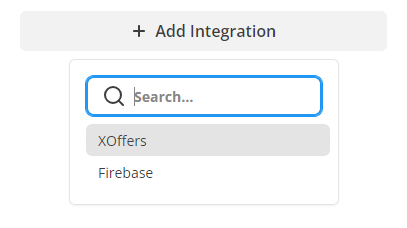
{
    "baseUrl": "https://your-xoffers-server.example",
    "gameSlug": "your-game-slug",
    "secret": "YOUR_XOFFERS_GAME_SECRET",
    "sourceEnabled": true,
    "targetEnabled": true,
    "externalProvider": "portal",
    "portalIssuer": "https://hooli.games",
    "portalClientId": "YOUR_HOLI_CLIENT_ID"
}
XOffers Integration with the Balancy SDK
Use Balancy.API.XOffers to connect your game to Holi/XOffers. Balancy provides the authenticated API calls and delivers rewards through Balancy.API.Mailbox. Your game calculates player segments, checks gameplay goals, and grants and saves rewards.
This guide uses the Unity SDK (C#), including Unity WebGL. Offer presentation uses Holi's browser SDK or portal integration; the Balancy methods below do not create an offerwall or banner.
Choose Your Game's Role
| Role | What the player does | What your game implements |
|---|---|---|
| Source game | Sees an offer to visit or play another game, then receives a reward in your game. | Request context, pass it to Holi's presentation layer, and handle reward messages. |
| Target game | Arrives from an offer and completes a goal in your game. | Forward the launch token, query assignments, check the goal, and report completion. |
| Both | Can show offers and receive players from other games. | Implement both flows. |
For example, a player accepts “Reach level 10 in Game B” while playing Game A. Game A shows the offer. Game B queries the assignment and reports completion when its own goal rules are satisfied. The reward then arrives in Game A's mailbox.
What to Call and When
| When | Call or action | Applies to |
|---|---|---|
| The game launches from an offer | Capture the xorigin launch parameter and retain it until authentication finishes. |
Target; also pass it to context if your game requests context. |
| Balancy authentication and profile loading finish | Calculate the player's segments, then call API.XOffers.GetContext. |
Source |
| The same authenticated session is ready | Call API.XOffers.GetAssignments with the launch token, then evaluate the returned assignments. |
Target |
| The player opens offers | Use Holi's UI with the context returned by Balancy. | Source |
| A relevant gameplay event occurs | Evaluate known assignments; refresh assignments if needed. Call API.XOffers.CompleteOffer only for a satisfied EVENT goal. |
Target |
| The player logs in, returns to the source game, or opens the mailbox | Call API.Mailbox.GetMessages and load subsequent pages. |
Source |
| Your game decides to claim a reward | Apply it and save its GrantId with the profile. After saving succeeds, call API.Mailbox.MarkProcessed. |
Source |
| The account changes | Dispose the old offer UI and clear cached context, assignments, pending UI callbacks and mailbox data. Start again after the new account authenticates. | Both |
Source context and target assignments are separate requests. A target-only game can start with GetAssignments; it does not need GetContext first. Run initial requests once per authenticated account/session, rather than on every frame or every profile update.
Before You Start
- Install a Balancy SDK release with XOffers support, including the matching native library for your build platform.
- Have the integration administrator configure XOffers for your Balancy game, environment and platform, enabling the required source/target roles. Source games also need their reward webhook configured.
- Agree with the campaign owner on the offer IDs, goal rules, and currency/package IDs your game supports.
- Complete Balancy authentication and load the current player's profile before making these requests. If your integration uses Steam, Nutaku or portal identity, complete that platform's authentication/linking first.
Use these namespaces in the C# examples:
using System;
using Balancy;
using Balancy.Mail;
using Balancy.XOffers;
using UnityEngine;
Requests use the current Balancy account, game and environment. The game does not send a user ID, sign requests, or contain the XOffers game secret.
Source Game: Prepare the Offer Context
After authentication and profile loading, calculate the player's current XOffers segments and request a context:
public void PrepareOffers(
    XOffersTarget[] currentTargets,
    string playerLocale,
    string launchOrigin,
    int platform,
    Action<XOffersContextResponse> onContextReady)
{
    API.XOffers.GetContext(new XOffersContextOptions
    {
        Targets = currentTargets,
        Locale = playerLocale,
        Origin = launchOrigin,
        Platform = platform
    }, response =>
    {
        if (!response.Success)
        {
            Debug.LogWarning($"XOffers context: {response.ErrorCode} => {response.ErrorMessage}");
            return;
        }

        if (!response.SourceEnabled)
            return; // Offer presentation is disabled for this configuration.

        onContextReady(response);
    });
}
onContextReady is a callback supplied by your game. Pass response.BaseUrl and the exact response.ContextJson to the Holi browser/portal integration. ContextJson contains the signed identity and preserves JSON null values. Do not reconstruct the identity or log the context, signature or launch token.
GetContext prepares the context. It does not fetch or display offers, and does not establish the target assignment binding by itself.
Player Segments
Targets contains player segment IDs, not target-game IDs or offer IDs. Your game calculates this array from its profile and the segment definitions agreed with Holi. Balancy does not infer segments from the profile or verify purchase history.
| Enum | ID |
|---|---|
XOffersTarget.FreeOld |
1 |
XOffersTarget.PayerPast |
2 |
XOffersTarget.TrialPayer |
3 |
XOffersTarget.TrialFree |
4 |
XOffersTarget.PayerCurrent |
5 |
XOffersTarget.Developers |
6 |
XOffersTarget.FreeNew |
7 |
Pass unique values. The default is an empty array, which matches no offers. Use Developers only for players who belong to that segment; it is not a default for all players.
Request a fresh context and update/recreate the Holi presentation integration when the account, language or segment membership changes. There is no separate Balancy “set segment” call. You can reuse the current context while these inputs remain unchanged.
Displaying Offers in WebGL
Balancy's XOffers API calls work through the existing WebGL native bridge. To display offers, your game still needs to pass the context from Unity to its page/portal integration and forward its UI actions. That presentation bridge is game-specific and is not part of API.XOffers.
For a standalone host page with Holi's browser SDK loaded, the hand-off can look like this:
// Called by your page bridge with the values from GetContext.
async function createOfferwall(baseUrl, contextJson) {
    const client = new XOffers.RuntimeClient(JSON.parse(contextJson), baseUrl);
    await client.context();

    const session = new XOffers.OfferSession(client);
    const ui = new XOffers.OffersUI(session, {
        mode: 'popup',
        target: 'window'
    });

    return {
        // Call from your Offers button handler; handle rejected promises there.
        open: () => ui.openOfferwall(),
        dispose: () => {
            ui.dispose();
            session.dispose();
        }
    };
}
XOffers in this JavaScript example is Holi's browser SDK. createOfferwall is an example page function, not a Balancy API. Handle script/network failures in the page and let the game continue. Dispose the previous instance before replacing its context or switching accounts.
For games inside a portal iframe, use Holi's portal host/client integration and its allowed-origin configuration. Follow the platform's presentation integration instructions for loading the scripts and connecting the page bridge.
Target Game: Query Assignments After Login
Read xorigin from the launch URL or platform launch parameters and pass the parameter value unchanged. It is an opaque token: do not parse its contents or create one yourself. In WebGL, the hosting page must deliver it to Unity. Retain it through authentication and transient request failures; do not carry another player's launch token across an account switch.
After authentication and profile loading, query assignments:
public void RefreshAssignments(
    string launchOrigin,
    int platform,
    Action<XOffersAssignment> onAssignment)
{
    API.XOffers.GetAssignments(launchOrigin, response =>
    {
        if (!response.Success)
        {
            Debug.LogWarning($"XOffers assignments: {response.ErrorCode} => {response.ErrorMessage}");
            return;
        }

        foreach (var assignment in response.Assignments)
        {
            if (assignment.State != XOffersAssignmentState.Accepted)
                continue;

            onAssignment(assignment);
        }
    }, platform);
}
Your onAssignment handler caches the assignment or immediately evaluates it against the loaded profile. Map assignment.OfferId to your own goal rules. The response contains IDs, state and timestamps; it does not include an executable goal definition or a level threshold.
For example, configure which offer ID means “reach level 10.” When that offer is accepted and your game's rules say it is complete, report that offer ID. There is no level_reached method or event payload in this API, and Balancy does not inspect the player's level.
The query normally returns accepted and expired EVENT assignments. OriginOfferId identifies the offer from the verified launch token; it does not filter the returned list. Evaluate all relevant accepted assignments. Re-evaluate after loading a profile so already-satisfied goals are not missed; apply any campaign-specific timing requirements in your goal rules.
A successful query establishes the account/assignment binding on Holi before completion. Without a launch token, matching can work through a verified Steam, Nutaku or portal identity. Pass null for the token in that case, or use API.XOffers.GetAssignments(callback) when the default platform selection is sufficient. If a token was supplied, forward it even when an external identity is available.
Query again on a new authenticated session and on relevant gameplay events when assignments may have changed. Continuous polling is unnecessary.
Target Game: Report a Completed Goal
Call this only after your game has verified the goal for an accepted assignment:
public void ReportCompletedGoal(XOffersAssignment assignment, int platform)
{
    if (assignment.State != XOffersAssignmentState.Accepted)
        return;

    API.XOffers.CompleteOffer(assignment.OfferId, response =>
    {
        if (!response.Success)
        {
            Debug.LogWarning($"XOffers completion: {response.ErrorCode} => {response.ErrorMessage}");
            return;
        }

        if (response.Pending)
        {
            // Balancy has saved the request and will retry Holi automatically.
            // Keep the offer ID if your UI needs to check the result later.
            return;
        }

        // Holi confirmed completion: State is Completed or Rewarded.
        // Duplicate=true means this operation had already completed.
        // Update your completion UI; the reward belongs to the source game's mailbox.
    }, platform);
}
Pass OfferId, not AssignmentId, a level number, or a locally invented event name. CLICK and wishlist completion are handled by Holi; CompleteOffer is for EVENT goals.
Success == true with Pending == true means the request is durably queued, not that Holi has confirmed it. The backend continues retrying after the client closes. To check a queued result later, call CompleteOffer with the same offer ID and platform. Repeated calls are idempotent; do not send them every frame. Prevent concurrent submissions from your gameplay handlers.
Even confirmed completion does not tell the source game to grant inventory directly. The source game receives a separate mailbox message after reward delivery.
Source Game: Retrieve Reward Messages
Refresh the mailbox after login, when the player returns from another game, and when opening the mailbox. Reward delivery is asynchronous, so an immediate refresh may be empty; allow a later refresh. The SDK does not push a reward callback or poll automatically.
The following helper visits all pages and passes supported, unprocessed XOffers messages to your game:
public void LoadOfferRewards(
    Action<XOffersRewardMessage> onReward,
    string cursor = null)
{
    API.Mailbox.GetMessages(new MailboxListOptions
    {
        Limit = 50,
        Cursor = cursor
    }, page =>
    {
        if (!page.Success)
        {
            Debug.LogWarning($"Mailbox: {page.ErrorCode} => {page.ErrorMessage}");
            return;
        }

        if (page.InvalidMessageCount > 0)
            Debug.LogWarning($"Mailbox skipped {page.InvalidMessageCount} invalid messages.");

        foreach (var message in page.Messages)
        {
            if (message.Status == MailMessageStatus.Processed ||
                message.ParseStatus != MailParseStatus.Parsed)
                continue;

            if (message is XOffersRewardMessage reward)
                onReward(reward);
        }

        if (!string.IsNullOrEmpty(page.NextCursor))
            LoadOfferRewards(onReward, page.NextCursor);
    });
}
onReward is your own handler: for example, add the message to a claim screen. Listing does not grant the reward. Avoid overlapping refreshes and deduplicate displayed/pending messages by message.Id. Keep this refresh and any later grant/save callbacks scoped to the same authenticated account.
Limit is the page size. Pass NextCursor unchanged for the next page, and start with no cursor for a new refresh. Continue based on NextCursor, even if the current page contains no XOffers messages. Read messages can still be unprocessed; UnreadCount is not the number of unclaimed rewards.
XOffers rewards are inserted directly into the mailbox by the reward webhook. API.Mailbox.Sync is not required for XOffers; it is used for pending delivery flows such as Nutaku daily rewards.
Read the Reward
Messages use MailMessageType.XOffersReward and are parsed as XOffersRewardMessage.
| Property | How to use it |
|---|---|
Id |
Mailbox message ID, used by MarkRead, MarkProcessed and Delete. |
GrantId |
Reward delivery ID. Record it with the player's saved reward to prevent duplicate grants. |
Reward.Type |
XOffersRewardType.Currency or XOffersRewardType.Package. |
Reward.CurrencyId, Reward.Amount |
Map the currency ID to your game's currency and apply the amount (long). |
Reward.PackageId |
Map the package ID to your game's reward definition. |
OfferId, AssignmentId, CampaignId, SourceGameId, CompletedAt |
Information about the completed offer. |
Content |
Optional display text: Locale, Title, Description, RewardText. Can be null. |
Currency and package IDs must match the definitions agreed for the campaign. A package ID is not automatically resolved to a Balancy inventory item. Leave an unknown or unsupported reward unprocessed until your game can handle it.
Grant, Save, Then Mark Processed
When your game chooses to claim a message:
- Check the current player's saved set of handled
GrantIdvalues. - If the grant is new, apply the reward and record
GrantIdin the same durable profile save. Serialize claims so two handlers cannot apply the same grant concurrently. - Wait for the save to succeed. If the grant was already saved, skip granting it again.
- Call
API.Mailbox.MarkProcessedwith the message ID:
// Run only after the reward and GrantId are saved, or that GrantId was already saved.
API.Mailbox.MarkProcessed(message.Id, response =>
{
    if (!response.Success)
    {
        Debug.LogWarning($"MarkProcessed: {response.ErrorCode} => {response.ErrorMessage}");
        return; // Retry acknowledgement later; do not grant the reward again.
    }

    // Update your mailbox UI to show that this message was handled.
});
If the game closes after saving but before MarkProcessed succeeds, the message can appear again. Its saved GrantId lets you retry only the acknowledgement. A failed save must leave the message unprocessed. Your profile system must also resolve concurrent-device/save conflicts; mailbox status alone is not an inventory transaction.
MarkRead is optional and only records that a message was read. Delete hides a message and does not grant its contents; use it after handling the reward if your design allows deletion. A duplicate provider callback does not recreate a deleted reward message.
Errors and Recovery
All callbacks expose Success, ErrorCode and ErrorMessage. Check Success before consuming response data. A temporary offers error should not block the rest of the game.
| Result | What your game should do |
|---|---|
xoffers_not_configured, xoffers_role_disabled, or xoffers_disabled |
Ask the integration administrator to check the current game/environment/platform and enabled roles. |
xoffers_platform_required |
Pass the configured platform number consistently to all XOffers methods. |
| No matching offers | Check the player's calculated Targets and campaign eligibility. An empty array matches no offers. |
404 NOT_FOUND from completion |
Complete a successful GetAssignments query/binding first, then retry the same valid offer when its goal is satisfied. |
409 COMPLETION_TOO_LATE |
The assignment expired. Stop retrying that completion. |
Success=true, Pending=true |
Keep completion pending in your UI; Balancy retries automatically. |
| Network/service error | Retry the relevant request later. If completion's outcome is uncertain, repeat the same offer ID. |
Native Balancy library requires XOffers support |
Install the matching SDK/native library for the current platform. |
Missing typed reward or InvalidMessageCount > 0 |
Check the matching SDK/native version and message parsing diagnostics. Keep unsupported messages available. |
On logout or account switch, stop processing the previous account's cached assignments and rewards. After the new account is ready, recalculate segments, obtain fresh context/assignments as appropriate, and refresh its mailbox.